This site uses cookies to enhance your user experience. By clicking any link on this site you are giving your consent to our cookie policy. Read more
Reject
Accept All
NordPass Password Manager

NordPass Password Manager

verified Verified App

Developer: Nord Security

  • category

    Category: Productivity

  • price

    Price: free

  • age rating

    Age Rating: Everyone

  • rating

    Rating: 4.4

  • download

    Downloads: 1,000,000+

  • version

    Version: 5.8.5

Screenshot 1
Screenshot 2
Screenshot 3
Screenshot 4
Screenshot 5
Screenshot 6
Screenshot 7
Screenshot 8

Features & Highlights

Cross-Platform Access

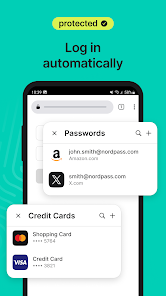
NordPass is designed for versatility, allowing you to access your passwords seamlessly across multiple devices, including desktops, smartphones, and browsers. This cross-platform functionality ensures you always have your essential information at your fingertips, no matter where you are.

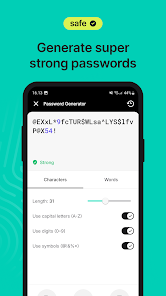
Password Generator

With NordPass’s built-in password generator, you can create strong and unique passwords for all your accounts in seconds. This feature helps eliminate the risk of using weak or repeated passwords, making your online security more robust and reliable.

Password Health Check

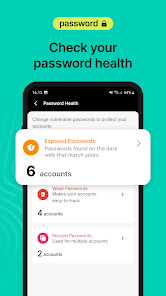
The Password Health Check feature analyzes the strength of your stored passwords and alerts you to any vulnerabilities. By providing actionable insights, it encourages you to update weak or compromised passwords, enhancing your overall online security.

Secure Vault

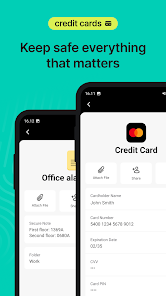
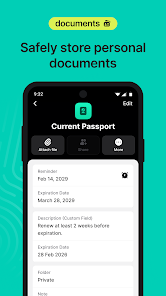
NordPass offers a highly secure vault for storing your passwords, credit card information, and sensitive documents. Utilizing advanced encryption methods, your data remains protected from unauthorized access, ensuring peace of mind as you navigate your online life.

Pros & Cons

Pros
  • Securely stores all your passwords in one place
  • User-friendly interface simplifies password management
  • Offers strong encryption for maximum security
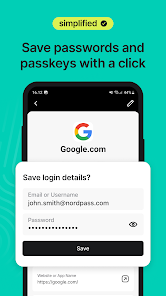
  • Autofill feature saves time and effort
  • Multi-device support for seamless access everywhere
Cons
  • Limited free version features compared to competitors
  • No two-factor authentication for free users
  • Occasional syncing issues across devices
  • Lacks advanced security features like biometric login

Real Experience Using NordPass Password Manager

Application Scenarios

NordPass Password Manager is designed for a variety of users, from individuals needing to securely store personal passwords to businesses requiring a comprehensive solution for team access management. Whether you're a student juggling multiple accounts or a professional managing sensitive company credentials, NordPass streamlines the process of password management. Users can easily generate strong passwords, store sensitive information like credit card details and personal notes, and access their vault from any device. The built-in password sharing feature is particularly useful for families or teams, allowing safe sharing of login credentials without revealing the actual passwords.

User Experience

The user experience of NordPass is intuitive and straightforward, making it accessible for both tech-savvy individuals and those less familiar with digital security tools. Upon signing up, users are greeted with a clean and organized interface that guides them through the setup process. The onboarding tutorial effectively demonstrates how to utilize various features, including password generation and autofill capabilities. The browser extension enhances usability, allowing users to fill in passwords seamlessly across different websites. Additionally, NordPass employs strong encryption protocols, ensuring that user data remains secure. Overall, the app delivers a smooth experience, with quick access to passwords and a responsive design that works well across smartphones, tablets, and desktop platforms.

Pricing

NordPass offers a competitive pricing structure, making it an attractive option for those seeking a reliable password manager. Users can choose between a free version with essential features or opt for premium plans that unlock advanced functionalities. The premium subscription includes enhanced security features such as password health reports, priority support, and the ability to share passwords securely. Annual plans provide significant savings compared to monthly subscriptions, encouraging long-term commitment to the service. This flexible pricing ensures that users can find a plan that fits their budget while enjoying robust password management tools.

Updates & Support

NordPass is committed to continuous improvement, regularly rolling out updates that enhance functionality and security. Users can expect frequent enhancements based on feedback and evolving security standards, ensuring that the app remains at the forefront of password management solutions. In terms of customer support, NordPass provides a comprehensive help center filled with articles, guides, and FAQs to assist users. For more personalized help, the support team can be contacted via email, and they typically respond promptly. This level of support, combined with regular updates, demonstrates NordPass's dedication to providing a secure and user-friendly experience for its customers.

verified Security & Privacy Review

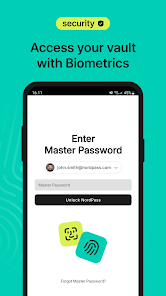
NordPass Password Manager prioritizes user security and privacy with robust encryption protocols. It employs end-to-end encryption using the AES-256 standard, ensuring that user data is securely stored and inaccessible to unauthorized parties. The zero-knowledge architecture means that even NordPass cannot access your passwords, providing an added layer of privacy. The app requires minimal permissions, primarily focusing on what is essential for its functionality. Users can store not only passwords but also secure notes and credit card information, all protected by the same stringent security measures. Regular security audits and updates help maintain the integrity of the app against evolving threats. NordPass also offers features like biometric authentication and two-factor authentication (2FA), further enhancing account security. Data is synchronized across devices using secure channels, with no data stored on NordPass servers in a readable format. Overall, NordPass demonstrates a strong commitment to user privacy and data protection, making it a reliable choice for managing sensitive information.

Reviews

4.4

“Easy to use and intuitive interface”

“Great security features for peace of mind”

“Syncs smoothly across all my devices”

“Affordable pricing for premium features”

“Customer support is responsive and helpful”

Editor's Choice