This site uses cookies to enhance your user experience. By clicking any link on this site you are giving your consent to our cookie policy. Read more
Reject
Accept All

Advertiser and Editorial Disclosures

NissanConnect® EV & Services

NissanConnect® EV & Services

verified

Nissan North America, Inc.

4.0
Rating
100,000+ Downloads
/ Version
  • category

    Category: Lifestyle

  • price

    Price: free

  • age rating

    Age Rating: Everyone

  • rating

    Rating: 4.0

  • available on

    Available on: /

  • updated on

    Updated on: Mar 17, 2026

Screenshot 1
Screenshot 2
Screenshot 3
Screenshot 4
Screenshot 5
Screenshot 6
Screenshot 7
Screenshot 8

Features & Highlights

Navigation Assistance

The app provides real-time navigation assistance, ensuring you always find the quickest routes to your destination. It also identifies nearby charging stations, allowing you to plan your journey with ease and confidence, especially on longer trips.

Remote Access

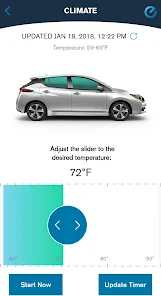
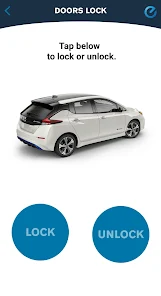
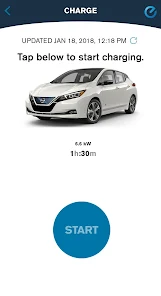
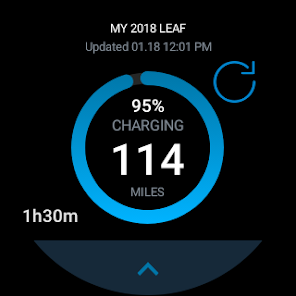
With NissanConnect® EV & Services, you can control your vehicle remotely using your smartphone. Whether it's checking battery status, starting the charging process, or pre-conditioning your cabin, convenience is just a tap away, making your driving experience smoother and more efficient.

Smart Charging Options

NissanConnect® EV & Services offers smart charging features that allow you to schedule charging times based on utility rates or personal preferences. This maximizes efficiency and saves you money, making it easier to integrate electric vehicle ownership into your daily routine.

Vehicle Health Monitoring

Stay informed about your vehicle’s health with comprehensive monitoring features. The app alerts you to critical maintenance needs and provides detailed reports, helping you keep your Nissan EV in top shape and ensuring peace of mind on every drive.

Pros & Cons

Pros
  • Stay connected with your Nissan vehicle anytime, anywhere for ultimate convenience.
  • Monitor your EV's battery status remotely for peace of mind.
  • Schedule charging sessions to take advantage of off-peak electricity rates.
  • Locate nearby charging stations effortlessly for hassle-free travel.
  • Receive real-time alerts and notifications to stay informed about your vehicle's status.
Cons
  • Limited availability of features in certain regions can hinder usability.
  • User interface may feel outdated and less intuitive compared to competitors.
  • Reliance on smartphone connectivity can lead to functionality issues when signal is weak.

Real Experience Using NissanConnect® EV & Services

Application Scenarios

NissanConnect® EV & Services is designed for Nissan electric vehicle owners who want to maximize their driving experience and effectively manage their vehicle's capabilities. Users can take advantage of a variety of scenarios, such as remotely monitoring battery levels and charging status, scheduling charging times to take advantage of off-peak electricity rates, and pre-conditioning their vehicle’s cabin temperature before getting in. This app is particularly useful for those who live in areas with extreme weather conditions, allowing them to ensure their vehicle is ready to drive in comfort. Additionally, users can locate nearby charging stations, plan routes that incorporate charging stops, and receive real-time updates on charging station availability, making long trips more manageable. The app also provides notifications for software updates and maintenance reminders, ensuring that users are always informed about their vehicle's needs.

User Experience

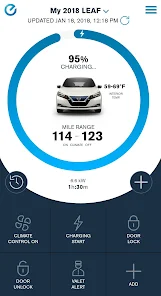
The user experience of NissanConnect® EV & Services is generally positive, with a user-friendly interface that is easy to navigate. Upon opening the app, users are greeted with a clean dashboard displaying vital information such as battery charge percentage, estimated range, and charging station locations. The app allows for seamless integration with the vehicle, providing real-time updates and alerts. Users appreciate the intuitive design, which makes it simple to access features like remote start, climate control, and charge scheduling. However, some users have reported occasional connectivity issues with the app, which can disrupt the smooth operation of remote features. Overall, the app enhances the ownership experience by providing valuable tools and insights that help users manage their electric vehicles more effectively.

Pricing

NissanConnect® EV & Services is offered as a complimentary service for Nissan electric vehicle owners, which adds significant value to the ownership experience. There are no hidden fees or subscription costs, making it an appealing choice for those already invested in the Nissan ecosystem. However, users should be aware that while the app itself is free, they may incur costs associated with public charging stations or electricity used during home charging. This transparent pricing model encourages users to engage with the app without financial concerns, allowing them to focus on maximizing the benefits of their electric vehicle.

Updates & Support

Nissan regularly updates the NissanConnect® EV & Services app to enhance functionality and address user feedback. These updates often include bug fixes, performance improvements, and new features aimed at improving the user experience. The support team is accessible through the app, offering assistance for any questions or concerns users may have. Additionally, Nissan provides comprehensive online resources, including FAQs and user guides, to help users make the most of their app experience. Overall, the combination of regular updates and responsive support contributes to a reliable and user-centric application experience.

verified Security & Privacy Review

The NissanConnect® EV & Services app prioritizes user security and privacy through robust data protection measures. The app employs encryption protocols to safeguard personal information and ensure secure communication between the vehicle and the mobile device. Users are required to create an account, which involves sharing personal data; however, Nissan adheres to strict privacy policies to manage this information responsibly. When installing the app, users must grant specific permissions, including access to location services and vehicle data. These permissions are essential for providing real-time updates and functionalities, such as remote vehicle monitoring and control. Users can manage their privacy settings within the app, allowing them to customize what data is shared and how it is used. Nissan commits to transparency regarding data handling practices, offering users insights into what information is collected and how it is utilized to enhance their driving experience. Overall, the app demonstrates a strong commitment to protecting user data while providing valuable features for electric vehicle owners.

User Reviews

  • Frank Andrews
    2025/11/27

    The app is barely functional. Most of the features are locked behind a pay-wall and the features that are not are unreliable. There is a very long delay between requesting info and it being returned to the phone and a lot of times it just fails to retrieve the information all together. I wish the app just connect to the car via Bluetooth or WiFi. It would be able to quickly issue commands and get battery SOC info. If I leave the range it just remembers my charge

  • Tesla Todd
    2025/02/16

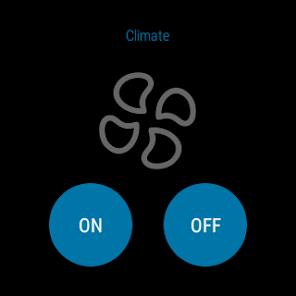
    very limited on usage. For example, one needs 2 "buttons" to turn on and off climate control. Also, you can only have 6 feature buttons available for use. the GPS needs to know where you are leaving from. why can't it just know where you are and that is the starting point. awkward to use in general. plus many other issues. Can't tell if climate control is on or off by display on the app. one should be able to stop charging remotely via the app.

  • Keith Buck
    2024/07/06

    Very slow and annoying to use. A few weeks after I bought my new car, the app broke completely. After hours on the phone with Nissan Connect, they said my car had a hardware problem and needed service, despite the fact that everything else worked (including the SOS button). After waiting 2 months for the parts to arrive at the dealer, surprise! The app starts working again without the replacement. Thanks for the waste of time. Naturally, they've never owned up to their mistake.

  • Dave Rohrbach
    2022/02/08

    Barely Usable, Despite Great Potential - It takes a solid minute or two to get the car's climate control turned on, with a failure error about 50% of the time that requires retrying. Unlocking/locking the car doors also takes a solid minute or two. The feature set of the app is awesome, but it takes so incredibly long to do anything that there's a fair number of occasions that I avoid using it because I don't have the time to invest in trying to get it to work.

  • Randy
    2023/08/18

    This app is the worst!!!!! Update 9-26-21 the app just keeps getting worse. Now it won't even run, it just crashes when you try to start it. I hope the people who wrote the app are never allowed to work on the car's software! ! This has to be the slowest most unreliable apps ever. It maybe works 1 out of 5 times and it hasn't updated the battery level in over a week. The climate control hardly every works and yes it is in a great coverage area. I only hope my car is more reliable

Review Source: Google Play store public user reviews.

FAQ

1

Can I submit suggestions or feedback to NissanConnect® EV & Services?

Yes, users can usually submit suggestions or feedback through the app or by contacting customer support, as the developers welcome user input for improvements.

2

Does NissanConnect® EV & Services collect my personal data?

Yes, the app may collect personal data to enhance user experience and provide personalized services, but it adheres to privacy regulations to protect user information.

3

Does NissanConnect® EV & Services support offline use?

Some features may be accessible offline, but most functionalities require an internet connection to provide real-time updates and information.

4

How do I cancel my NissanConnect® EV & Services subscription?

Users can cancel their subscription through the app’s settings or by contacting customer support for assistance with the cancellation process.

5

How much does a subscription to NissanConnect® EV & Services cost?

Subscription costs can vary based on the selected features and services; users should check the app or Nissan’s official website for the most current pricing.

How to use NissanConnect® EV & Services

1

Can I log in from multiple devices?

Yes, you can log in to your NissanConnect® account from multiple devices using the same credentials. Just ensure you log out from any device when not in use.

2

Can I update my customer number with customer service?

Yes, customer service can assist you in updating your customer number if necessary. Be prepared to provide your personal details for verification.

3

How can I activate my NissanConnect® account?

To activate your account, check your email for an activation link after registration and follow the instructions provided.

4

How do I contact customer service for NissanConnect® EV & Services?

You can reach customer service by calling the dedicated support number available on the NissanConnect® website or through the app's support section.

5

How do I log in to my NissanConnect® account?

To log in, open the app or website, enter your registered email and password, and click "Log In."

What's New

What's New:- Bug fixes and product enhancements.- For questions regarding NissanConnect EV & Services, please contact a NissanConnect EV Customer Support Specialist at (877) NO GAS EV

Editor's Choice