This site uses cookies to enhance your user experience. By clicking any link on this site you are giving your consent to our cookie policy. Read more
Reject
Accept All

Advertiser and Editorial Disclosures

Nielsen Mobile App

Nielsen Mobile App

verified

Nielsen Apps

4.4
Rating
1,000,000+ Downloads
10.3.0 Version
  • category

    Category: Tools

  • price

    Price: free

  • age rating

    Age Rating: Everyone

  • rating

    Rating: 4.4

  • available on

    Available on: /

  • updated on

    Updated on: Jun 20, 2024

Screenshot 1
Screenshot 2
Screenshot 3
Screenshot 4
Screenshot 5
Screenshot 6

Features & Highlights

Incentive Programs

The app rewards users for their participation through various incentive programs, allowing users to earn points that can be redeemed for gift cards or other rewards. This gamified approach not only increases user engagement but also makes contributing to research feel rewarding and enjoyable.

Privacy Protection Measures

Nielsen prioritizes user privacy with robust protection measures, ensuring that all data collected is anonymized and secure. Users can feel confident that their personal information remains confidential, allowing them to participate in research without compromising their privacy.

Real-Time Data Collection

Nielsen Mobile App empowers users to contribute to market research by collecting and sharing real-time data on their mobile usage. This feature allows users to understand their own habits while helping brands gain valuable insights into consumer behavior, fostering a sense of community participation.

User-Friendly Interface

With a clean and intuitive design, the Nielsen Mobile App ensures that users can easily navigate through its features. This user-friendly interface makes it simple for anyone to engage with the app, regardless of their technical expertise, enhancing the overall experience and encouraging regular use.

Pros & Cons

Pros
  • Earn rewards for sharing app usage data
  • Access insights on app trends and behaviors
  • Influence future app development and features
  • Enjoy a seamless, user-friendly experience
  • Participate in research that shapes technology
Cons
  • Limited data privacy controls for users
  • Requires constant internet connection for functionality
  • May drain device battery quickly over time
  • User interface can be confusing for some users

Real Experience Using Nielsen Mobile App

Application Scenarios

The Nielsen Mobile App is designed primarily for users who want to earn rewards while sharing their mobile usage data. This app is particularly beneficial for individuals who are interested in contributing to market research and understanding consumer behavior. Whether you're a college student wanting to make a little extra cash or a working professional looking to turn your everyday mobile activities into rewards, this app serves a wide demographic. It is perfect for those who frequently use their smartphones for browsing, social media, or shopping. With its user-friendly interface, the Nielsen Mobile App allows users to seamlessly integrate their mobile habits into the app, making it an effortless and engaging experience.

User Experience

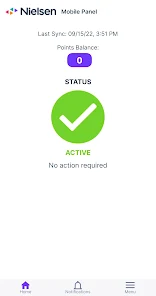
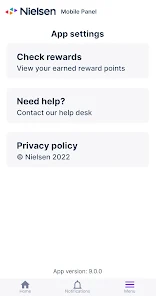
The user experience of the Nielsen Mobile App is notably smooth and intuitive. Upon installation, users are greeted with a clean and straightforward interface that guides them through the setup process. The app runs in the background, collecting data on mobile usage without being intrusive. Users can easily navigate through the app to check their rewards, view their data contributions, and understand how their participation impacts market insights. The notifications are timely, alerting users when they have earned rewards or when new opportunities to earn arise. Furthermore, the app offers an engaging dashboard that presents insights into their own mobile usage patterns, adding a layer of personal engagement. Overall, the combination of ease of use and transparent data collection processes contributes to a positive user experience.

Pricing

The Nielsen Mobile App is completely free to download and use, making it accessible to a wide audience. Instead of a traditional pricing model, users are rewarded for their participation in the form of points, which can be redeemed for gift cards and other rewards. This model not only incentivizes users to keep the app on their devices but also ensures that they feel appreciated for their contributions. The absence of hidden fees or subscription costs further enhances the appeal of the app, inviting even the most budget-conscious users to participate.

Updates & Support

Nielsen regularly updates the Mobile App to improve functionality and enhance user experience based on feedback and technological advancements. These updates often include performance improvements, bug fixes, and new features that make the app even more user-friendly. The support team is accessible through the app and provides quick responses to user inquiries, ensuring that help is just a tap away. Additionally, the app features a comprehensive FAQ section that addresses common concerns and offers troubleshooting tips. This commitment to ongoing support and improvement reflects Nielsen's dedication to maintaining a high-quality experience for its users.

verified Security & Privacy Review

The Nielsen Mobile App places a strong emphasis on security and privacy, adhering to industry standards to protect user data. The app employs encryption protocols to safeguard sensitive information both in transit and at rest, ensuring that personal data remains confidential. Users are informed about the data collection practices through a transparent privacy policy, detailing what information is collected and how it is utilized. Permissions requested by the app are generally limited to what is necessary for its functionality, such as internet access for data transmission and location services for relevant insights. Users can review and manage these permissions within their device settings, which promotes user control over personal information. The app also supports anonymization techniques, helping to ensure that individual user data cannot be directly identified. Nielsen commits to not selling personal information to third parties, further enhancing user trust. Overall, the Nielsen Mobile App demonstrates a responsible approach to data security and privacy, providing users with clear information and control over their data while maintaining robust protective measures.

User Reviews

  • Stephanie Cosgrove
    2024/04/16

    Earning rewards is easy on my laptop; however, the mobile app prevents so many sites from loading. It's so very annoying and frustrating. But turning it off on the mobile app only creates mind-boggling notifications to turn it back on. So now, when the mobile app refuses to allow a site through (not blocking for unsafe sites, just hanging up), I have to go to my laptop in order to access whatever site it is I'm trying to view. It's time consuming and often inconvenient.

  • Kyle Stein
    2024/02/18

    Rewards are good, but app interferes with my internet connection so that I have to force stop it in order to load almost any webpages. It has gotten a bit better, but it's still very bad. And of course the help desk wants you to reinstall it 5 times rather than admit that it's a broken app. But it got me like $150 off a new laptop (used my rewards points for a Best Buy gift card) so I'm satisfied overall. And hey, it keeps me on my phone less!

  • A Google user
    2019/04/24

    The app had been working just fine. I received an email that I had earned points, then a day or so later, an email that my device wasn't transmitting and my account was in jeopardy. After several emails back and forth with support, they told me to uninstall the app from my phone, log into my account on a computer, and add my device. I have been trying for over a week now, but the website keeps telling me my device is "currently not available." I am still waiting for Mobile Support's response to my latest email about this issue. They said allow 72 business hours, but it's been longer than that. I'm about to cash out and move on.

  • Valerie Rill
    2023/12/23

    After downloading this app to my phone, accessing websites became a waiting game because it took so long for them to open, if they actually did. My phone became sluggish, where it hadn't been previously. I couldn't even log into the app/extension on other devices. The idea of the app is nice but should work quietly in the background, not affect what's going on in the foreground.

  • Kathy Davis
    2024/04/11

    Easy way to earn rewards. However, I am having problems connecting my new phone to the app so I can earn points. I keep getting an error that says I don't qualify for the panel at this time. also tells me to add additional mobile device by logging in ... Which I have done multiple times with no results. I have had to Opt out of this app and the opportunities to earn rewards. I have contacted the Nielsen IT help desk multiple times, but I they haven't been any help.

Review Source: Google Play store public user reviews.

FAQ

1

Does Nielsen Mobile App collect my personal data?

The Nielsen Mobile App collects anonymized data related to app usage and device activity, but it does not collect personally identifiable information without user consent.

2

Does Nielsen Mobile App offer a free trial or free version?

The Nielsen Mobile App is free to download and use, and users can earn rewards for their participation, making it accessible without any trial or subscription fees.

3

Does Nielsen Mobile App require an internet connection?

Yes, the Nielsen Mobile App requires a stable internet connection to collect and transmit usage data to the Nielsen servers.

4

How can I contact support or send feedback for Nielsen Mobile App?

Users can contact support or send feedback through the app itself, typically found in the settings or help section, or by visiting the Nielsen website for additional resources and contact information.

5

How do I manage or cancel my Nielsen Mobile App subscription?

Since the Nielsen Mobile App does not operate on a subscription model, there are no subscription management or cancellation processes. Users can simply uninstall the app if they no longer wish to participate.

How to use Nielsen Mobile App

1

How can I contact customer service for the Nielsen Mobile App?

You can reach customer service through the help section in the app or visit the Nielsen website for contact options.

2

How do I activate the Nielsen Mobile App?

Download the app, create an account, and follow the on-screen instructions to complete the activation process.

3

How do I log in to the Nielsen Mobile App?

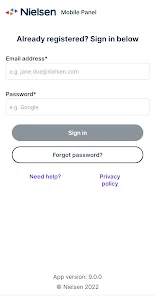
Open the app and enter your registered email and password. If you haven't registered, follow the prompts to create an account.

4

What is the customer number for Nielsen Mobile App support?

The customer number can vary; please check the app's help section or the official Nielsen website for the most accurate information.

What's New

• New look and improved features• Improved stability

Editor's Choice