This site uses cookies to enhance your user experience. By clicking any link on this site you are giving your consent to our cookie policy. Read more
Reject
Accept All

Advertiser and Editorial Disclosures

MyMazda

MyMazda

verified

Mazda Motor Corporation

4.5
Rating
1,000,000+ Downloads
9.0.7 Version
  • category

    Category: Lifestyle

  • price

    Price: free

  • age rating

    Age Rating: Everyone

  • rating

    Rating: 4.5

  • available on

    Available on: /

  • updated on

    Updated on: Jul 2, 2026

Screenshot 1
Screenshot 2
Screenshot 3
Screenshot 4
Screenshot 5
Screenshot 6
Screenshot 7
Screenshot 8

Features & Highlights

Owner's Manual Access

Access your owner's manual digitally, making it easier than ever to find the information you need about your vehicle. MyMazda provides a searchable database of your manual so you can troubleshoot issues or learn about features whenever you need. It’s like having a personal Mazda expert in your pocket.

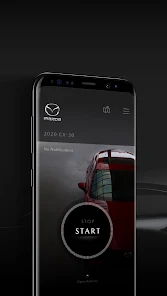
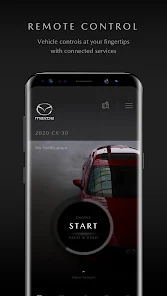
Remote Services

Take convenience to the next level with remote services that allow you to lock or unlock your car and start the engine from your smartphone. Whether you're warming up the car on a chilly morning or ensuring it’s secure, MyMazda gives you peace of mind right at your fingertips.

Service Scheduling

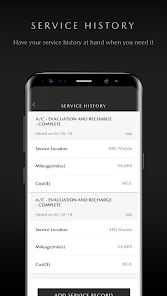
Easily schedule maintenance appointments through the app with just a few taps. MyMazda lets you view your vehicle's service history and receive reminders for upcoming services, making it simple to keep your Mazda in top shape. This streamlined process saves you time and helps you stay on track with your car care.

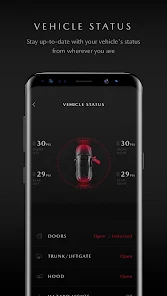
Vehicle Status

Stay informed about your Mazda's health with real-time vehicle status updates. MyMazda provides you with essential information such as fuel levels, tire pressure, and maintenance alerts, ensuring you’re always prepared for your next drive. This feature helps you maintain your vehicle's performance and longevity effortlessly.

Pros & Cons

Pros
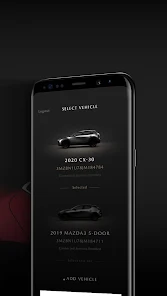
  • Seamless vehicle management at your fingertips
  • Stay updated with maintenance reminders and schedules
  • Access exclusive offers and promotions easily
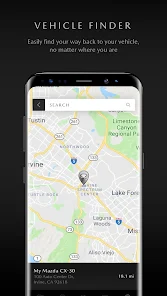
  • Track your vehicle's location for added security
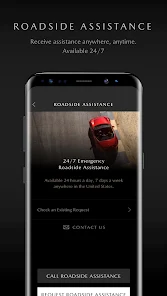
  • Connect with Mazda support for quick assistance
Cons
  • Limited functionality compared to other car apps
  • Inconsistent performance with updates and features
  • User interface can be confusing for new users
  • Connectivity issues with some smartphone models

Real Experience Using MyMazda

Application Scenarios

The MyMazda app serves as a comprehensive companion for Mazda vehicle owners, enhancing the driving experience through a variety of practical features. It is particularly useful for those who frequently travel or rely on their vehicles for daily commutes. Users can easily access their vehicle's information, such as fuel levels, tire pressures, and maintenance schedules. The app also allows for remote start capabilities, making it convenient for users to pre-condition their vehicles before stepping inside. Additionally, MyMazda is beneficial for scheduling service appointments, allowing users to manage their vehicle maintenance effortlessly. Whether on a road trip or simply navigating daily life, the MyMazda app provides essential tools that cater to the needs of Mazda drivers.

User Experience

The user experience offered by MyMazda is generally positive, characterized by an intuitive interface that makes navigation seamless. Users appreciate the clean layout, which allows for quick access to vehicle information and features without overwhelming them with unnecessary details. The app's performance is commendable, with minimal lag, which enhances the overall usability. Notifications and reminders for maintenance are particularly well-received, ensuring that users stay informed about their vehicle's condition. However, some users have reported occasional connectivity issues with their vehicles, which can lead to frustration. Overall, the app strikes a good balance between functionality and ease of use, making it a valuable tool for Mazda owners.

Pricing

One of the standout features of the MyMazda app is that it is free to download and use, providing a significant advantage over some competing applications that may require a subscription fee. Users can access a wide range of services without incurring additional costs, making it accessible for all Mazda owners. This free model allows users to take full advantage of the app's functionalities, from remote access to vehicle diagnostics, without worrying about ongoing expenses. The absence of a pricing barrier enhances the appeal of the app, encouraging widespread adoption among Mazda enthusiasts.

Updates & Support

MyMazda is regularly updated to ensure that users receive the latest features and improvements. The developers are attentive to user feedback, implementing changes that address common concerns and enhance performance. Support resources are readily available within the app, including FAQs and troubleshooting guides, which empower users to resolve issues independently. For more complex inquiries, customer support can be contacted directly through the app, ensuring that users receive timely assistance. The commitment to continuous improvement and user satisfaction demonstrates the developers' dedication to providing a high-quality experience for Mazda owners.

verified Security & Privacy Review

The MyMazda app places a strong emphasis on security and privacy, ensuring that user data is handled with care. The app employs advanced encryption protocols to protect sensitive information during transmission, safeguarding it from unauthorized access. Users are informed about the types of data collected, including vehicle information, location data, and user preferences, which enhances transparency. Permissions required by the app are clearly outlined during the installation process, allowing users to make informed choices about what data they wish to share. The app does not collect unnecessary information, adhering to a principle of data minimization. Users can also manage their privacy settings within the app, granting them control over which features they utilize and what data they disclose. MyMazda adheres to industry standards for data protection, and regular updates ensure that security measures remain robust against evolving threats. Overall, the app demonstrates a commitment to user privacy while providing valuable features, making it a reliable choice for Mazda owners concerned about data security.

User Reviews

  • Dana Booth
    2026/03/16

    update: bought a new car and got a year free. paying for this for 1 month and it's back to its nonsense of not opening. just trying to start my car to defrost/defog the windshield before work and the thing doesn't open. Like so many other reviews, if I'm paying for the app for basic functions for my car, the app should work. Every time. Remote start is basic on every other comparable vehicle these days, but other companies don't charge an additional fee for it.... And it DOESN'T EVEN OPEN!

  • Michael Leonard
    2025/06/01

    This app isn't useful. The remote start capability doesn't work (it's a manual transmission), and other than that feature, there's not much there. I'll probably never use the remote lock and unlock. It informs me that the trunk or a door is open, but that's usually because it's open while I'm unloading the car, and the notification arrives long after I've closed the offending trunk or door. The app is OK, but only OK. It's free for now, but when that's over, I sure won't pay to keep it.

  • Gordon Stein
    2026/06/16

    Useless app. The only time it gives a notification of anything is when I sit in the car for a bit after getting home, where it tells me that I've unlocked it. The remote features don't work, and the status updates don't work, even when the car is on our wi-fi. Who would pay for this? I feel ripped off and I'm getting it for free for a year. The only positive is that the annoying ad notifications can be turned off, just not through Android's settings.

  • Lo MG
    2026/06/09

    You want to start charging me $120 a year to continue to use the features of a car I bought 3 years ago, which comes with most new cars with a key fob. Not worth it. I'm so annoyed by this new way to make more money off loyal customers who have already paid THOUSANDS. I love my Mazda, but I don't know if I'd buy another when they choose to make money over customer service, even knowing they are about to lose a major Marketing avenue for services & new cars when people delete the App.

  • jonna artisan
    2026/05/11

    sucks!!! doesn't lock or open door. gives false notifications. randomly says I don't have a connected server. I've had it 2 months and I hate! it's nothing more than a gimmick. most definitely will not be subscribing to this! if it was actually useful, and free when purchasing car, maybe I would keep it. it does not function as described. I was told "with the app your phone is your key". NOPE! absolutely NOT true! do not believe it. Company tracker perhaps???

Review Source: Google Play store public user reviews.

FAQ

1

Does MyMazda collect my personal data?

Yes, MyMazda collects personal data to enhance user experience and provide tailored services, but it adheres to privacy policies to protect user information.

2

Does MyMazda offer a free trial or free version?

MyMazda is free to download and use, offering various features without a subscription, although some premium features may require payment.

3

Does MyMazda require an internet connection?

Yes, MyMazda requires an internet connection to access most of its features, including remote services and vehicle data updates.

4

How can I contact support or send feedback for MyMazda?

You can contact MyMazda support or send feedback through the app's help section, or visit the official Mazda website for customer service options.

5

How do I manage or cancel my MyMazda subscription?

You can manage or cancel your MyMazda subscription through the app's settings or your account settings on the respective app store, following their guidelines for subscription management.

How to use MyMazda

1

Do I need to activate my MyMazda account?

Yes, after registration, you may need to activate your account via a confirmation email sent to you. Follow the link in the email to complete activation.

2

How can I contact customer service for the MyMazda app?

You can reach MyMazda customer service via the support section in the app or by calling the customer service number found on the official Mazda website.

3

How do I log in to the MyMazda app?

Open the app, enter your registered email and password, and tap "Log In." If you haven’t registered, you can do so using the app.

4

What is the customer number for MyMazda support?

The customer support number for MyMazda is typically available on the Mazda website or within the app under the help section.

What's New

This latest version of the MyMazda app includes improvements to enhance the convenience and reliability of Mazda Connected Services, including:- Minor bug fixes

Editor's Choice