This site uses cookies to enhance your user experience. By clicking any link on this site you are giving your consent to our cookie policy. Read more
Reject
Accept All
myGMC

myGMC

verified Verified App

Developer: General Motors (GM)

  • category

    Category: Lifestyle

  • price

    Price: free

  • age rating

    Age Rating: Everyone

  • rating

    Rating: 4.7

  • download

    Downloads: 1,000,000+

  • version

    Version: 8.1.0

Screenshot 1
Screenshot 2
Screenshot 3
Screenshot 4
Screenshot 5
Screenshot 6
Screenshot 7
Screenshot 8

Features & Highlights

In-App Navigation

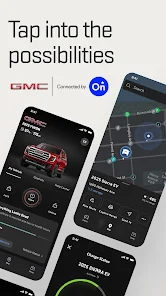
The app integrates advanced navigation tools, helping you find the fastest routes, real-time traffic updates, and nearby points of interest. This makes your driving experience more enjoyable and efficient, ensuring you reach your destination with ease.

Remote Access

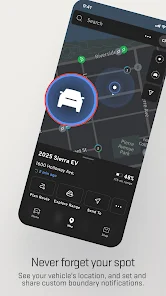
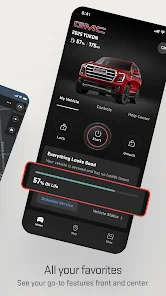
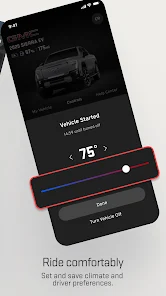
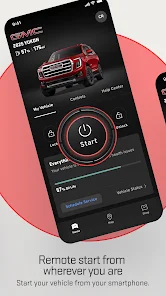
With myGMC, you can remotely start your vehicle, lock or unlock doors, and even locate it in a crowded parking lot. This feature adds convenience to your daily routine, giving you control over your vehicle from the palm of your hand.

Vehicle Alerts

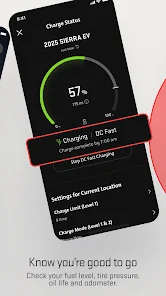
Stay informed with timely vehicle alerts that notify you of important updates, such as low fuel levels or tire pressure issues. This feature empowers you to take proactive measures, enhancing your overall driving experience and vehicle safety.

Vehicle Management

myGMC provides seamless vehicle management, allowing users to monitor their vehicle's health, track mileage, and receive alerts for maintenance needs. This ensures that your vehicle remains in peak condition, offering peace of mind for every journey you take.

Pros & Cons

Pros
  • Seamless vehicle management from your smartphone.
  • Access real-time vehicle diagnostics and alerts.
  • Schedule service appointments with ease and convenience.
  • Track your vehicle's location for added security.
  • Receive personalized maintenance reminders and tips.
Cons
  • Limited compatibility with older vehicle models
  • User interface can be confusing for new users
  • App performance may be inconsistent at times
  • Customer support can be slow to respond

Real Experience Using myGMC

Application Scenarios

The myGMC app is designed to enhance the ownership experience for GMC vehicle users. It serves as a comprehensive tool for managing vehicle services, tracking maintenance schedules, and accessing personalized content. Users can easily schedule service appointments, view their vehicle's health status, and receive notifications for upcoming maintenance. Additionally, the app provides features for remote vehicle control, allowing users to start their engine, lock or unlock doors, and even locate their vehicle in crowded parking spaces. Whether users are on a road trip or simply commuting to work, the myGMC app proves to be an invaluable companion in managing their vehicle's needs efficiently.

User Experience

The user interface of the myGMC app is intuitive and user-friendly, making navigation seamless for users of all ages. Upon logging in, users are greeted with a clean dashboard that presents essential information at a glance. The app's layout is well-organized, with clearly labeled sections for services, vehicle details, and account settings. Users have reported that the app's responsiveness is commendable, with quick loading times and minimal lag during usage. Furthermore, the integration of features such as vehicle health reports and reminders for oil changes enhances the overall user experience by keeping owners informed and proactive about their vehicle's maintenance. The app also allows for personalized settings, enabling users to customize notifications according to their preferences, thus enhancing engagement and satisfaction.

Pricing

The myGMC app is free to download and use, making it accessible to all GMC vehicle owners. There are no hidden fees or subscription costs associated with the app, which is a significant advantage for users looking to manage their vehicle without incurring additional expenses. The app provides a wealth of features that would typically require a premium service in other automotive apps, ensuring that GMC owners receive excellent value. However, users should note that certain features, like remote start, may require a compatible vehicle model and may be tied to vehicle connectivity subscriptions, which are typically offered by GMC.

Updates & Support

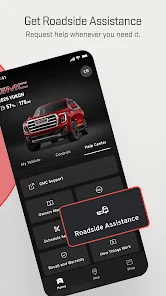
myGMC is regularly updated to improve functionality and address user feedback. The developers have shown a commitment to enhancing the app by incorporating new features, refining existing ones, and ensuring compatibility with the latest operating systems. Users can expect timely updates that not only fix bugs but also introduce enhancements that make the app more efficient. Customer support is readily available through the app, where users can access a help section and contact GMC representatives for assistance. The support team is known for being responsive and helpful, providing solutions to any issues users may encounter while using the app. This robust support system ensures that users can fully utilize the app's capabilities without frustration.

verified Security & Privacy Review

The myGMC app prioritizes user security and privacy through robust data protection measures. The app implements encryption protocols to safeguard sensitive information, ensuring that user data remains confidential during transmission and storage. Regarding permissions, myGMC requests access to essential device features, such as location services and contacts, to enhance user experience. Users are informed about these permissions and can manage them through their device settings, allowing for greater control over personal information. myGMC adheres to industry-standard privacy practices, including compliance with relevant regulations. The app's privacy policy outlines how user data is collected, used, and shared, ensuring transparency in data handling. Users are encouraged to review this policy to understand their rights and the app's data practices fully. Overall, myGMC demonstrates a commitment to maintaining user privacy and securing personal data, making it a reliable choice for those concerned about their digital safety.

Reviews

4.7

“User-friendly interface with great functionality”

“Excellent for managing vehicle maintenance”

“Convenient features for scheduling service appointments”

“App crashes occasionally, needs improvement”

“Loving the remote start feature!”

Editor's Choice