This site uses cookies to enhance your user experience. By clicking any link on this site you are giving your consent to our cookie policy. Read more
Reject
Accept All

Advertiser and Editorial Disclosures

myCigna

myCigna

verified Verified App

Developer: Cigna

  • category

    Category: Health & Fitness

  • price

    Price: free

  • age rating

    Age Rating: Everyone

  • rating

    Rating: 4.0

  • download

    Downloads: 1,000,000+

  • version

    Version: 7.13.0

Screenshot 1
Screenshot 2
Screenshot 3
Screenshot 4
Screenshot 5
Screenshot 6

Features & Highlights

Claims Tracking

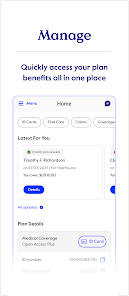
Stay informed about your healthcare expenses with the claims tracking feature in myCigna. You can easily view the status of your claims, see what has been processed, and understand your benefits in real time. This transparency helps you stay on top of your healthcare costs, giving you peace of mind.

Easy Appointment Scheduling

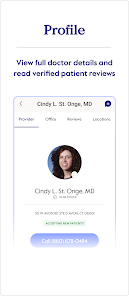
With myCigna, scheduling appointments with healthcare providers is a breeze. The app allows you to view available time slots, book appointments, and even manage cancellations with just a few taps. This convenience ensures that your healthcare is always within reach, making it easier to prioritize your health.

Personalized Health Insights

myCigna offers personalized health insights based on your medical history and health goals. This feature helps you understand your health better, providing tailored recommendations and tips to manage your wellness effectively. It's like having a health coach right in your pocket, guiding you every step of the way.

Prescription Management

Managing your prescriptions has never been easier thanks to myCigna. You can refill medications, check the status of your prescriptions, and even find nearby pharmacies with just a few clicks. This feature takes the stress out of medication management, allowing you to focus on what matters most—your health.

Pros & Cons

Pros
  • Easy access to personalized health information online
  • Comprehensive coverage options tailored to individual needs
  • User-friendly mobile app for health management
  • 24/7 support from healthcare professionals available
  • Wellness resources to promote healthy living habits
Cons
  • Limited network of healthcare providers can restrict access
  • High out-of-pocket costs for certain services and medications
  • Complicated claims process may lead to delays
  • Customer service can be difficult to reach or unhelpful

Real Experience Using myCigna

Application Scenarios

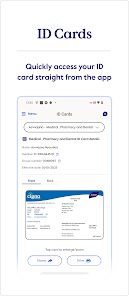
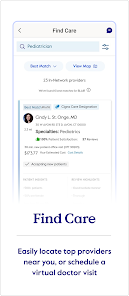
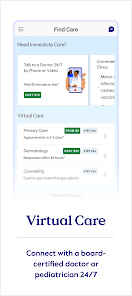
The myCigna app is designed to streamline the management of health benefits and medical care for Cigna insurance users. It serves multiple scenarios, such as checking insurance coverage, locating in-network healthcare providers, and accessing personal health information. Users can also submit claims, view benefits, and track their deductibles and out-of-pocket expenses directly from their smartphones. This is particularly useful for those who are busy or prefer managing their health-related tasks on the go. Furthermore, the app facilitates telehealth visits, allowing users to connect with healthcare professionals virtually, making it an invaluable tool during times when in-person visits are challenging.

User Experience

The user experience of the myCigna app is generally positive, characterized by a clean and intuitive interface. Navigating through the app is straightforward, with clearly labeled sections and easy access to essential features. Users consistently report that the app loads quickly and provides relevant information promptly. The ability to view lab results, medical records, and claims status has been highlighted as a standout feature, contributing to a more informed healthcare experience. Additionally, the app’s personalized dashboard offers users a tailored overview of their health benefits, making it easier to manage their healthcare needs efficiently. However, some users have noted occasional glitches, particularly with the login process and syncing information, which can be frustrating but are often resolved with app updates.

Pricing

As a healthcare management tool, the myCigna app is free to download and use for Cigna insurance policyholders. There are no hidden fees or subscription costs associated with accessing the app’s features. However, users should be aware that any medical services or treatments accessed through the app may incur standard copays or deductibles as outlined in their specific health plans. This transparency in pricing is appreciated by users, as it allows for better financial planning regarding their healthcare expenses. Overall, the app provides significant value without additional financial burdens, making it an attractive option for Cigna members.

Updates & Support

The myCigna app is regularly updated to enhance functionality and user experience. Cigna is committed to addressing user feedback, resulting in frequent improvements and the addition of new features, such as enhanced telehealth capabilities and better claim tracking. Users can easily access support through the app, either by utilizing the FAQ section or by reaching out to customer service for personalized assistance. Cigna’s support team is generally responsive, assisting users with any issues they may encounter. Overall, the combination of regular updates and robust support contributes to user satisfaction and encourages continued use of the app.

verified Security & Privacy Review

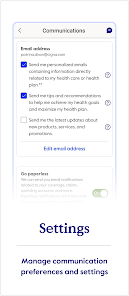
The myCigna app prioritizes user security and privacy, implementing robust measures to protect sensitive health information. Data encryption during transmission ensures that personal and medical details remain confidential, safeguarding against unauthorized access. The app requires essential permissions, such as access to the device's camera for uploading documents and location services for finding nearby healthcare providers. Users are informed about these permissions, allowing for transparency in how their data is utilized. myCigna adheres to strict privacy practices, complying with HIPAA regulations to maintain the confidentiality of user health records. The app's privacy policy clearly outlines how user data is collected, used, and shared, giving users control over their information. Moreover, users have the option to manage their privacy settings, including the ability to opt-out of certain data-sharing practices. Overall, myCigna demonstrates a commitment to protecting user privacy while providing essential healthcare management tools.

Reviews

4.0

“Easy to navigate and user-friendly interface”

“Quick access to my health information”

“Great customer support and assistance”

“Useful tools for managing my health”

“Timely updates on claims and benefits”

FAQ

1

Does myCigna collect my personal data?

Yes, myCigna collects personal data to provide you with customized services and to manage your health information effectively, but it adheres to strict privacy policies.

2

Does myCigna offer a free trial or free version?

myCigna is free to download and use for members of Cigna health plans, but it may not offer a free trial for premium features, as all functionalities are generally included for members.

3

Does myCigna require an internet connection?

Yes, myCigna requires an internet connection to access most of its features, including viewing plan details and managing health information.

4

How can I contact support or send feedback for myCigna?

You can contact support through the app or website by accessing the help section, or you can reach out to Cigna customer service via phone or email for feedback and assistance.

5

How do I manage or cancel my myCigna subscription?

Since myCigna does not have a subscription model, you do not need to manage or cancel a subscription; however, you can contact Cigna customer service for assistance with your health plan.

How to use myCigna

1

How do I activate my myCigna account?

To activate your myCigna account, go to the myCigna website or app, click on "Register," and follow the prompts to enter your information and set up your account.

2

How do I contact customer service for myCigna?

You can contact myCigna customer service by calling the number on the back of your Cigna ID card or by visiting the Cigna website for additional support options.

3

How do I log into myCigna?

To log into myCigna, visit the myCigna website or app, enter your username and password, and click "Log In." If you don’t have an account, you can register for one.

4

What is the customer service number for myCigna?

The customer service number for myCigna is typically found on your Cigna ID card. Alternatively, you can visit the official Cigna website for more contact information.

Editor's Choice