This site uses cookies to enhance your user experience. By clicking any link on this site you are giving your consent to our cookie policy. Read more
Reject
Accept All

Advertiser and Editorial Disclosures

Pedometer - Step Counter

Pedometer - Step Counter

verified Verified App

Developer: Jersey Studio

  • category

    Category: Health & Fitness

  • price

    Price: 0

  • age rating

    Age Rating: Everyone

  • rating

    Rating: 4

  • download

    Downloads: /

  • version

    Version: 2.0.1

Screenshot 1
Screenshot 2
Screenshot 3
Screenshot 4
Screenshot 5
Screenshot 6

Features & Highlights

Calorie Tracking

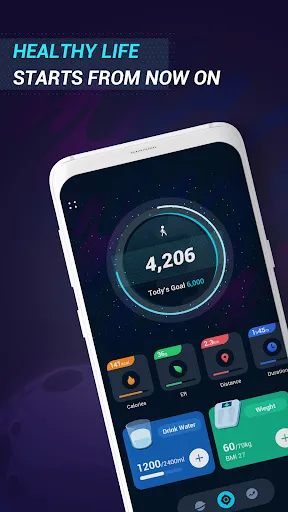
Our app not only counts your steps but also calculates the calories burned throughout the day. This feature helps you understand the impact of your physical activity on your overall health, encouraging you to push your limits and maintain a balanced lifestyle.

Goal Setting

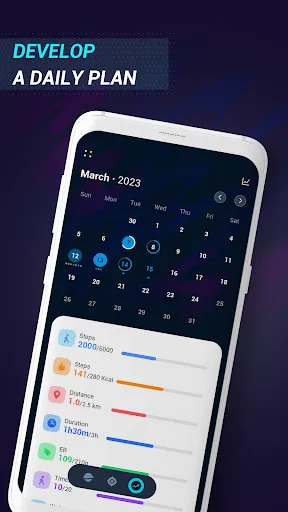
Set personalized fitness goals to keep you on track and motivated. Whether you aim to increase your daily steps or improve your overall fitness, the app provides reminders and progress updates to help you stay committed to achieving your objectives.

Monthly Reports

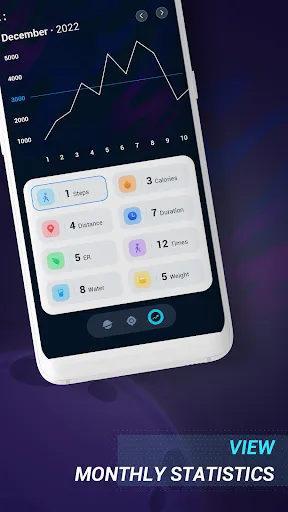
Receive detailed monthly summaries of your walking habits, including step counts, calories burned, and active days. These reports give you valuable insights into your progress, helping you identify trends and adjust your fitness routine as needed.

Step Tracking

Easily monitor your daily step count with precise tracking that updates in real time. The app ensures you stay motivated by providing insights into your walking patterns and progress over time, making every step count towards your fitness goals.

Pros & Cons

Pros
  • Tracks daily steps for better fitness awareness
  • Encourages consistent physical activity and movement
  • Helps set and achieve personal fitness goals
  • Promotes healthy lifestyle choices and habits
  • Provides motivation through progress tracking and rewards
Cons
  • Inaccurate in measuring uneven terrain steps
  • Limited functionality beyond step counting
  • May not sync with all devices
  • Battery life can be short

Real Experience Using Pedometer - Step Counter

Application Scenarios

The Pedometer - Step Counter app excels in a variety of scenarios, making it ideal for both casual walkers and fitness enthusiasts. For those looking to maintain a healthy lifestyle, the app serves as a daily companion, helping users track their steps during morning jogs, leisurely strolls in the park, or even while running errands. It’s particularly useful for individuals aiming to meet specific fitness goals, such as hitting a daily step count target or preparing for a marathon. Additionally, the app's functionality extends to different environments, whether indoors on a treadmill or outdoors on hiking trails, showcasing its versatility across various physical activities.

User Experience

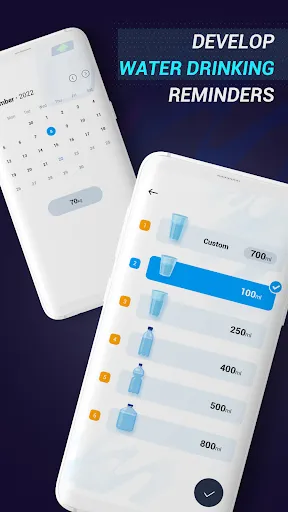
When it comes to user experience, the Pedometer - Step Counter app truly shines. The interface is intuitive and user-friendly, ensuring that even the least tech-savvy individuals can navigate it with ease. Upon launching the app, users are greeted with a clean dashboard displaying their step count, distance traveled, and calories burned, all in real-time. The app also includes motivational features like daily goals and progress tracking, which encourage users to stay active. Notifications and reminders can be customized to suit individual preferences, adding a personal touch to the experience. The app runs smoothly without significant lag, providing a seamless experience whether you are checking stats or changing settings. Overall, the design and functionality are tailored to keep users engaged and motivated.

Pricing

The Pedometer - Step Counter app adopts a freemium model, allowing users to download and use the core features at no cost. This accessibility promotes widespread use among individuals looking to improve their fitness without the burden of upfront costs. For those seeking advanced features, such as detailed analytics and customizable workout plans, the app offers a premium subscription option. This subscription is reasonably priced and provides excellent value for users who are serious about their fitness journey. There are occasional promotions and discounts that make the premium features even more accessible, ensuring that users can choose a plan that aligns with their budget and fitness goals.

Updates & Support

The developers of the Pedometer - Step Counter app are dedicated to enhancing user experience through regular updates and improvements. Users can expect frequent updates that introduce new features, improve existing functionalities, and address any bugs or issues promptly. The app also boasts a robust support system, with a comprehensive FAQ section and responsive customer service that can be reached via email or social media. This level of support ensures that users can quickly resolve any concerns or questions, contributing to an overall positive experience. Additionally, user feedback is actively sought and incorporated into future updates, demonstrating the developers' commitment to meeting the needs of their community.

verified Security & Privacy Review

The Pedometer - Step Counter app takes user security and privacy seriously. Upon installation, the app requests permissions to access essential device features such as location and storage. However, it ensures that users are informed about why these permissions are necessary, promoting transparency in its operations. Data collected by the app primarily includes step count, distance traveled, and calories burned. This information is stored locally on the user's device, minimizing the risk of unauthorized access. The app does not share personal data with third parties, adhering to strict privacy practices. Users can also opt-out of sharing any data, allowing for complete control over their information. Additionally, the app employs encryption protocols to safeguard any sensitive data transmitted during use. Regular updates are provided to enhance security features, ensuring that the app remains compliant with the latest privacy regulations. Overall, users can feel confident that their data is handled with care, prioritizing privacy and security throughout their experience with Pedometer - Step Counter.

Reviews

4

“Accurate step tracking and easy to use.”

“Great motivation for daily activity levels!”

“Simple interface with useful features.”

“Syncs well with other health apps.”

“Helps me stay active and reach my goals.”

FAQ

1

Can I submit suggestions or feedback to Pedometer - Step Counter?

Yes, users can submit suggestions or feedback through the app's support section or contact the development team via email or social media.

2

Does Pedometer - Step Counter collect my personal data?

The app prioritizes user privacy and generally does not collect personal data, though it may request access to certain device features for optimal functionality.

3

Does Pedometer - Step Counter support offline use?

Yes, Pedometer - Step Counter can function offline, allowing users to track their steps and activity even without an internet connection.

4

How do I cancel my Pedometer - Step Counter subscription?

To cancel your subscription, go to your device's settings, find the subscriptions section, and follow the prompts to cancel the Pedometer - Step Counter subscription.

5

How much does a subscription to Pedometer - Step Counter cost?

Subscription prices for Pedometer - Step Counter may vary, typically offering monthly and yearly plans, so it's best to check within the app for the most current pricing.

How to use Pedometer - Step Counter

1

Can I log in to my account on multiple devices?

Yes, you can log in to your account on multiple devices using the same credentials, but ensure only one device syncs at a time.

2

Can I log in to my account using social media?

Yes, you can log in using your social media accounts if you activated that option during account setup.

3

How can I find customer service hours?

Our customer service hours are listed on our website in the contact section. Please check there for the most accurate information.

4

How do I activate my account after purchase?

To activate your account, follow the activation link sent to your email after purchase and set your password.

5

How do I contact customer service for my pedometer?

You can reach our customer service team by calling the number provided on our website or through the app's support section.

Editor's Choice