This site uses cookies to enhance your user experience. By clicking any link on this site you are giving your consent to our cookie policy. Read more
Reject
Accept All

Advertiser and Editorial Disclosures

Home Workout - No Equipment

Home Workout - No Equipment

verified

Leap Fitness Group

4.9
Rating
100,000,000+ Downloads
1.6.3 Version
  • category

    Category: Health & Fitness

  • price

    Price: free

  • age rating

    Age Rating: Everyone

  • rating

    Rating: 4.9

  • available on

    Available on: /

  • updated on

    Updated on: Jun 15, 2026

Screenshot 1
Screenshot 2
Screenshot 3
Screenshot 4
Screenshot 5
Screenshot 6
Screenshot 7
Screenshot 8

Features & Highlights

Instructional Videos

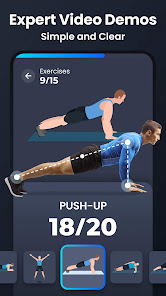
Each exercise comes with clear instructional videos that guide you through proper form and technique. This feature helps you minimize the risk of injury while maximizing the effectiveness of your workouts, ensuring you perform each movement with confidence.

Personalized Workout Plans

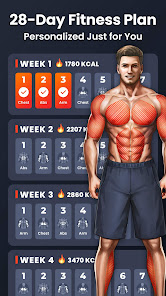
Home Workout - No Equipment offers tailored workout plans designed to suit your fitness level and goals. Whether you're a beginner or looking to maintain your fitness, the app adjusts the difficulty and duration of exercises to keep you challenged and engaged every step of the way.

Progress Tracking

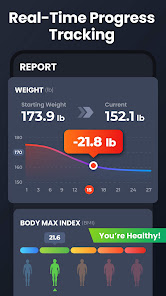
Stay motivated by tracking your progress over time with detailed statistics. The app allows you to see improvements in your strength, endurance, and overall fitness, helping you set and achieve realistic goals while celebrating your successes along the journey.

Variety of Exercises

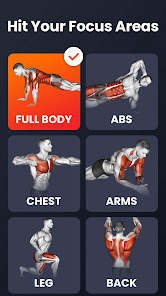
With a broad range of exercises targeting different muscle groups, the app keeps your workouts fresh and exciting. From bodyweight routines to flexibility training, you'll find plenty of options to prevent boredom and ensure a full-body workout without any equipment needed.

Pros & Cons

Pros
  • Saves money by eliminating gym membership fees
  • Convenient to fit into any daily schedule
  • No travel time, workout anytime at home
  • Enhances creativity with varied bodyweight exercises
  • Promotes a comfortable, private workout environment
Cons
  • Limited exercise variety can lead to boredom
  • Harder to maintain motivation without a gym environment
  • Difficult to track progress accurately over time
  • May lack guidance or proper technique without supervision

Real Experience Using Home Workout - No Equipment

Application Scenarios

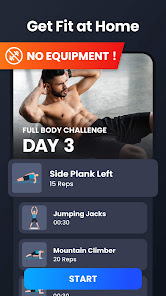
The "Home Workout - No Equipment" app is designed for individuals looking to maintain or enhance their fitness levels without the need for gym equipment. It caters to various scenarios, making it versatile for users. Whether you’re a busy professional seeking a quick workout during lunch breaks, a stay-at-home parent managing a hectic schedule, or someone who prefers the privacy of their home for workouts, this app fits seamlessly into your lifestyle. The workout plans are categorized based on goals such as weight loss, muscle gain, or overall fitness, allowing users to select routines that align with their personal objectives. The guided videos and step-by-step instructions ensure that even beginners can follow along with confidence. Additionally, the ability to customize workouts makes it suitable for users at all fitness levels, from novices to advanced enthusiasts.

User Experience

User experience is a crucial aspect of any fitness app, and "Home Workout - No Equipment" excels in this area. The app features a clean, intuitive interface that is easy to navigate. Users can quickly access workout plans, track their progress, and set reminders for their sessions. The animations and video demonstrations for each exercise enhance understanding, ensuring that users perform movements safely and effectively. The app also includes a community feature where users can connect, share their progress, and motivate one another, fostering a sense of camaraderie that can be lacking in solo home workouts. With its user-friendly design and engaging features, it encourages regular use, making fitness a fun and achievable goal.

Pricing

Updates & Support The developers of "Home Workout - No Equipment" are committed to providing regular updates to improve user experience and expand the app's features. Users can expect periodic additions of new workouts and enhancements based on user feedback. The app also provides a responsive customer support system, which users have praised for its efficiency. Whether it’s a query about a workout or a technical issue, users can rely on prompt assistance. Additionally, the app's community forums serve as a platform for users to share insights and suggestions, which the developers actively consider for future updates. Such engagement not only improves the app but also fosters a loyal user base.

verified Security & Privacy Review

The "Home Workout - No Equipment" app prioritizes user security and privacy by implementing robust data protection measures. The app does not require any personal information during the signup process, allowing users to engage without the need to share sensitive data. This feature enhances user confidence in maintaining their privacy. Permissions requested by the app are minimal and relevant to its functionality. Users are only prompted to grant access to essential features, such as notifications for workout reminders. The app does not request permissions that could compromise user data, such as location services or access to contacts. Data handling practices are transparent, with the app clearly outlining its policy regarding user information. The collected data, primarily related to fitness progress, is stored securely and is not shared with third parties without explicit consent. Regular updates are provided to ensure compliance with evolving privacy regulations, further solidifying its commitment to protecting user data. Overall, "Home Workout - No Equipment" offers a secure environment for users to focus on their fitness goals without concerns about privacy violations.

User Reviews

  • David Clarke
    2024/12/25

    Only been using it for a few weeks, but I already opted for the membership. It's been a huge help keeping me on schedule, and I love that I can download/add workouts to fit my needs. Also, if there's an exercise you're not familiar with, it provides video and instructions to help you. It's like having a virtual personal trainer, which is exactly what I was looking for. If something in the scheduled workout is too difficult (or easy) you can swap it out. Fully customizable. 5 stars!

  • Jaylon Harmon
    2026/06/23

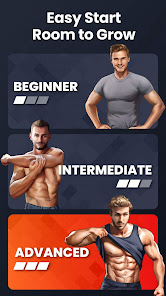
    I actually love this workout app its simple and easy to navigate and I really like how in the workouts there is a voice assistant that tells you how to do the workout. And the fact that you can go at your own pace when doing reps. these workouts are really effective and they have different levels to do, such as beginner, intermediate, and advanced. Overall a great workout app 10/10!!

  • Paul Dubois
    2026/06/07

    Simple and Great. This was my first time to use the app. It was nice because it had the option of using either an animated person or a real person and you can zoom in and check and see exactly what the poses are. This is helpful because some of these I've never seen or done before. I thought doing some of these for only 30 seconds would be super simple but it's not necessarily as easy as you might think if you haven't worked out in a while. I just wish it would sync with MyFitnessPal

  • Basking Crow
    2026/04/16

    Instructions are great (video, written, including common mistakes), no complaints there. The multiple built in monthly plans is great for a beginner to just pick one and go. Same with the varying levels and ability to adjust difficulty or replace any exercise at will (the recommendations for similar, harder, easier are also great) Could be better: I really need a way to star/favorite routines and exercises and 'block' certain exercises too so they wont show up in routines.

  • Nelson Moteiro
    2026/01/24

    Love the app and it's easy to use interface! I also enjoy the ability to customize (most) of the workout plans to your preference! My main gripes: The "Full body workout" isn't really full body, but mix it up with the lower body plan and you can cover it all. The most annoying aspect is the fake encouragement they give you in the latest update. It doesn't sound authentic and is more a distraction than an encouraging. I need a way to shut that off without killing voice prompts.

Review Source: Google Play store public user reviews.

FAQ

1

Does Home Workout - No Equipment collect my personal data?

Home Workout - No Equipment may collect personal data as outlined in its privacy policy, primarily for account management and user experience enhancement.

2

Does Home Workout - No Equipment offer a free trial or free version?

Yes, Home Workout - No Equipment typically offers a free version with limited features, and often includes a free trial period for premium features.

3

Does Home Workout - No Equipment require an internet connection?

Home Workout - No Equipment offers offline functionality, allowing you to access workouts without an internet connection after downloading the app.

4

How can I contact support or send feedback for Home Workout - No Equipment?

You can contact support or send feedback through the app's settings menu, where you will find options for customer support or feedback submission.

5

How do I manage or cancel my Home Workout - No Equipment subscription?

You can manage or cancel your subscription through the app store settings on your device, typically under subscriptions or account settings.

How to use Home Workout - No Equipment

1

Do I need to activate the Home Workout app after downloading?

No activation is necessary; simply download the app and start your workouts immediately.

2

How can I contact customer service for the Home Workout app?

You can reach customer service through the app's help section or by emailing support

3

How do I find my customer number in the Home Workout app?

Your customer number can be found in the app settings under "Account Information."

4

How do I log in to the Home Workout app?

To log in, enter your email and password on the login screen, then tap "Log In."

Editor's Choice