This site uses cookies to enhance your user experience. By clicking any link on this site you are giving your consent to our cookie policy. Read more
Reject
Accept All
Google Fit: Activity Tracking

Google Fit: Activity Tracking

verified Verified App

Developer: Google LLC

  • category

    Category: Health & Fitness

  • price

    Price: free

  • age rating

    Age Rating: Everyone

  • rating

    Rating: 3.5

  • download

    Downloads: 100,000,000+

  • version

    Version: /

Screenshot 1
Screenshot 2
Screenshot 3
Screenshot 4
Screenshot 5
Screenshot 6
Screenshot 7
Screenshot 8
Screenshot 9

Features & Highlights

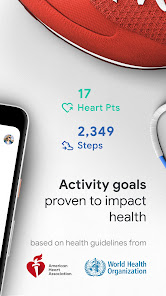
Activity Goals

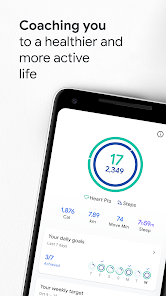
Set personalized activity goals to keep yourself motivated and on track. Whether you're aiming for a certain number of steps or workout minutes, Google Fit will remind you of your progress and encourage you to achieve your health aspirations, making exercise a rewarding experience.

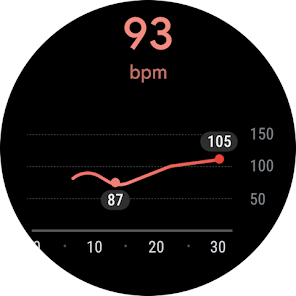
Heart Rate Monitoring

Google Fit seamlessly tracks your heart rate throughout the day, providing insights into your cardiovascular health. With this feature, you can monitor your heart rate during workouts and at rest, helping you understand your fitness levels and adjust your routines accordingly for optimal performance.

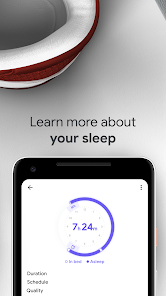
Sleep Insights

Google Fit provides valuable insights into your sleep patterns, helping you understand the quality and duration of your rest. By tracking your sleep, you can identify trends and make necessary adjustments to improve your overall health and well-being.

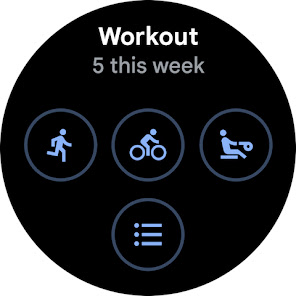
Workout Tracking

Easily log and track various workouts with Google Fit's intuitive interface. Whether you're running, cycling, or practicing yoga, the app captures essential metrics like duration, calories burned, and distance, giving you a comprehensive overview of your fitness journey and progress.

Pros & Cons

Pros
  • Monitors daily activity levels effortlessly
  • Tracks workouts and progress over time
  • Integrates with various fitness apps easily
  • Offers personalized fitness goals for motivation
  • Provides insights to improve health and wellbeing
Cons
  • Inaccurate step counting in certain conditions
  • Limited support for non-Google devices
  • Lack of advanced metrics for serious athletes
  • Minimal social features for community engagement

Real Experience Using Google Fit: Activity Tracking

Application Scenarios

Google Fit: Activity Tracking is designed for a wide range of users, making it applicable in various scenarios. Fitness enthusiasts can utilize the app to monitor their workouts, track running distances, or log cycling sessions, allowing them to set personal records and achieve fitness goals. For those focused on general health, the app helps in tracking daily activity levels, encouraging users to stay active throughout the day with reminders to move. It also seamlessly integrates with other apps and devices, such as wearables, to provide a comprehensive view of health metrics including heart rate, sleep patterns, and calorie intake. Furthermore, Google Fit is particularly useful for individuals preparing for specific events, like marathons or triathlons, as it allows for tailored training plans based on user input and activity history.

User Experience

The user experience in Google Fit is intuitive and user-friendly. Upon launching the app, users are greeted with a clean interface that makes navigation simple. The dashboard displays key metrics at a glance, including steps taken, calories burned, and active minutes, ensuring users can quickly assess their activity levels. The app features customizable goals, so users can set personal benchmarks according to their fitness levels and aspirations. One of the standout features is the integration of various health metrics, allowing users to have a holistic view of their wellness journey. Moreover, the app's social components, such as challenges and sharing achievements with friends, add an element of motivation and community engagement, enhancing the overall user experience.

Pricing

Google Fit is a free application, which makes it highly accessible to a wide audience. Unlike many fitness tracking apps that require subscriptions or in-app purchases for premium features, Google Fit offers a robust set of tools without any cost. This includes activity tracking, integration with other health apps, and personalized insights, ensuring that users can effectively manage their health and fitness without financial barriers. The absence of pricing tiers means users can focus on their fitness journey without worrying about hidden costs or upsells, making it an attractive option in the crowded fitness app market.

Updates & Support

Google Fit is regularly updated to enhance functionality and improve user experience. The development team actively listens to user feedback, ensuring that updates address common concerns and introduce new features that keep the app relevant and competitive. Support is readily available through Google’s help resources, where users can find answers to common questions and troubleshoot issues. The community forums also provide a platform for users to share experiences and tips, fostering a supportive environment for anyone using the app. Overall, the combination of consistent updates and robust support makes Google Fit a reliable partner in users’ fitness journeys.

verified Security & Privacy Review

Google Fit takes user security and privacy seriously, implementing robust measures to protect personal data. The app requires users to grant specific permissions, such as access to location and activity data, which are essential for accurate tracking. However, users are encouraged to review these permissions carefully, as excessive access can lead to potential privacy concerns. The app adheres to Google's stringent privacy policies, ensuring that user data is encrypted both in transit and at rest. Google Fit provides transparency regarding data collection, offering users the ability to manage their settings and control what information is shared. Users can opt to disconnect from third-party apps, further enhancing their privacy. Additionally, Google Fit allows users to delete their data at any time, providing an added layer of control over personal information. Overall, while the app requires certain permissions to function effectively, it prioritizes user privacy and data security, aligning with industry standards for protecting sensitive information.

Reviews

3.5

“User-friendly interface with great activity tracking features”

“Syncs perfectly with my smartwatch”

“Motivates me to stay active daily”

“Offers detailed insights for fitness progress”

“Lacks some advanced workout options”

Editor's Choice