This site uses cookies to enhance your user experience. By clicking any link on this site you are giving your consent to our cookie policy. Read more
Reject
Accept All

Advertiser and Editorial Disclosures

Garmin Connect™

Garmin Connect™

verified

Garmin

4.1
Rating
10,000,000+ Downloads
5.21 Version
  • category

    Category: Health & Fitness

  • price

    Price: free

  • age rating

    Age Rating: Everyone

  • rating

    Rating: 4.1

  • available on

    Available on: /

  • updated on

    Updated on: Jun 24, 2026

Screenshot 1
Screenshot 2
Screenshot 3
Screenshot 4
Screenshot 5
Screenshot 6
Screenshot 7
Screenshot 8

Features & Highlights

Activity Tracking

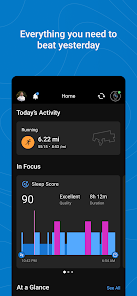
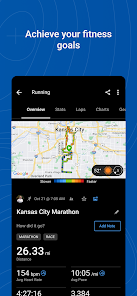
Garmin Connect™ allows users to effortlessly track a wide range of activities, from running and cycling to swimming and walking. With detailed metrics on distance, pace, and calories burned, it helps you monitor your progress and stay motivated to reach your fitness goals.

Community Engagement

Join a vibrant community of fellow fitness enthusiasts with Garmin Connect™. You can share your achievements, participate in challenges, and connect with friends to inspire and motivate each other, turning your fitness journey into a shared experience.

Personalized Insights

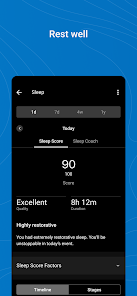
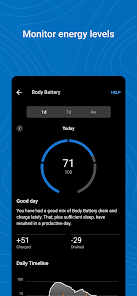
Get tailored insights based on your activity data with Garmin Connect™. The app analyzes your performance trends and provides recommendations to improve your fitness levels, making it easier to identify areas for growth and keep your training on the right track.

Workout Planning

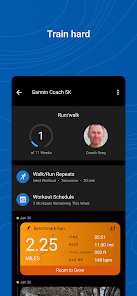
Garmin Connect™ makes it simple to create and schedule workouts tailored to your fitness goals. With access to a library of customizable training plans and the ability to sync them directly to your Garmin devices, you can ensure each workout is effective and aligned with your objectives.

Pros & Cons

Pros
  • Track workouts and progress effortlessly over time
  • Sync data across devices for seamless access
  • Join challenges to stay motivated and engaged
  • Analyze detailed metrics for better performance insights
  • Connect with friends for social fitness support
Cons
  • Limited compatibility with non-Garmin devices
  • Syncing issues can occur occasionally
  • User interface may feel cluttered to some
  • Data insights lack depth for advanced users

Real Experience Using Garmin Connect™

Application Scenarios

Garmin Connect™ excels in a variety of scenarios, catering to both casual fitness enthusiasts and serious athletes. Whether you’re training for a marathon, cycling through the countryside, or simply tracking your daily steps, this app offers tailored features to meet your needs. For runners, the app provides detailed metrics such as pace, elevation, and heart rate, making it an invaluable tool for optimizing performance. Cyclists can benefit from route planning and analysis, while swimmers can track their laps and strokes in the pool. Moreover, Garmin Connect seamlessly integrates with various Garmin devices, allowing users to sync their workouts and health data effortlessly. This makes it ideal for individuals who wish to track their progress over time or participate in challenges with friends and family.

User Experience

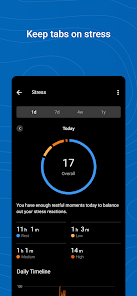
The user experience offered by Garmin Connect™ is generally smooth and intuitive. Upon opening the app, users are greeted with a visually appealing dashboard that summarizes their activity data at a glance. Navigation is straightforward, with clear menus and well-organized sections for workouts, health metrics, and community features. The app allows users to set personalized goals and receive insights based on their performance, which can motivate them to stay active. Additionally, the social aspect of Garmin Connect enables users to join groups, share achievements, and participate in fitness challenges, fostering a sense of community. However, some users have reported occasional syncing issues with their devices, which can be frustrating. Overall, the app effectively combines functionality with user-friendly design, making it accessible to a wide range of users.

Pricing

Garmin Connect™ is free to download and use, which is a significant advantage compared to many other fitness tracking applications. Users can access a myriad of features without any subscription fees, making it an attractive option for those looking to monitor their fitness without financial commitment. However, certain advanced features may require a compatible Garmin device, and while the app itself is free, users may need to invest in a Garmin device to unlock its full potential. This pricing model allows Garmin to maintain a competitive edge in the fitness app market, appealing to both budget-conscious individuals and serious athletes seeking advanced tracking capabilities.

Updates & Support

Garmin is known for its commitment to quality and user satisfaction, which is reflected in the regular updates provided for the Garmin Connect™ app. These updates often introduce new features, enhance existing functionalities, and address any bugs reported by users. The company also maintains a robust support system, with extensive online resources including FAQs, user manuals, and community forums where users can seek assistance or share tips. For more personalized help, Garmin offers customer service through various channels, including chat and email support. This dedication to continuous improvement and user support ensures that Garmin Connect remains relevant and effective in the evolving landscape of fitness technology.

verified Security & Privacy Review

The Garmin Connect™ app takes user security and privacy seriously, implementing a variety of measures to protect personal data. The app employs encryption protocols to safeguard data during transmission and storage, minimizing risks associated with unauthorized access. Garmin adheres to strict privacy policies, ensuring that user information is only used for intended purposes, such as enhancing the user experience and providing performance insights. Users are informed about the types of data collected, which may include fitness metrics, location data, and device information. Garmin Connect™ allows users to manage their privacy settings, giving them control over what information is shared and with whom. Additionally, the app requires certain permissions, such as access to location services, which are clearly communicated to users during the setup process. Garmin also emphasizes transparency by updating its privacy policy regularly, allowing users to stay informed about any changes. Overall, Garmin Connect™ demonstrates a commitment to robust security practices and user privacy, making it a reliable choice for fitness enthusiasts concerned about data protection.

User Reviews

  • Ashley Sherman
    2026/04/09

    ever since the last update the app has been almost unusable. I have reached out to support as I can't open any of the different things in the app I can only see my home screen but have not heard from them as of yet. For example I went for a walk and cannot even open the walk statistics. I hope they come out with a new update very very soon to correct the bugs that they created with the last one. Until then I'm not sure how usable it is.

  • Nina Christy Lorraine
    2025/04/02

    I love my watch - I use it for health tracking, mainly sleep, oxygen, heart rate, HRV, and stress. Lately, I'm mostly tracking sleep. I think it's extremely annoying that you cannot delete naps in the Garmin Connect app. My Garmin device frequently falsely detects naps. You can edit the nap times, but cannot delete them! It also sometimes doesn't detect sleep properly, and even after editing sleep times, will still give false info about the sleep I got, like saying it was short when it wasn't.

  • Corin Van de Griek (Isl1ngt0n)
    2025/04/11

    it's alright, neither as terrible or as life changing as some imply. The subscription is pretty useless. I would have considered paying if it allowed me to properly integrate with fitness apps that gave actual training guides and classes, but no, I have to pay other services to shuttle my data onto this platform. Open your ecosystem, integrate with other providers and your app/hardware would be utterly indispensable to me. Now I'm only here until something better comes along.

  • Dylan Herbst
    2025/01/07

    I honestly love the app and the interface tons. But I have a huge problem with the fact that you cannot input any custom BMI values UNLESS you purchase and add the Garmin scale they sell. I paid to have a very accurate BMI measurement taken and I have nowhere to input it now. It's not a technology issue, it's the decision they actively made against us.

  • Rachel Juozapaitis
    2025/01/20

    The app used to be better before an update that happened a bit ago. Now the layout mimics that of Fitbit, which I personally hate. It's drab, it's not conducive for the user and overall was a bad move. I'm hoping Garmin will either fit it in an update, or give users the option to pick how they want their app set up. If not, I'll find another tracker to use

Review Source: Google Play store public user reviews.

FAQ

1

Does Garmin Connect™ collect my personal data?

Yes, Garmin Connect™ collects personal data such as your workout history, health metrics, and user profile information to provide personalized insights and recommendations, but you can manage your privacy settings.

2

Does Garmin Connect™ offer a free trial or free version?

Garmin Connect™ offers a free version that provides basic features for tracking and analyzing your fitness data, while some advanced features may require a subscription.

3

Does Garmin Connect™ require an internet connection?

Yes, Garmin Connect™ requires an internet connection to sync your data with the cloud, access features, and receive updates, but some functionalities can be used offline.

4

How can I contact support or send feedback for Garmin Connect™?

You can contact Garmin Connect™ support through the help section in the app or website, where you can find FAQs, submit a support ticket, or provide feedback directly to the team.

5

How do I manage or cancel my Garmin Connect™ subscription?

You can manage or cancel your Garmin Connect™ subscription through the app or website by navigating to your account settings and following the prompts for subscription management.

How to use Garmin Connect™

1

Can I use the Garmin Connect™ app without a Garmin device?

Yes, you can use the app to track activities manually and monitor health metrics, but some features require a Garmin device.

2

How can I contact Garmin customer service for assistance with the Connect™ app?

You can reach Garmin customer service by visiting their website and using the contact form or by calling their dedicated support number available for your region.

3

How can I delete my Garmin Connect™ account?

Log in to the Garmin Connect™ website, go to account settings, and select the option to delete your account. Confirm the action to complete.

4

How can I update my Garmin Connect™ app?

Go to the app store on your device, search for Garmin Connect™, and select "Update" if an update is available.

5

How do I log in to the Garmin Connect™ app?

Open the app, enter your email and password associated with your Garmin account, and tap "Log In." If you don't have an account, you can create one from the app.

What's New

With the bug fixes and performance improvements in this version of Garmin Connect, tracking your health and fitness stats is easier than ever before.

Editor's Choice