This site uses cookies to enhance your user experience. By clicking any link on this site you are giving your consent to our cookie policy. Read more
Reject
Accept All
myChevrolet

myChevrolet

verified Verified App

Developer: General Motors (GM)

  • category

    Category: Lifestyle

  • price

    Price: free

  • age rating

    Age Rating: Everyone

  • rating

    Rating: 4.6

  • download

    Downloads: 5,000,000+

  • version

    Version: 8.1.0

Screenshot 1
Screenshot 2
Screenshot 3
Screenshot 4
Screenshot 5
Screenshot 6
Screenshot 7
Screenshot 8

Features & Highlights

Navigation and Directions

Easily send destinations from your phone to your Chevrolet's navigation system with just a few taps. This feature simplifies planning your trips, allowing you to choose the best routes and avoid traffic, ensuring you arrive at your destination smoothly and efficiently.

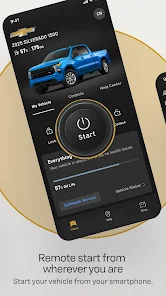
Remote Vehicle Start

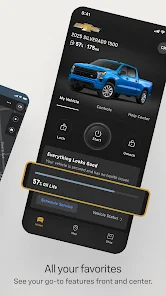
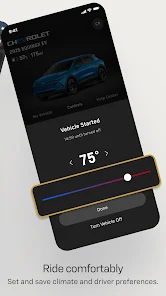
With the myChevrolet app, you can start your vehicle from anywhere, ensuring it's warm in winter or cool in summer before you even step inside. This feature adds a layer of convenience, allowing you to prepare your ride effortlessly, whether you're at home or on the go.

Schedule Service Appointments

The myChevrolet app streamlines the process of scheduling service appointments for your vehicle. You can view available dates, book your service, and even receive reminders, making vehicle maintenance hassle-free and ensuring your car stays in top shape.

Vehicle Status Alerts

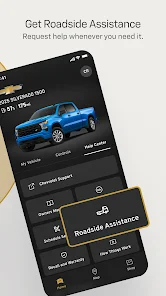
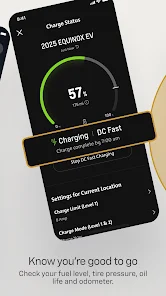
Stay informed about your vehicle's health with real-time status alerts on your smartphone. The myChevrolet app keeps you updated on important maintenance notifications and diagnostics, making it easier to manage your vehicle's upkeep without needing to visit a dealership every time.

Pros & Cons

Pros
  • Seamless vehicle integration for enhanced driving experience
  • Remote access to control your car from anywhere
  • Real-time vehicle diagnostics for peace of mind
  • Personalized maintenance reminders to keep you on track
  • User-friendly interface for effortless navigation and features
Cons
  • Limited compatibility with older vehicles
  • User interface can be confusing
  • Frequent app crashes reported by users
  • Lacks advanced features found in competitors

Real Experience Using myChevrolet

Application Scenarios

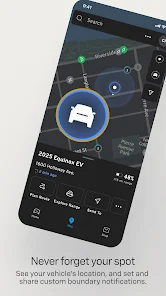
One of the standout features of the myChevrolet app is its ability to connect seamlessly with your vehicle. Users can remotely start their cars, lock or unlock doors, and even check fuel levels and tire pressure. This is particularly useful in extreme weather conditions, where starting the vehicle remotely can ensure it's warm or cool by the time you get in. Additionally, the app provides access to vehicle diagnostics, allowing users to monitor engine health and maintenance needs from their smartphones. For those who frequently travel, the app can assist in locating parked vehicles, ensuring you never lose track of where you left your car.

User Experience

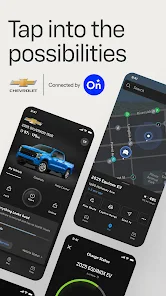
The user experience of the myChevrolet app is largely positive, characterized by an intuitive interface that simplifies navigation. Users appreciate the clean design, which makes it easy to access various features without feeling overwhelmed. Notifications are timely and relevant, alerting users to maintenance reminders or vehicle status updates. However, some users report occasional connectivity issues, particularly when trying to sync with their vehicles. While these instances can be frustrating, the app's overall functionality and ease of use generally outweigh these minor setbacks. The integration with Apple CarPlay and Android Auto also enhances the driving experience, allowing for easy access to navigation and music without distraction.

Pricing

The myChevrolet app is free to download, making it accessible for all Chevrolet vehicle owners. There are no hidden fees or subscriptions required to access the basic features, which include remote start, locking/unlocking, and vehicle diagnostics. However, certain premium features may require a subscription, which could involve additional costs. Users should review the app's offerings to determine if these premium options align with their needs and driving habits.

Updates & Support

The developers of the myChevrolet app are committed to providing regular updates to enhance functionality and user experience. These updates often include new features, bug fixes, and improvements based on user feedback. Support is readily available through the app, where users can find FAQs and contact customer service for assistance. The responsive support team is generally praised for their helpfulness, ensuring that users can quickly resolve any issues they encounter. Overall, the combination of regular updates and reliable support contributes significantly to the app's reputation among Chevrolet owners.

verified Security & Privacy Review

The myChevrolet app prioritizes user security and privacy, implementing robust measures to protect sensitive information. The app uses industry-standard encryption protocols to ensure that data transmitted between the user’s device and Chevrolet servers remains secure from unauthorized access. Users are informed about the types of data collected, which may include vehicle information, location data, and personal identifiers. This data is primarily used to enhance user experience, such as providing maintenance reminders and facilitating remote vehicle access. Chevrolet clearly outlines its data handling practices in its privacy policy, allowing users to make informed decisions. Permissions requested by the app are essential for its functionality, including access to location services for features like vehicle tracking. Users can manage these permissions through their device settings, offering flexibility and control over personal information. Overall, myChevrolet demonstrates a commitment to protecting user data while providing a seamless app experience.

Reviews

4.6

“User-friendly interface makes navigation easy and enjoyable.”

“Great for remote vehicle control and monitoring.”

“Useful features enhance the driving experience significantly.”

“Frequent updates improve functionality and fix bugs.”

“Occasional connectivity issues can be frustrating.”

Editor's Choice