This site uses cookies to enhance your user experience. By clicking any link on this site you are giving your consent to our cookie policy. Read more
Reject
Accept All
myCadillac

myCadillac

verified Verified App

Developer: General Motors (GM)

  • category

    Category: Lifestyle

  • price

    Price: free

  • age rating

    Age Rating: Everyone

  • rating

    Rating: 4.6

  • download

    Downloads: 500,000+

  • version

    Version: 8.1.0

Screenshot 1
Screenshot 2
Screenshot 3
Screenshot 4
Screenshot 5
Screenshot 6
Screenshot 7
Screenshot 8

Features & Highlights

Maintenance Reminders

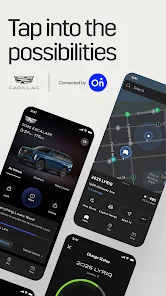
The myCadillac app keeps you ahead of the game with timely maintenance reminders tailored to your vehicle's needs. This way, you can schedule service appointments in advance and keep your Cadillac running smoothly and efficiently for years to come.

Navigation Assistance

Easily access turn-by-turn directions through the integrated navigation assistance feature, which syncs with your vehicle's infotainment system. Whether you're commuting to work or exploring new places, this feature ensures you stay on track without missing a beat.

Remote Start

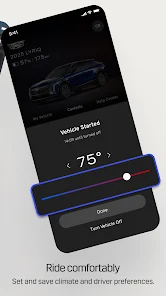
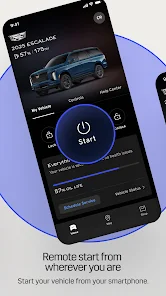
With the myCadillac app, you can conveniently start your vehicle from anywhere, ensuring that it's warmed up and ready to go when you are. This feature is perfect for those chilly mornings or hot summer days, allowing you to enjoy a comfortable drive right from the get-go.

Vehicle Status

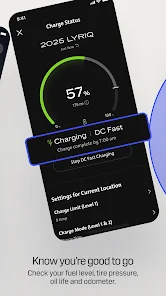
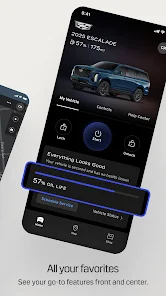
Stay informed about your Cadillac's health with the vehicle status feature, which provides real-time updates on tire pressure, fuel levels, and more. This helps you keep your car in optimal condition and plan your trips without any surprises along the way.

Pros & Cons

Pros
  • Access personalized vehicle information easily
  • Schedule service appointments with convenience
  • Receive real-time vehicle diagnostics alerts
  • Enjoy seamless integration with Apple CarPlay and Android Auto
  • Track maintenance history for better vehicle care
Cons
  • Limited compatibility with older vehicle models
  • User interface can be confusing for new users
  • Performance issues reported with frequent updates
  • Dependence on smartphone connectivity for full features

Real Experience Using myCadillac

Application Scenarios

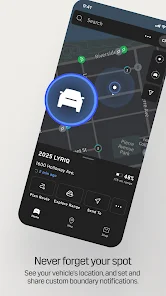
The myCadillac app serves as a digital companion for Cadillac owners, enhancing their driving experience by offering a range of useful features. Users can access remote vehicle controls, such as starting the engine, locking and unlocking doors, and locating their vehicle in a crowded parking lot. This is especially beneficial for those who live in urban areas where parking can be a challenge. Moreover, the app provides real-time vehicle diagnostics, alerting users to maintenance needs, tire pressure issues, and fuel levels. For road trips or daily commutes, the app allows users to plan routes, find nearby charging stations for electric models, and even schedule service appointments at their convenience. The integration of features like a digital owner’s manual and personalized driving tips ensures that users can fully leverage their vehicles’ capabilities.

User Experience

The user experience of myCadillac is generally intuitive and user-friendly. The app’s layout is clean, with easy navigation that allows users to access various features without feeling overwhelmed. First-time users can quickly familiarize themselves with the interface, thanks to the straightforward design and helpful prompts. The remote start feature works seamlessly, providing peace of mind during inclement weather. However, some users have reported occasional connectivity issues, which can be frustrating when trying to access live updates or remote functionalities. Overall, the app enhances the Cadillac ownership experience by providing valuable information and convenient features that cater to the needs of modern drivers.

Pricing

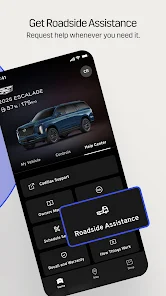
The myCadillac app is free to download for both iOS and Android devices, making it accessible to all Cadillac owners without any upfront costs. While the app itself does not carry a subscription fee, certain features may require the owner to have an active OnStar subscription, which offers additional services such as emergency assistance, navigation services, and vehicle diagnostics. Pricing for OnStar varies based on the plan selected, but it is generally considered reasonable for the level of connectivity and support it provides. This tiered approach allows users to choose the level of service that best suits their driving habits and needs.

Updates & Support

The developers of myCadillac are committed to continuous improvement, regularly releasing updates that enhance functionality and address user feedback. The app’s performance has seen significant upgrades, with recent updates focusing on bug fixes and enhanced user interface elements. Support for the app is readily available through the Cadillac website and within the app itself, where users can access FAQs, troubleshooting guides, and customer service contact information. The responsive support team is dedicated to assisting users with any issues or questions they may have, ensuring a smooth experience for all Cadillac owners.

verified Security & Privacy Review

The myCadillac app prioritizes user security and privacy by implementing robust data protection measures. It employs encryption protocols to safeguard personal information during transmission and storage, ensuring that sensitive data remains confidential. Users are informed about the types of data collected, which includes location, vehicle status, and user preferences, allowing for a transparent experience. Upon installation, the app requests various permissions, such as access to location services and contacts. Users are encouraged to review these permissions carefully, as the app's functionality relies on certain data inputs. The myCadillac app adheres to industry best practices regarding data handling, allowing users to manage their privacy settings easily. Users can control what information is shared and can opt out of data collection features if desired. Additionally, the app has a clear privacy policy outlining how user data is utilized, stored, and shared. Regular updates to the app improve security features and address potential vulnerabilities, reinforcing the commitment to protecting user information and maintaining trust.

Reviews

4.6

“User-friendly interface makes navigation a breeze”

“Great features for car management”

“Love the remote start functionality”

“Helpful for scheduling maintenance appointments”

“Occasional bugs can be frustrating”

Editor's Choice