This site uses cookies to enhance your user experience. By clicking any link on this site you are giving your consent to our cookie policy. Read more
Reject
Accept All
myBuick

myBuick

verified Verified App

Developer: General Motors (GM)

  • category

    Category: Lifestyle

  • price

    Price: free

  • age rating

    Age Rating: Everyone

  • rating

    Rating: 4.7

  • download

    Downloads: 500,000+

  • version

    Version: 8.1.0

Screenshot 1
Screenshot 2
Screenshot 3
Screenshot 4
Screenshot 5
Screenshot 6
Screenshot 7
Screenshot 8

Features & Highlights

Navigation Assistance

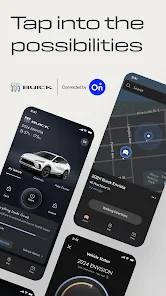
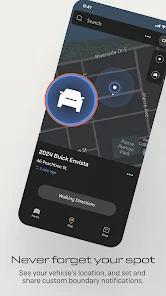
myBuick offers seamless navigation assistance to help you find the best routes and avoid traffic. With real-time updates and turn-by-turn directions, you can focus on the road ahead while the app keeps you on track to your destination.

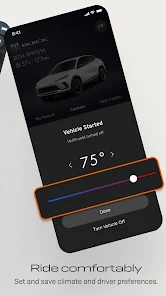
Remote Start

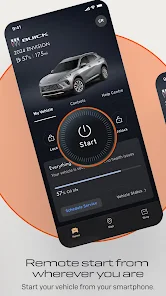
Experience the convenience of remote start, allowing you to warm up or cool down your vehicle before you even step inside. This feature is perfect for those chilly mornings or hot days, ensuring your Buick is always comfortable when you are ready to drive.

Service Scheduling

Keeping your Buick in top shape is easier than ever with the service scheduling feature. You can easily book maintenance appointments, receive reminders, and track service history, ensuring that your vehicle remains reliable and performs at its best.

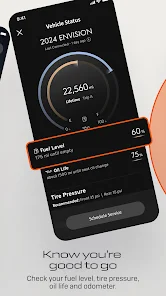
Vehicle Status

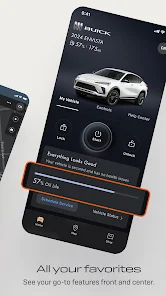
With myBuick, you can easily check the status of your vehicle from anywhere. Whether it's fuel level, tire pressure, or oil life, you can stay informed and maintain your Buick's health with just a few taps on your smartphone.

Pros & Cons

Pros
  • Access vehicle information anytime, anywhere.
  • Schedule maintenance and service with ease.
  • Receive vehicle health alerts instantly.
  • Enjoy remote start and lock features.
  • Personalize your driving experience effortlessly.
Cons
  • Limited compatibility with third-party apps
  • User interface can be confusing to navigate
  • Occasional connectivity issues with smartphones
  • Lacks advanced features found in competitors

Real Experience Using myBuick

Application Scenarios

The myBuick app is tailored for Buick vehicle owners who wish to enhance their driving experience through connectivity and convenience. Whether you're planning a long road trip or simply commuting to work, the app serves as a digital companion. Users can check their vehicle's health status, schedule maintenance appointments, and even start their engine remotely, making it perfect for those chilly mornings. Additionally, the app integrates with navigation features, allowing users to send destinations to their vehicle seamlessly. This is particularly helpful for busy professionals who need to maximize their time on the road. The app is also beneficial for families, enabling parents to monitor their vehicle’s location, ensuring peace of mind when their teenagers are behind the wheel.

User Experience

The user experience of the myBuick app is largely intuitive and straightforward. Upon logging in, users are greeted with a clean interface that allows for easy navigation through various features. The dashboard provides a quick overview of vital information, such as fuel levels, tire pressure, and battery status, all of which are crucial for maintaining a vehicle's health. Many users have reported that the app runs smoothly with minimal lag, making it a pleasure to use. Customization options allow users to set preferences for notifications and reminders, enhancing the overall usability. However, some users have noted occasional connectivity issues, particularly in areas with poor cellular service, which can hinder the app's functionality at times.

Pricing

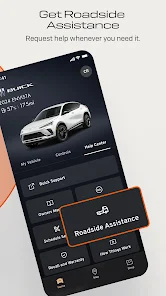
The myBuick app is free to download and use, making it an accessible tool for all Buick owners. There are no hidden fees or subscription costs associated with the basic features. Users can take full advantage of the app’s offerings without worrying about extra charges, making it a cost-effective solution for managing their vehicle. However, certain premium services, such as advanced diagnostics or on-demand roadside assistance, may incur additional fees. Despite this, the core functionalities provided in the free version are robust and serve the needs of most users effectively.

Updates & Support

The myBuick app receives regular updates, ensuring that users benefit from the latest features and enhancements. These updates often focus on improving functionality, fixing bugs, and enhancing user interface elements based on customer feedback. Buick's commitment to customer support is evident through various channels, including in-app help sections, online FAQs, and direct customer service contact options. Users have praised the support team for being responsive and helpful, resolving issues quickly and efficiently. Overall, the combination of frequent updates and dedicated support contributes to a positive long-term user experience with the myBuick app.

verified Security & Privacy Review

The myBuick app prioritizes user security and privacy through robust data protection measures. It employs encryption protocols to safeguard sensitive information transmitted between the app and Buick’s servers. The app's privacy policy clearly outlines the types of data collected, which primarily include vehicle information, location data, and user preferences. Users are informed about how their data is utilized, enhancing transparency. Regarding permissions, myBuick requests access to location services, contacts, and notifications, which are essential for providing a personalized experience. However, users can manage these permissions within their device settings, allowing for control over what data is shared. The app also provides options to opt-out of data collection practices, reflecting a commitment to user consent. Overall, myBuick demonstrates a strong approach to data security and privacy, ensuring that user information is handled responsibly while providing valuable features. Regular updates and adherence to industry standards further enhance its reliability in protecting user data.

Reviews

4.7

“User-friendly interface and easy navigation experience.”

“Great for tracking vehicle maintenance and performance.”

“Love the remote start feature for cold mornings.”

“Occasional connectivity issues with the app.”

“Helpful for finding nearby dealerships and service centers.”

Editor's Choice