This site uses cookies to enhance your user experience. By clicking any link on this site you are giving your consent to our cookie policy. Read more
Reject
Accept All

Advertiser and Editorial Disclosures

My Macros+ | Diet & Calories

My Macros+ | Diet & Calories

verified Verified App

Developer: My Macros LLC

  • category

    Category: Health & Fitness

  • price

    Price: free

  • age rating

    Age Rating: Everyone

  • rating

    Rating: 4.5

  • download

    Downloads: 100,000+

  • version

    Version: 2026.01

Screenshot 1
Screenshot 2
Screenshot 3
Screenshot 4
Screenshot 5
Screenshot 6
Screenshot 7
Screenshot 8

Features & Highlights

Barcode Scanner

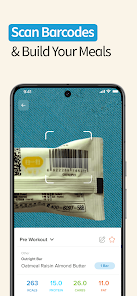
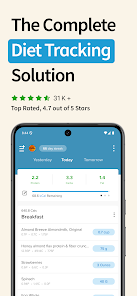
The built-in barcode scanner makes logging food items a breeze. Simply scan the barcode of your packaged foods, and the app instantly retrieves accurate nutritional information, saving you time and effort in tracking your calorie intake throughout the day.

Customizable Macros

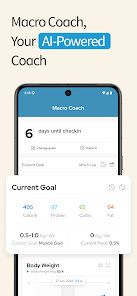
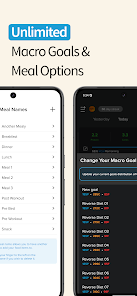
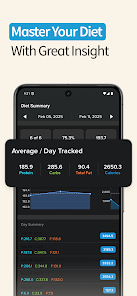
My Macros+ allows you to set personalized macro goals based on your dietary preferences and fitness objectives. This flexibility ensures that you can easily track your intake and adjust your nutrition plan as your goals evolve, making it easier to stay on track with your health journey.

Extensive Food Database

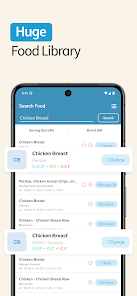
With an extensive database of over 1 million foods, My Macros+ helps you find nutritional information quickly and accurately. Whether you're dining out or cooking at home, you can easily log your meals and ensure you're meeting your dietary needs without any hassle.

Progress Tracking

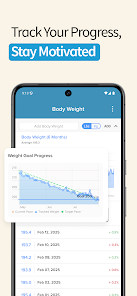
My Macros+ offers robust progress tracking features that allow you to monitor your weight changes and dietary habits over time. With visual graphs and statistics, you can easily see how your efforts are paying off, providing motivation to keep you on your fitness path.

Pros & Cons

Pros
  • Easily track your daily calorie intake for effective weight management.
  • Customizable macro goals help you meet your specific dietary needs.
  • User-friendly interface simplifies food logging and tracking progress.
  • Access a vast food database for accurate calorie and macro information.
  • Set reminders to stay accountable and maintain your nutrition goals.
Cons
  • Limited food database can hinder accurate tracking for some users
  • User interface may feel cluttered and overwhelming for beginners
  • Syncing issues can disrupt data accuracy across multiple devices

Real Experience Using My Macros+ | Diet & Calories

Application Scenarios

My Macros+ is an ideal companion for individuals striving to maintain a balanced diet and track their calorie intake. Whether you're a fitness enthusiast looking to bulk up, a dieter aiming to shed pounds, or someone simply wanting to eat healthier, this app provides flexible solutions. Users can log their meals on-the-go, making it perfect for busy lifestyles. With an extensive food database, users can quickly find and log various foods, including restaurant meals, which is especially beneficial when dining out. The app also allows users to set specific goals based on their dietary preferences, making it versatile for different eating plans, including keto, paleo, and vegan diets. Moreover, athletes can utilize the app to monitor their macronutrient distribution effectively, ensuring they meet their performance needs while maintaining nutritional balance.

User Experience

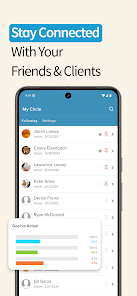
The user experience of My Macros+ is designed with simplicity and functionality in mind. The interface is clean and intuitive, allowing users to navigate through the app effortlessly. Meal logging is streamlined, with features such as barcode scanning and a favorites list to speed up the process. Users have reported that the app's ability to customize goals and track progress is particularly motivating, as it provides a clear visual representation of their achievements. Additionally, the app offers a social component, where users can connect with friends and share progress, fostering a sense of accountability. However, some users have mentioned the occasional glitch or lag during high-traffic times, which can be frustrating. Overall, the app strikes a good balance between usability and feature-rich design, making it a solid choice for both beginners and seasoned dieters.

Pricing

My Macros+ operates on a freemium model, offering both free and premium subscription options. The free version provides essential features, which are sufficient for casual users. However, the premium subscription unlocks advanced functionalities, such as personalized coaching, in-depth nutrient analysis, and an ad-free experience. The premium price is competitive compared to similar apps in the market, making it an attractive option for serious users who want to maximize their nutritional tracking. The monthly or yearly subscription plans make it flexible for users to choose according to their commitment level, ensuring that they only pay for what they need.

Updates & Support

The developers of My Macros+ are proactive in providing updates and support to enhance user experience continually. Regular updates introduce new features, improve the food database, and fix bugs reported by users. The customer support team is responsive, addressing inquiries and feedback through multiple channels, including email and social media. Users have praised the support team for their quick turnaround times and helpful responses. Additionally, the app's community forums allow users to share tips and best practices, further enriching the support ecosystem. Overall, the commitment to updates and user support adds value to the app, ensuring that it remains relevant and functional for its audience.

verified Security & Privacy Review

The security and privacy practices of My Macros+ | Diet & Calories app are paramount for ensuring user trust. The app employs industry-standard encryption methods to protect sensitive information, including personal and dietary data. Users are advised to create strong passwords and enable two-factor authentication to further enhance their account security. In terms of permissions, the app requests access to certain device features, such as storage for saving meal logs and photos. Users should review these permissions carefully and only grant access that is necessary for the app's functionality. The app's privacy policy clearly outlines how user data is collected, used, and shared, ensuring transparency in data handling practices. My Macros+ does not sell personal information to third parties, and users have the option to manage their data sharing preferences within the app settings. Regular updates and security patches are provided to mitigate any potential vulnerabilities, reflecting the developer's commitment to maintaining a secure user environment.

Reviews

4.5

“Easy to track my meals and calories!”

“Great interface and user-friendly design.”

“Customizable options make dieting simpler.”

“Helps me stay accountable to my goals.”

“Excellent food database and scanning feature.”

FAQ

1

Can I submit suggestions or feedback to My Macros+ | Diet & Calories?

Yes, users are encouraged to submit suggestions or feedback directly through the app or via the official website to help improve the service.

2

Does My Macros+ | Diet & Calories collect my personal data?

The app may collect certain user data to improve functionality and user experience, but it prioritizes user privacy and security.

3

Does My Macros+ | Diet & Calories support offline use?

Yes, My Macros+ | Diet & Calories allows users to log their food and track their intake even when offline.

4

How do I cancel my My Macros+ | Diet & Calories subscription?

Users can cancel their subscription through the app settings or the app store where they purchased the subscription.

5

How much does a subscription to My Macros+ | Diet & Calories cost?

The subscription cost may vary based on the plan chosen, typically offering monthly, yearly, or lifetime options.

How to use My Macros+ | Diet & Calories

1

Can I activate my account if I didn't receive the activation email?

Yes, if you didn't receive the email, check your spam folder or request a new activation email through the app.

2

Can I log in using my social media account?

Yes, you can log in using your social media account if you initially signed up that way. Just select the appropriate option on the login screen.

3

How can I contact customer service for My Macros+?

You can reach customer service through the app's support section or by emailing support

4

How do I change my customer number?

Customer numbers cannot be changed. If you have issues, please contact customer service for assistance.

5

How do I log in to my My Macros+ account?

To log in, open the app and enter your registered email and password. If you have trouble, use the "Forgot Password" link.

Editor's Choice