This site uses cookies to enhance your user experience. By clicking any link on this site you are giving your consent to our cookie policy. Read more
Reject
Accept All

Advertiser and Editorial Disclosures

Mushroom Identify - Automatic

Mushroom Identify - Automatic

verified

Annapurnapp Technologies GmbH

4.4
Rating
1,000,000+ Downloads
2.99 Version
  • category

    Category: Tools

  • price

    Price: free

  • age rating

    Age Rating: Everyone

  • rating

    Rating: 4.4

  • available on

    Available on: /

  • updated on

    Updated on: Nov 11, 2024

Screenshot 1
Screenshot 2
Screenshot 3
Screenshot 4
Screenshot 5
Screenshot 6

Features & Highlights

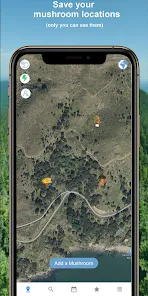
Community Sharing Features

Mushroom Identify - Automatic includes community-driven sharing features, enabling users to connect and share their finds with fellow mushroom enthusiasts. This fosters a sense of community and encourages learning from each other’s experiences, making foraging more enjoyable and educational.

Comprehensive Database Access

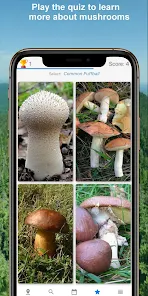
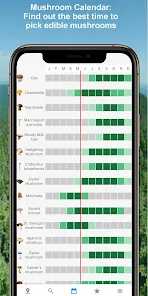
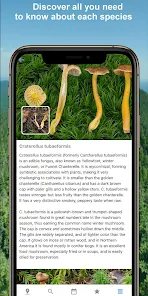
The app boasts an extensive database of mushroom species, complete with detailed descriptions, habitat information, and edibility ratings. This wealth of knowledge empowers users to learn more about the fungi they encounter, enhancing their understanding of the mushroom world.

Instant Mushroom Recognition

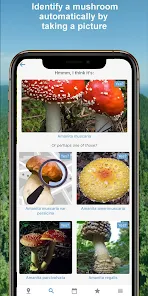
With advanced image recognition technology, Mushroom Identify - Automatic allows you to take a quick photo of any mushroom and receive immediate identification. This feature helps you make informed decisions about foraging, ensuring you can safely enjoy your finds without uncertainty.

User-Friendly Interface

Designed with simplicity in mind, the app features an intuitive interface that makes identifying mushrooms an enjoyable experience. Whether you're a seasoned forager or a curious beginner, navigating through the app is effortless, allowing you to focus on discovering new species.

Pros & Cons

Pros
  • Instantly identifies mushrooms with high accuracy
  • User-friendly interface for all experience levels
  • Extensive database for diverse mushroom species
  • Provides safety alerts for toxic varieties
  • Supports offline access for outdoor use
Cons
  • Limited accuracy in identifying rare species
  • May struggle with poorly captured images
  • Lacks comprehensive database for all mushrooms
  • Cannot replace expert knowledge and experience

Real Experience Using Mushroom Identify - Automatic

Application Scenarios

The Mushroom Identify - Automatic app serves a diverse range of users, from casual nature enthusiasts to serious mycologists. Its primary application scenario is during outdoor activities such as hiking, camping, and foraging. Users can easily snap a picture of a mushroom they encounter and receive instant identification, which is particularly useful for those who are unsure about edible versus toxic species. Additionally, the app can be beneficial for educational purposes, allowing students and researchers to learn about various fungi in their natural habitats. Urban dwellers who may encounter mushrooms in parks or gardens can also use the app to satisfy their curiosity about local biodiversity. Overall, the app caters to anyone interested in enhancing their knowledge of fungi, making it a versatile tool for both leisure and study.

User Experience

User experience is a highlight of the Mushroom Identify - Automatic app. The interface is intuitive, allowing users of all ages to navigate seamlessly. Upon opening the app, users are greeted with a clean design that emphasizes ease of use. The identification process is straightforward: after capturing an image, the app quickly analyzes it and presents results with detailed descriptions, including habitat information and potential uses. Most users appreciate the accuracy of the identifications, which fosters trust in the app's capabilities. Furthermore, the inclusion of community features, such as sharing findings and discussions, enhances user engagement. However, some users have reported occasional inaccuracies, especially with less common species, which underscores the importance of cross-referencing with reliable resources.

Pricing

Updates & Support The developers of Mushroom Identify - Automatic are committed to continuous improvement and user satisfaction. Regular updates introduce new features, improve identification algorithms, and expand the database with newly discovered species. Users can expect to see enhancements that reflect the latest research in mycology. Support is readily available through an integrated help section within the app, where users can find FAQs and troubleshooting tips. Additionally, the app features a feedback system that encourages users to report issues or suggest improvements. This proactive approach to user support and engagement fosters a sense of community among users, ensuring that their needs are met while the app evolves.

verified Security & Privacy Review

The Mushroom Identify - Automatic app prioritizes user security and privacy, incorporating several measures to safeguard personal information. The app requires minimal permissions, primarily accessing the camera for mushroom identification purposes, which is essential for its functionality. Users are informed about the necessary permissions during the installation process, ensuring transparency. User data handling is conducted with care; the app does not collect personal information unless explicitly provided by the user for optional features. Any data collected is anonymized and used solely for improving app performance and user experience. The app does not share personal data with third parties without user consent, adhering to strict privacy policies. Additionally, the app employs encryption protocols to secure any data transmitted over the internet, protecting users from potential breaches. Regular updates ensure that the app remains aligned with the latest security standards. Overall, Mushroom Identify - Automatic demonstrates a commitment to maintaining user privacy while delivering an efficient mushroom identification experience.

User Reviews

  • Jake Chambers
    2022/06/08

    I was skeptical about it being a picture ID system, but I think they nailed the way to do it. Adding information about the stem and the gill/pore type is an excellent way to narrow the choices. Also, having a long list of similar types makes the chance of a good identification much better. My only suggestion would be to narrow choices by location (not gps location)

  • Keith Walker
    2023/07/27

    So far hasn't been the most accurate. Seems like it gets fairly close, which they specify is the case in the app, so no big deal. What I really don't like is that if you choose to take a picture of a mushroom you've found, it doesn't save the picture or give you any kind of history of what you've searched. If you don't take it with your regular camera, that information is just gone.

  • Jayson Rowan
    2021/08/08

    It's findings aren't always 100% accurate but it's pretty good! And, if it's wrong, you usually find the correct species in it's list of look-alikes! Been using the app for quite some time now. It's like going to a friend who knows a lot about mushrooms but like anybody, isn't perfect. And that's okay because the app itself tells you to double check it's identifications with a professional as the creator(s) know it's not perfect. And that my friends, is respectable..

  • NiHilistAnT N/A
    2023/06/12

    This app has been 100% free to use... Mycologys been an interest for around 30 years to me. However, identifying ageric bodies (mushroom) has always seemed a bit daunting and scary. After taking a short time to learn the most basic anatomy of the fruiting organ, and with this app, I now realize the fear was silly. I find the app to be accurate and easy-to-use. Also, I love being aware and close to the Fungi kingdom, without being part of it (at least not yet!). Thanks Devs and participants.

  • A Google user
    2020/03/28

    Edit 5/28/20, After the most recent update it still crashes after scanning. Camera doesn't work after scanning and then selecting other options to improve accuracy. Used to love this app. Even gave it a high rating before. I have a new phone and it still crashes more than it works. The scanning always causes a crash. Had this app for a year now... frustrating. Not uninstalling because I'm hoping for a patch that fixes it.

Review Source: Google Play store public user reviews.

FAQ

1

Does Mushroom Identify - Automatic collect my personal data?

Mushroom Identify - Automatic prioritizes user privacy and does not collect personal data unless explicitly provided for specific features or user accounts. Always check the privacy policy for detailed information.

2

Does Mushroom Identify - Automatic offer a free trial or free version?

Yes, Mushroom Identify - Automatic offers a free version with limited features, as well as a free trial period for users interested in exploring premium features.

3

Does Mushroom Identify - Automatic require an internet connection?

Mushroom Identify - Automatic can function offline for basic identification, but some features, such as accessing detailed databases and updates, may require an internet connection.

4

How can I contact support or send feedback for Mushroom Identify - Automatic?

You can contact support or send feedback for Mushroom Identify - Automatic through the app's help section, where you will find options for email support or a feedback form.

5

How do I manage or cancel my Mushroom Identify - Automatic subscription?

You can manage or cancel your Mushroom Identify - Automatic subscription through your device's app store settings, where you can find subscription management options.

How to use Mushroom Identify - Automatic

1

How can I contact customer service for the Mushroom Identify app?

You can reach customer service by emailing support

2

How do I activate the Mushroom Identify app?

To activate, download the app, create an account, and follow the prompts to enter your activation code if required.

3

How do I log in to the Mushroom Identify app?

To log in, open the app and enter your registered email and password on the login screen.

4

Is there a customer number I can use for inquiries?

Yes, your customer number is located in the app under your profile settings.

What's New

New! V3 of the classification engine! Now a lot more accurate. Scanner improvedCrashes fixed

Editor's Choice