This site uses cookies to enhance your user experience. By clicking any link on this site you are giving your consent to our cookie policy. Read more
Reject
Accept All
Meitu- AI Photo & Video Editor

Meitu- AI Photo & Video Editor

verified Verified App

Developer: Meitu (China) Limited

  • category

    Category: Photography

  • price

    Price: free

  • age rating

    Age Rating: Teen

  • rating

    Rating: 4.6

  • download

    Downloads: 100,000,000+

  • version

    Version: 12.2.3

Screenshot 1
Screenshot 2
Screenshot 3
Screenshot 4
Screenshot 5
Screenshot 6
Screenshot 7
Screenshot 8

Features & Highlights

AI-Powered Enhancements

Meitu leverages advanced AI technology to automatically enhance your photos and videos, ensuring every detail is optimized for a stunning finish. With just a tap, you can transform ordinary images into captivating visuals that showcase your best self, making editing fast and effortless.

Beauty Retouching Tools

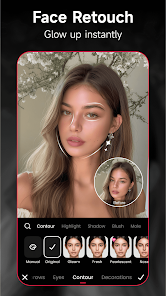
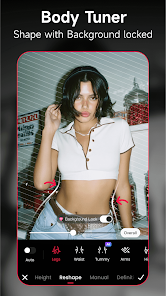
Meitu provides powerful beauty retouching tools that help you smooth skin, brighten eyes, and add that perfect glow to your selfies. These features are designed to enhance your natural beauty while ensuring your edits look authentic and pleasing, making your photos truly shine.

Creative Collage Maker

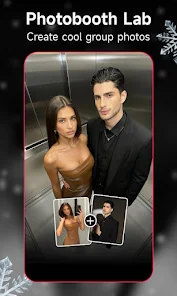
Unleash your creativity with Meitu's intuitive collage maker that allows you to combine multiple photos into one stunning layout. With various templates and customization options, you can easily showcase your favorite moments in a visually appealing way, perfect for sharing on social media.

Vibrant Filters & Effects

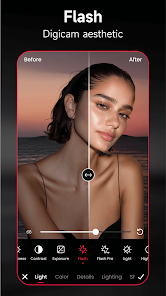
Explore a rich library of vibrant filters and creative effects designed to elevate your photos and videos. Whether you’re going for a vintage look or a modern aesthetic, Meitu offers a diverse range of options that can instantly change the mood and style of your visuals.

Pros & Cons

Pros
  • User-friendly interface for effortless editing experience
  • Advanced AI technology enhances photo quality seamlessly
  • Wide range of filters for creative expression
  • Quick sharing options for social media integration
  • Regular updates ensure fresh features and improvements
Cons
  • Limited editing features compared to professional software
  • High reliance on internet connectivity for functionality
  • Frequent ads can disrupt user experience
  • Privacy concerns regarding photo storage and sharing

Real Experience Using Meitu- AI Photo & Video Editor

Application Scenarios

Meitu - AI Photo & Video Editor shines in a variety of application scenarios, making it a versatile choice for users looking to enhance their visual content. Whether you're preparing for a social media post, creating stunning digital artwork, or simply wanting to touch up everyday photos, Meitu provides the tools to elevate your imagery. Users can apply filters and effects to selfies, landscape shots, and group photos alike, ensuring that every moment captured is presented beautifully. The app is particularly popular among influencers and content creators who require quick yet professional-quality edits. Additionally, Meitu can be utilized for personal projects, such as making invitations or collages, as well as for more professional needs, like marketing materials or presentations.

User Experience

The user experience in Meitu is designed to be intuitive and engaging. Upon opening the app, users are greeted with a clean and organized interface that simplifies navigation. The various editing tools are easily accessible, allowing users to quickly switch between options like beautification, filters, and stickers. The AI-powered features are a standout, automatically enhancing photos with minimal input required from the user. This makes it an excellent choice for those who may not be tech-savvy or have limited editing experience. Furthermore, the app’s real-time editing capabilities allow users to see changes as they make them, adding to the overall satisfaction of the editing process. However, some users may find the abundance of features slightly overwhelming at first, but the learning curve is manageable, and tutorials are available to assist.

Pricing

Meitu offers a freemium model, providing users with access to a range of basic features at no cost. However, for those looking to unlock the full potential of the app, a subscription model is available. The premium version offers additional filters, advanced editing tools, and an ad-free experience, which many users find worth the investment. Pricing is competitive compared to similar apps in the market, making it an appealing option for both casual users and serious content creators. Periodic discounts and promotions are also offered, which can be a great opportunity for new users to experience premium features at a lower cost.

Updates & Support

Meitu regularly updates its app to introduce new features, refine existing tools, and enhance performance, ensuring that users always have access to the latest technology in photo and video editing. The developers are responsive to user feedback, often implementing suggestions in updates, which fosters a sense of community and involvement among users. The support system is robust, offering FAQs, user guides, and direct customer service channels. Users can easily reach out for assistance, whether they encounter technical issues or have questions about specific features. Overall, the commitment to continuous improvement and user support significantly enhances the overall experience with the app.

verified Security & Privacy Review

The Meitu - AI Photo & Video Editor app prioritizes user security and privacy by implementing various measures to protect personal data. The app collects user information such as device details, location data, and usage statistics, which are typically used to enhance user experience and improve app functionality. However, users should be aware that such data may be shared with third-party partners for analytics and advertising purposes. In terms of permissions, Meitu requests access to the camera, storage, and microphone, which are essential for its photo and video editing capabilities. Users are encouraged to review these permissions and only grant access if they are comfortable sharing this information. The app provides options to manage privacy settings, allowing users to control what data is shared and with whom. Meitu also employs encryption protocols to safeguard user data during transmission. However, it is advisable for users to familiarize themselves with the app's privacy policy to understand how their information is handled and the measures in place to ensure data security. Overall, while Meitu takes steps to protect user data, users should remain vigilant about their privacy when using the app.

Reviews

4.6

“User-friendly with amazing editing features and effects”

“Love the artistic filters and stickers”

“Great for quick photo enhancements on the go”

“Occasional bugs, but overall a fun app”

“Wish for more advanced editing tools”

Editor's Choice