This site uses cookies to enhance your user experience. By clicking any link on this site you are giving your consent to our cookie policy. Read more
Reject
Accept All
Maxthon browser

Maxthon browser

verified Verified App

Developer: Maxthon Browser

  • category

    Category: Tools

  • price

    Price: free

  • age rating

    Age Rating: Everyone

  • rating

    Rating: 3.3

  • download

    Downloads: 10,000,000+

  • version

    Version: 7.4.8.107

Screenshot 1
Screenshot 2
Screenshot 3
Screenshot 4
Screenshot 5
Screenshot 6

Features & Highlights

Ad Blocker

With its built-in ad blocker, Maxthon browser provides a cleaner, faster browsing experience by removing intrusive ads and pop-ups. This not only enhances page loading times but also helps protect your privacy by blocking unwanted tracking.

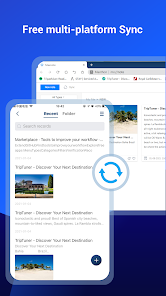
Cloud Sync

Maxthon browser offers seamless cloud synchronization, allowing users to access their bookmarks, history, and settings across multiple devices. This feature ensures that your browsing experience is consistent and uninterrupted, whether you're on your phone, tablet, or computer.

Privacy Protection

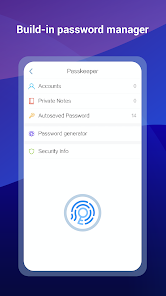
Maxthon browser is equipped with advanced privacy protection tools, including a built-in VPN and incognito mode. These features help safeguard your online activities from prying eyes, ensuring that your data remains secure while you surf the web.

Split Screen View

Maxthon's split screen view feature allows users to open two tabs side by side, making multitasking effortless. Whether you're comparing information or watching a video while browsing, this functionality enhances productivity and provides a more dynamic browsing experience.

Pros & Cons

Pros
  • Fast browsing speeds for quick access to websites
  • Built-in ad blocker enhances browsing experience seamlessly
  • Cloud syncing keeps your data accessible across devices
  • Customizable interface allows for personalized user experience
  • Supports multiple engines for versatile browsing options
Cons
  • Limited extension support compared to major browsers
  • Frequent updates can disrupt user experience
  • Privacy concerns regarding data handling practices
  • Slower performance on resource-intensive websites

Real Experience Using Maxthon browser

Application Scenarios

The Maxthon browser is designed to cater to a wide range of browsing needs, making it suitable for various user scenarios. Whether you're a casual internet surfer, a student conducting research, or a professional needing a reliable tool for work, Maxthon provides an efficient browsing experience. One of its standout features is the dual-engine layout, which allows users to switch between WebKit and Trident engines, optimizing compatibility and performance based on the type of content being accessed. This is particularly useful for users who frequently switch between different websites that may require specific rendering engines. Additionally, Maxthon excels in resource management, which is ideal for those who multitask with numerous tabs open, ensuring that system resources are utilized efficiently without compromising speed.

User Experience

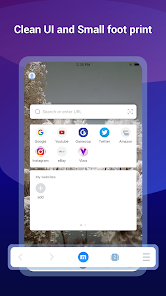
User experience is at the heart of Maxthon's design philosophy. The interface is sleek and intuitive, providing easy navigation and accessibility to essential features such as bookmarks, history, and extensions. Users appreciate the customizable options, which allow them to tailor the browser to suit their personal preferences. The built-in ad blocker enhances the browsing experience by reducing distractions from unwanted advertisements. Moreover, Maxthon's cloud services, including cloud syncing for bookmarks and tabs, facilitate seamless transitions between devices. This feature is particularly beneficial for users who switch between a desktop and mobile device, ensuring that their browsing data is always at their fingertips. Overall, the combination of speed, efficiency, and user-friendly design makes Maxthon a favorite among many users.

Pricing

Updates & Support Maxthon is committed to providing regular updates to enhance user experience and security. The development team frequently releases patches and new features based on user feedback, ensuring that the browser remains current with technological advancements. Users can easily access the latest version through the app's settings or official website. Support is readily available through an online help center, which provides comprehensive guides, FAQs, and user forums. Additionally, users can reach out to the support team for personalized assistance, ensuring that any issues are resolved promptly. This proactive approach to updates and customer support emphasizes Maxthon's dedication to delivering a robust and user-friendly browsing experience.

verified Security & Privacy Review

The Maxthon browser prioritizes user security and privacy, incorporating several features designed to protect your data. It utilizes a robust encryption protocol to safeguard information during transmission, ensuring that users can browse securely over public networks. Additionally, Maxthon includes a built-in ad blocker that not only enhances browsing speed but also reduces tracking by third-party advertisers. In terms of privacy practices, Maxthon offers a comprehensive privacy mode that does not store browsing history, cookies, or cache, allowing users to surf the web anonymously. The browser also provides options for users to manage permissions effectively, enabling them to control what data is shared with websites and applications. Maxthon is transparent about its data handling policies, stating that it does not sell user data to third parties. However, it is essential for users to review the app’s privacy policy to understand how their information is collected and used. Overall, Maxthon browser demonstrates a commitment to maintaining user privacy and security while providing a versatile browsing experience.

Reviews

3.3

“Fast and lightweight with great customization options”

“User-friendly interface, easy to navigate”

“Reliable performance and smooth browsing experience”

“Excellent ad blocker, enhances privacy”

“Syncing across devices is seamless and efficient”

Editor's Choice