This site uses cookies to enhance your user experience. By clicking any link on this site you are giving your consent to our cookie policy. Read more
Reject
Accept All

Advertiser and Editorial Disclosures

Map My Run GPS Running Tracker

Map My Run GPS Running Tracker

verified Verified App

Developer: MapMyFitness, Inc.

  • category

    Category: Health & Fitness

  • price

    Price: free

  • age rating

    Age Rating: Everyone

  • rating

    Rating: 4.8

  • download

    Downloads: 10,000,000+

  • version

    Version: 26.1.0

Screenshot 1
Screenshot 2
Screenshot 3
Screenshot 4
Screenshot 5
Screenshot 6
Screenshot 7

Features & Highlights

Community Challenges

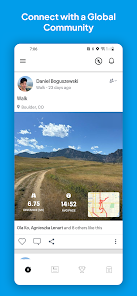
Join a vibrant community of runners through engaging challenges that motivate you to push your limits. Compete with friends or other users, earn badges, and track your progress to stay inspired and accountable while making running a fun and social experience.

Detailed Workout Analysis

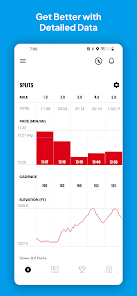
After each run, get in-depth insights into your performance with detailed workout analysis. This feature provides metrics such as pace, calories burned, and splits, helping you understand your strengths and areas for improvement, so you can optimize your training for better results.

Personalized Training Plans

With customizable training plans tailored to your fitness level and goals, Map My Run keeps your workouts engaging and effective. Whether you're preparing for a 5K or aiming to improve your overall fitness, these plans guide you every step of the way, adjusting as you progress.

Real-Time GPS Tracking

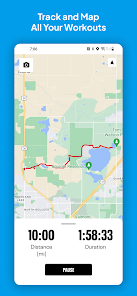
Map My Run utilizes advanced GPS technology to provide precise tracking of your running routes. This feature allows you to visualize your path on a map, ensuring you never get lost while exploring new areas, and helps you monitor your distance and pace effectively.

Pros & Cons

Pros
  • Track your distance and pace accurately with GPS technology.
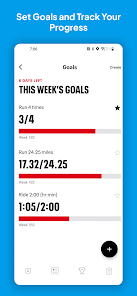
  • Set personalized goals and monitor your progress over time.
  • Join challenges and connect with a supportive running community.
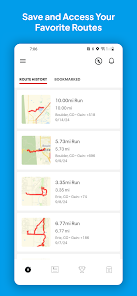
  • Access detailed maps and route planning for varied workouts.
  • Integrate with wearables and other fitness apps for seamless tracking.
Cons
  • Limited offline functionality restricts use in areas without cell service.
  • Occasional GPS inaccuracies can lead to unreliable distance tracking.
  • In-app advertisements may disrupt user experience during workouts.

Real Experience Using Map My Run GPS Running Tracker

Application Scenarios

Map My Run GPS Running Tracker is designed for a variety of fitness enthusiasts, from casual joggers to serious marathoners. Whether you are training for a race or simply looking to incorporate more physical activity into your daily routine, this app serves multiple purposes. Users can track their runs, walks, or any outdoor activities with GPS accuracy, providing detailed information about distance, pace, and route. The app is also ideal for those who enjoy exploring new trails, as it allows users to map and save their favorite routes. Additionally, Map My Run can be used for indoor exercises, with options to log treadmill workouts or even cycling sessions, making it a versatile tool for a broader fitness journey.

User Experience

Upon launching the Map My Run app, users are greeted with an intuitive interface that is easy to navigate. The app's dashboard displays essential metrics clearly, allowing users to start their workout with just a few taps. The GPS tracking feature functions seamlessly, providing real-time data on performance. Users appreciate the ability to set personal goals, such as distance or duration, which motivates them to stay committed to their fitness objectives. The community aspect of the app is another highlight; users can share their achievements, join challenges, and connect with fellow runners for support and motivation. The integration of music streaming services adds to the overall experience, letting users listen to their favorite tunes while exercising.

Pricing

Map My Run offers a free version that includes essential tracking features suitable for most casual users. However, for those seeking a more comprehensive experience, the premium subscription unlocks advanced features such as personalized coaching, training plans, and detailed analytics. The premium version is competitively priced and often comes with promotional offers, making it accessible for serious runners who want to enhance their performance. Users can choose between monthly and yearly plans, providing flexibility based on their budget and commitment level.

Updates & Support

The developers of Map My Run are committed to enhancing the user experience, as evidenced by regular updates that introduce new features, fix bugs, and improve functionality. User feedback is actively solicited, and many updates are influenced by community suggestions, ensuring the app evolves to meet the needs of its users. Customer support is responsive, with an FAQ section that addresses common issues, alongside a contact option for more specific inquiries. Overall, the consistent updates and strong support infrastructure contribute to a reliable and user-friendly experience, keeping fitness enthusiasts engaged and motivated on their journeys.

verified Security & Privacy Review

Map My Run GPS Running Tracker prioritizes user security and privacy through a series of robust practices. The app collects essential data, such as location and activity metrics, to enhance user experience while ensuring that sensitive information is handled with care. Users are informed about data collection practices through a comprehensive privacy policy, allowing them to make informed decisions. The app requires specific permissions, including access to the user's location and storage. Users can manage these permissions through their device settings, providing them with control over what data is shared. Additionally, Map My Run employs encryption protocols to protect data transmitted between the app and its servers, minimizing the risk of unauthorized access. Users can also opt for account settings that limit data visibility, including options for sharing activities with friends or keeping them private. Overall, Map My Run demonstrates a commitment to protecting user data while providing features that enhance the running experience, making it a secure choice for fitness enthusiasts.

Reviews

4.8

“Great for tracking my runs and routes!”

“User-friendly interface, easy to navigate.”

“Accurate GPS, reliable for distance tracking.”

“Love the community features and challenges.”

“Syncs well with my smartwatch, very convenient!”

FAQ

1

Can I submit suggestions or feedback to Map My Run GPS Running Tracker?

Yes, users can submit suggestions or feedback through the app or the official website's contact form.

2

Does Map My Run GPS Running Tracker collect my personal data?

Yes, the app collects personal data to enhance user experience, including location, activity data, and user profile information.

3

Does Map My Run GPS Running Tracker support offline use?

Yes, users can download maps and use the app offline, although some features may require an internet connection.

4

How do I cancel my Map My Run GPS Running Tracker subscription?

Users can cancel their subscription through their account settings in the app or via their app store subscription settings, depending on the platform.

5

How much does a subscription to Map My Run GPS Running Tracker cost?

Subscription costs may vary based on the plan selected, but generally, it offers monthly and yearly options for premium features.

How to use Map My Run GPS Running Tracker

1

Can I activate my account through the mobile app?

Yes, you can activate your account through the mobile app by following the instructions sent to your email.

2

Can I log in using my social media account?

Yes, you can log in using your social media account if you linked it during registration.

3

How can I contact customer service for assistance with my Map My Run account?

You can reach customer service through the "Help" section in the app or visit the website for contact options.

4

How can I update my customer number if it has changed?

To update your customer number, log into your account and navigate to account settings to make changes.

5

How do I reach customer service if I have a technical issue?

To report a technical issue, use the "Contact Us" feature in the app or visit the website for support options.

Editor's Choice