This site uses cookies to enhance your user experience. By clicking any link on this site you are giving your consent to our cookie policy. Read more
Reject
Accept All
Life360: Stay Connected & Safe

Life360: Stay Connected & Safe

verified Verified App

Developer: Life360

  • category

    Category: Lifestyle

  • price

    Price: free

  • age rating

    Age Rating: Everyone

  • rating

    Rating: 4.4

  • download

    Downloads: 100,000,000+

  • version

    Version: 26.3.0

Screenshot 1
Screenshot 2
Screenshot 3
Screenshot 4
Screenshot 5
Screenshot 6
Screenshot 7
Screenshot 8

Features & Highlights

Driving Safety Alerts

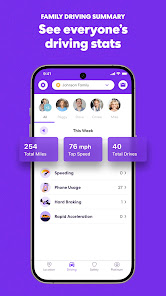
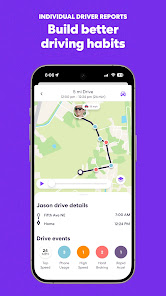
Life360 enhances your peace of mind with driving safety alerts that notify you of your loved ones' driving habits. Whether it's speeding, harsh braking, or other risky behaviors, you'll receive timely updates to help keep everyone safe on the road.

Emergency SOS Feature

In critical situations, the Emergency SOS feature provides a lifeline by allowing users to quickly alert emergency services and designated contacts. This ensures that help is on the way when it matters most, giving you and your family an added layer of security.

Location Sharing

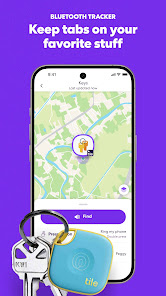
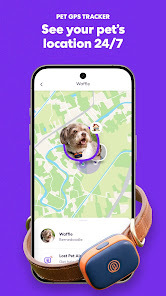
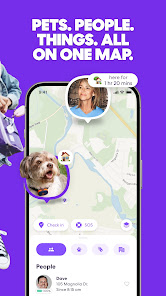
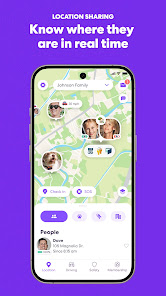
Stay effortlessly connected with your loved ones through real-time location sharing. Life360 allows family members to see each other's locations on a private map, ensuring everyone feels safe and informed, especially during busy days or emergencies.

Private Messaging

Communicate effortlessly with your family using the private messaging feature. Life360 offers a secure platform for sending messages and sharing updates, ensuring that important information is always just a tap away, fostering better connections among family members.

Pros & Cons

Pros
  • Real-time location sharing enhances family safety.
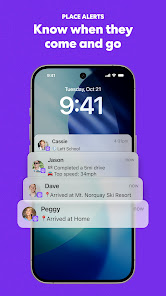
  • Instant alerts for arrivals keep you informed.
  • Driving reports help improve road safety habits.
  • Emergency SOS feature ensures quick assistance.
  • Private messaging fosters secure family communication.
Cons
  • Privacy concerns with location sharing.
  • Battery drain on devices.
  • Premium features require subscription fees.
  • Potential for over-dependence on tracking.

Real Experience Using Life360: Stay Connected & Safe

Application Scenarios

Life360 is designed for families and friends who want to stay connected and ensure each other's safety. One common scenario is when parents use the app to track their children's location, especially during school hours or while they are out with friends. Whether it's a quick check-in or a notification when a child arrives at a designated location, Life360 provides peace of mind. Another scenario is for groups of friends or family members who are traveling together, allowing them to share their locations in real time and coordinate meet-ups effortlessly. The app also features location history, which is useful for reviewing past locations and ensuring everyone made it to their destinations safely.

User Experience

The user experience of Life360 is generally positive, with a clean and intuitive interface that makes navigation easy for users of all ages. Setting up the app is straightforward; users can create "Circles" to manage groups of people they want to share their locations with. The app offers various features, including location sharing, driving reports, crash detection, and emergency alerts. Users appreciate the ability to customize notifications, which allows them to receive alerts when family members arrive or leave certain locations. Additionally, the in-app messaging feature enhances communication, making it easier to coordinate plans without needing to switch to other messaging apps. However, some users have reported concerns about battery consumption, as continuous location tracking can drain the phone's battery more quickly.

Pricing

Life360 operates on a freemium model, offering a basic version at no cost, which includes essential location-sharing features. For users seeking enhanced functionality, such as location history, driving analysis, and emergency services, there are premium subscription plans available. The paid tiers are reasonably priced, with options ranging from monthly to annual subscriptions. Most users find the cost justified, especially given the added safety features and peace of mind that comes with real-time location sharing. The app frequently runs promotions, making it accessible for those who may want to try premium features before committing to a longer subscription.

Updates & Support

Life360 is regularly updated to improve user experience and introduce new features. The developers are attentive to user feedback, often incorporating suggestions into their updates. The app's customer support is commendable, providing assistance through a comprehensive help center, FAQs, and direct support options. Users can easily access help for common issues, and response times for inquiries are generally quick. Regular updates not only address bugs but also enhance security features, ensuring users feel safe and protected while using the app. Overall, Life360 demonstrates a commitment to continual improvement, making it a reliable choice for families and groups looking to stay connected and safe.

verified Security & Privacy Review

The Life360 app prioritizes user security and privacy through a series of robust measures. It employs end-to-end encryption for location data, ensuring that only authorized family members can access real-time location information. The app’s data is stored securely, and users have full control over their personal information, with the ability to edit or delete data as desired. Life360 requires several permissions to function effectively, including access to location services, contacts, and notifications. Users are informed about these permissions during the setup process, allowing for informed consent. Importantly, the app does not sell personal data to third parties, adhering to strict privacy policies that prioritize user confidentiality. Additionally, Life360 offers customizable privacy settings, enabling users to manage who sees their location and when. Enhanced features, such as driving reports and crash detection, come with added privacy considerations, ensuring that sensitive information is handled securely. Overall, Life360 demonstrates a commitment to safeguarding user data while providing essential connectivity features for families.

Reviews

4.4

“Great for family safety and location sharing!”

“User-friendly interface with helpful features.”

“Reliable alerts keep us connected.”

“Battery drain issues on some devices.”

“Overall, a must-have for peace of mind.”

Editor's Choice