This site uses cookies to enhance your user experience. By clicking any link on this site you are giving your consent to our cookie policy. Read more
Reject
Accept All

Advertiser and Editorial Disclosures

Kasa Smart

Kasa Smart

verified

TP-LINK SYSTEMS INC.

4.7
Rating
5,000,000+ Downloads
3.4.451 Version
  • category

    Category: Lifestyle

  • price

    Price: free

  • age rating

    Age Rating: Everyone

  • rating

    Rating: 4.7

  • available on

    Available on: /

  • updated on

    Updated on: Jun 30, 2026

Screenshot 1
Screenshot 2
Screenshot 3
Screenshot 4
Screenshot 5
Screenshot 6

Features & Highlights

Energy Monitoring

Keep track of your energy usage with Kasa Smart's built-in energy monitoring feature. This capability provides insights into how much power your devices are consuming, helping you make informed decisions to reduce energy costs and promote sustainable practices in your household.

Remote Access Control

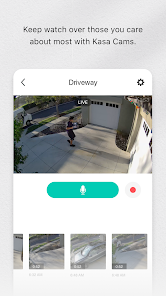
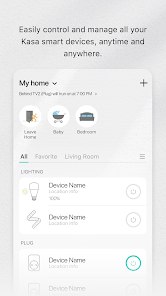
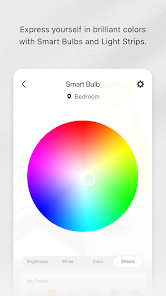
Kasa Smart allows you to control your devices from anywhere using the intuitive mobile app. Whether you’re at work or on vacation, you can easily turn off appliances or adjust your lighting, ensuring peace of mind and flexibility in your daily life.

Smart Scheduling

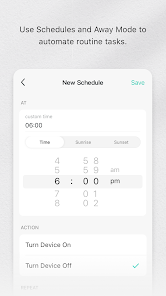
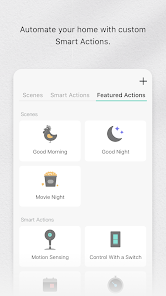
With Kasa Smart, you can effortlessly schedule your devices to turn on and off at specific times, giving you complete control over your home environment. This feature not only saves energy but also enhances your convenience, making it feel like your devices are working for you, even when you're not home.

Voice Assistant Compatibility

Easily integrate Kasa Smart with popular voice assistants like Amazon Alexa and Google Assistant. This compatibility means you can control your devices hands-free, making it simple to adjust settings or check status with just your voice, adding a layer of convenience to your smart home experience.

Pros & Cons

Pros
  • User-friendly app for seamless control
  • Voice assistant compatibility for hands-free operation
  • Energy monitoring helps save on bills
  • Customizable schedules enhance convenience and efficiency
  • Robust security features protect your devices
Cons
  • Limited compatibility with non-Kasa devices
  • Cloud dependency for full functionality
  • Inconsistent performance with Wi-Fi issues
  • Lack of advanced automation features

Real Experience Using Kasa Smart

Application Scenarios

Kasa Smart is designed to enhance the convenience and efficiency of home automation. Users can seamlessly integrate a variety of smart devices, including smart plugs, bulbs, and switches, making it an ideal choice for those looking to upgrade their living space. One of the most notable application scenarios is the ability to control lights and appliances remotely. For instance, users can turn on their living room lights before arriving home or schedule a coffee maker to start brewing in the morning. Additionally, Kasa Smart can be programmed for energy savings; users can set timers and schedules to ensure devices are only powered when needed. This app is particularly beneficial for busy families, tech enthusiasts, and anyone looking to simplify their daily routines.

User Experience

The user experience of Kasa Smart is predominantly positive, characterized by its straightforward interface and ease of use. Upon downloading the app, users are greeted with a clean layout that makes navigation intuitive. The onboarding process is seamless, guiding users through the setup of devices without overwhelming them with technical jargon. Features such as voice control compatibility with Amazon Alexa and Google Assistant further enhance usability, allowing users to control their devices with simple voice commands. Moreover, the app provides real-time notifications and usage statistics, empowering users to monitor their energy consumption. While the app performs well in most scenarios, occasional connectivity issues have been reported, which can disrupt the user experience. However, these instances are generally infrequent.

Pricing

Kasa Smart operates on a competitive pricing model, making it accessible to a wide range of users. The app itself is free to download, which is a significant advantage for those exploring smart home technologies without a financial commitment. The devices that the app controls, such as smart plugs and bulbs, are reasonably priced, often falling within the budget-friendly category. Many users appreciate that they can find Kasa devices at various retailers, and occasional sales or bundles can further enhance affordability. Overall, Kasa Smart presents a cost-effective solution for individuals looking to invest in smart home technology without breaking the bank.

Updates & Support

Kasa Smart consistently rolls out updates to improve functionality and introduce new features, demonstrating a commitment to user satisfaction. Users can expect regular enhancements that address any bugs or performance issues, ensuring that the app remains up-to-date with the latest smart home technology trends. Additionally, Kasa offers robust customer support, with a comprehensive FAQ section and responsive customer service. Users can reach out through various channels for assistance, ensuring that help is readily available when needed. This proactive approach to updates and support significantly contributes to a positive overall experience, as users feel valued and supported in their smart home journey.

verified Security & Privacy Review

The Kasa Smart app prioritizes user security and privacy, implementing robust measures to protect personal information. It employs end-to-end encryption for data transmission, ensuring that your smart device interactions remain confidential. User data is stored securely, and the app adheres to strict industry standards for data protection. In terms of permissions, Kasa Smart requires access to your location, Wi-Fi network, and device storage to function optimally. However, users have control over these permissions, allowing them to customize access based on personal comfort levels. The app also provides clear explanations for each permission request, promoting transparency. Kasa Smart has a comprehensive privacy policy that outlines how user data is collected, used, and shared. The policy emphasizes that personal information is not sold to third parties, and data is only used to enhance user experience and app functionality. Regular updates to the app include security patches and improvements, ensuring ongoing protection against emerging threats. Overall, Kasa Smart demonstrates a strong commitment to user security and privacy, making it a reliable choice for managing smart home devices.

User Reviews

  • Keith B.
    2026/06/26

    We've been using the app for some time, but something odd happened today: I got a motion notification, and when I opened the app, there was an ad wedged in between the quick functions and the device list. We've never seen this before, and even the app description states there's no ads. Not sure if there was a glitch, an oversight, or some hacking/hijack attempt, but we find it a little unsettling. 3 stars because it works fairly well, but recent events makes us explore our options.

  • Rebecca Herrick
    2026/06/14

    I use this app to access my camera at home. I'm not able to zoom in closely in anything it's just a blur. I would enjoy this app more if there were more options. example: more variety of options that trigger (motions/sounds) for the camera to start to record. and a faster way to to access clips from hours/days prior to real time. like maybe have it set up in a "grid like" for clips to be more accessible..

  • Duane Smith
    2026/06/25

    I moved into my house in 2019 and spent a lot of time researching different Wireless light options, I tested a handful of the Kasa light switches in my house and they worked well so I rolled them out throughout the whole house. In total I have 46 Kasa devices, all but one are still working perfectly. And the one that stopped working went out due to a lightning strike. If you're concerned about having these on your Wi-Fi network, do what I did and stand up a separate 2.4 GHz network.

  • Rich York
    2026/06/21

    At first I wasn't sure that I liked the light switches I purchased. But then I understood the app settings and it changed everything for me. I now can appreciate the app and settings. The Kasa switches are not the only ones I have. They are the ones I have in what I'll call critical areas. Kitchen, living room; places where the on/off feature can be overridden. I'll do an update in a few months. I really want to see how my electrical bill responds to automation.

  • Winston Wright
    2026/06/14

    Was working fine until last update. Now no matter which device I install, un install, clear data, clear cache, log out, log in, it freezes and doesn't work. One UI 8. One UI 8.5. Still doesn't work. The power strip it's controlling is for a reptile. Had to unplug and just use an old fashioned timer one. Not helpful.

Review Source: Google Play store public user reviews.

FAQ

1

Does Kasa Smart collect my personal data?

Kasa Smart may collect personal data as outlined in its privacy policy, which typically includes information necessary for account management and device functionality.

2

Does Kasa Smart offer a free trial or free version?

Kasa Smart does not require a subscription for basic functionalities, and it offers a free version that allows users to control their smart devices without any trial period.

3

Does Kasa Smart require an internet connection?

Yes, Kasa Smart typically requires an internet connection to control devices remotely, although some functionalities may work locally if the devices are on the same Wi-Fi network.

4

How can I contact support or send feedback for Kasa Smart?

You can contact Kasa Smart support through the app, via the TP-Link website, or by reaching out through social media channels for feedback and assistance.

5

How do I manage or cancel my Kasa Smart subscription?

Since Kasa Smart typically operates without a subscription model for its primary functions, there is no subscription to manage or cancel. For any premium features, users should refer to the app for specific instructions.

How to use Kasa Smart

1

Can I reset my password in the Kasa Smart app?

Yes, simply tap "Forgot Password?" on the login screen, and follow the prompts to reset it via your email.

2

Do I need an account to use the Kasa Smart app?

Yes, you need to create an account to manage and control your Kasa Smart devices through the app.

3

How can I contact customer service for the Kasa Smart app?

You can reach Kasa Smart customer service through the app under "Support" or by visiting their website for contact options.

4

How can I delete my Kasa Smart account?

You can delete your account by going to "Account Settings" in the app and selecting "Delete Account." Follow the prompts to confirm.

5

How do I activate my Kasa Smart device?

Follow the setup instructions in the Kasa Smart app, which typically involves connecting the device to your Wi-Fi and adding it through the app.

Editor's Choice