This site uses cookies to enhance your user experience. By clicking any link on this site you are giving your consent to our cookie policy. Read more
Reject
Accept All

Advertiser and Editorial Disclosures

JavaScript For Android

JavaScript For Android

verified Verified App

Developer: Serakont

  • category

    Category: Tools

  • price

    Price: free

  • age rating

    Age Rating: Everyone

  • rating

    Rating: 3.7

  • download

    Downloads: 1,000,000+

  • version

    Version: 5.0

Screenshot 1
Screenshot 2
Screenshot 3
Screenshot 4
Screenshot 5
Screenshot 6

Features & Highlights

Community Support Forum

A built-in community support forum connects learners with peers and experienced developers, fostering collaboration and knowledge sharing. Users can ask questions, share projects, and receive valuable insights, creating a supportive environment that enhances the learning experience and encourages growth.

Comprehensive Course Content

The app offers a thorough curriculum that covers everything from basic syntax to advanced programming concepts. Users can explore a wide range of topics, ensuring they gain a solid understanding of JavaScript and its application in Android development, all structured in a user-friendly manner.

Interactive Learning Environment

JavaScript For Android provides an engaging and interactive learning platform that allows users to practice coding in real-time. With instant feedback and practical exercises, learners can build their skills effectively while experimenting with various JavaScript concepts directly on their Android devices.

Offline Access Capability

JavaScript For Android allows users to download course materials and practice exercises for offline access. This feature ensures that learners can continue their education without needing a constant internet connection, making it convenient to study anytime and anywhere.

Pros & Cons

Pros
  • JavaScript enables rapid development for Android applications.
  • It allows for cross-platform compatibility with ease.
  • A vast ecosystem of libraries enhances functionality effortlessly.
  • It supports real-time updates, improving user experience significantly.
  • Developers can leverage existing web skills for mobile app creation.
Cons
  • Limited access to native device features can hinder app functionality.
  • Performance issues may arise, affecting user experience and responsiveness.
  • Debugging JavaScript on Android can be more challenging compared to native languages.

Real Experience Using JavaScript For Android

Application Scenarios

The "JavaScript For Android" app is designed to cater to a variety of users ranging from beginners to advanced developers. It is particularly useful for students learning JavaScript, web developers looking to test their scripts on-the-go, and even seasoned programmers who need a mobile solution for coding. The app is ideal for anyone who wants to write, debug, and execute JavaScript code directly from their Android devices. Users can take advantage of its functionality during commutes, while waiting in line, or even while relaxing at home. With features such as live coding and instant feedback, it serves as a practical tool for interactive learning and development. Additionally, it allows users to create small projects, run scripts, and experiment with code snippets in real-time, making it a versatile companion for both learning and professional development.

User Experience

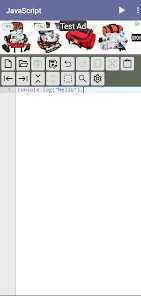
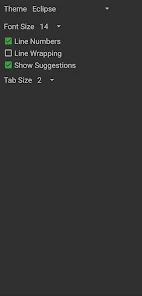
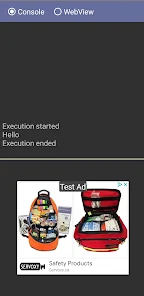
User experience with the app is generally positive, with many praising its intuitive interface and ease of use. The layout is clean and organized, making navigation smooth for first-time users. The code editor is equipped with syntax highlighting, which enhances readability and helps in identifying errors quickly. Furthermore, the app supports multiple themes, allowing users to customize their coding environment to their liking. The integrated console provides immediate feedback, which is crucial for debugging and learning. However, some users have reported occasional bugs, especially when running complex scripts, which can be frustrating. Overall, the app offers a solid experience for those looking to practice and improve their JavaScript skills on a mobile platform.

Pricing

Updates & Support The developers of "JavaScript For Android" are committed to continuous improvement and regularly release updates that enhance performance and introduce new features. Users can expect bug fixes and optimizations that address user feedback, ensuring a smoother experience over time. Support is available through various channels, including a dedicated help center and user forums, where users can ask questions and share tips. The response time from the support team is generally quick, which is reassuring for users who may encounter issues. Overall, the commitment to regular updates and responsive support contributes to a positive user experience and fosters a strong community around the app.

verified Security & Privacy Review

The "JavaScript For Android" app prioritizes user security and privacy, implementing various measures to protect sensitive data. It employs encryption protocols to safeguard user information, ensuring that data transmitted between the app and external servers remains secure. The app clearly outlines its privacy policy, detailing what user data is collected and how it is used, fostering transparency and trust. In terms of permissions, the app requests only the essential access needed for its functionality, minimizing exposure to unnecessary data collection. Users can easily review and manage these permissions through their device settings, allowing for greater control over personal information. The app does not engage in selling or sharing user data with third parties without explicit consent, adhering to best practices in data protection. Regular updates are provided to address any potential security vulnerabilities, further enhancing user confidence in the app’s safety. Overall, "JavaScript For Android" demonstrates a strong commitment to maintaining user privacy and security, making it a trustworthy choice for developers looking to learn and practice JavaScript on their Android devices.

Reviews

3.7

“Great resource for learning JavaScript on Android!”

“User-friendly interface makes coding easier.”

“Fantastic for beginners and experienced developers alike.”

“Helpful tutorials with practical examples.”

“Stable performance and responsive support team.”

FAQ

1

Can I submit suggestions or feedback to JavaScript For Android?

Yes, users can submit suggestions or feedback through the app's feedback feature or contact support via email.

2

Does JavaScript For Android collect my personal data?

JavaScript For Android is committed to user privacy and does not collect personal data without consent. However, users should review the privacy policy for detailed information.

3

Does JavaScript For Android support offline use?

Yes, JavaScript For Android supports offline use, allowing users to access tutorials and practice coding without an internet connection.

4

How do I cancel my JavaScript For Android subscription?

Users can cancel their subscription through their account settings in the app or via the app store where they purchased the subscription.

5

How much does a subscription to JavaScript For Android cost?

The subscription cost for JavaScript For Android varies depending on the plan chosen, with options for monthly or yearly billing. Detailed pricing can be found within the app.

How to use JavaScript For Android

1

Can I update my customer number?

Customer numbers are unique and cannot be changed. If you have concerns, contact customer service for assistance.

2

How can I log in to my account on the JavaScript for Android app?

To log in, open the app and enter your registered email and password. If you forget your password, use the "Forgot Password" link.

3

How can I reset my password if I can't log in?

Use the "Forgot Password" link on the login screen, and follow the instructions sent to your registered email.

4

How do I activate my account after registration?

After signing up, check your email for an activation link. Click on it to activate your account.

5

How do I contact customer service if I have issues with activation?

You can contact customer service via the app's support feature or send an email to help

Editor's Choice