
 Home
Home  Apps
Apps  Games
Games  Windows
  Topics
  Terms of Service
  Cookies & Privacy Policy
  About us
 Custom Scheduling
Easily create and manage custom schedules for your pool's equipment with iAquaLink. You can set specific times for pool cleaning, heating, or lighting, allowing you to enjoy a perfectly maintained pool without constant oversight.


Zodiac Pool Systems, Inc.
 4.3
4.3 
Category: Lifestyle

Price: free

Age Rating: Everyone

Rating: 4.3

Available on: /

Updated on: Jun 24, 2026
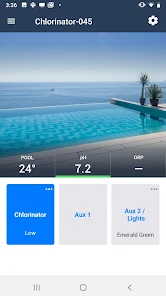
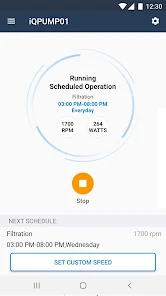
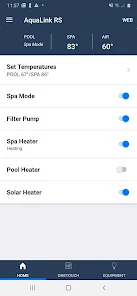
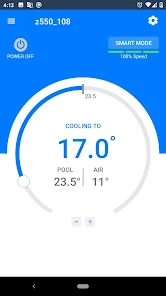
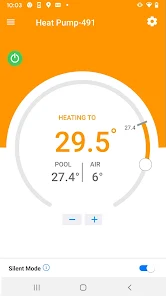
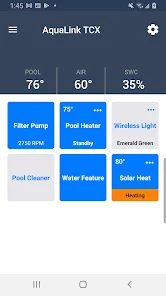
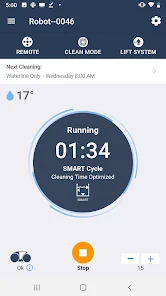
Easily create and manage custom schedules for your pool's equipment with iAquaLink. You can set specific times for pool cleaning, heating, or lighting, allowing you to enjoy a perfectly maintained pool without constant oversight.
Stay informed with real-time notifications directly to your phone. iAquaLink keeps you updated on your pool's status, whether it's a maintenance reminder or an alert about water chemistry imbalances, ensuring you never miss an important update.
With iAquaLink, you can control your pool settings from anywhere using your smartphone, tablet, or computer. Whether you want to adjust the temperature, activate the heater, or turn on the lights, all it takes is a few taps on your device for ultimate convenience.
iAquaLink boasts a sleek and intuitive interface designed for users of all technical backgrounds. Navigating through the app is a breeze, making it simple to access all features and settings, enhancing your overall pool management experience.

 Remote control from anywhere, anytime. User-friendly interface for easy navigation. Customizable settings for personalized experiences. Real-time updates for efficient management. Enhanced security features for peace of mind.
 Limited compatibility with older systems Initial setup can be complicated Reliant on internet for full functionality App performance may vary across devices
 iAquaLink is designed to enhance the experience of managing your pool and spa systems, making it an essential tool for homeowners and pool maintenance professionals alike. The app is particularly useful for those who want to monitor their pool's temperature, control lighting, and manage water features remotely. Ideal for busy individuals, iAquaLink allows users to adjust settings from anywhere, whether at work or on vacation. Imagine lounging on the beach and being able to turn on the pool heater or schedule a cleaning cycle—all at the touch of a button. Additionally, the app is well-suited for those who frequently host gatherings, as it enables users to create the perfect ambiance with customized lighting and water features, ensuring a memorable experience for guests.
The user experience of iAquaLink is generally smooth and intuitive. Upon launching the app, users are greeted with a clean, user-friendly interface that simplifies navigation. The dashboard provides quick access to essential features such as pool temperature, pump settings, and water quality monitoring. Customization options allow users to set up personalized alerts for maintenance tasks or temperature changes, ensuring that nothing goes overlooked. Many users appreciate the app's compatibility with smart home devices, allowing for voice control through platforms like Amazon Alexa or Google Assistant. However, some users have reported occasional connectivity issues, particularly in areas with weak Wi-Fi signals, which can hinder the app's functionality. Overall, though, the experience is highly satisfactory, with most users noting improved efficiency in managing their pool systems.
iAquaLink is free to download, providing a basic set of features that cater to most users' needs. The app may require a compatible pool control system, which can have varying costs depending on the brand and model. For those looking for premium features or enhanced functionalities, there might be optional in-app purchases or subscription plans available. Pricing details are typically found within the app, and it's advisable to review any ongoing promotions or bundles that may offer better value for bundled services. Overall, the app provides a cost-effective solution for pool management, particularly compared to traditional methods that require manual monitoring and adjustments.
iAquaLink regularly receives updates that improve functionality, fix bugs, and expand compatibility with new pool systems. Users can expect periodic enhancements that refine the overall experience and introduce innovative features. Customer support is readily available through various channels, including email and online chat, making it easy for users to get assistance with technical issues or inquiries. The support team is generally responsive, and many users have reported positive experiences when seeking help. The developers also actively engage with user feedback, often incorporating suggestions into future updates, which reflects their commitment to improving the app continually. This level of support and ongoing development contributes to the overall reliability and satisfaction of the iAquaLink experience.
Security & Privacy Review


This app sucks. I am using it for a pool in a rental property, which means I have to give tenants access to certain features like the lights and the waterfall. I wanted to be able to lock them out from messing with the pool systems. I tried to call the app ... multiple times ... no answer, just disconnected. I emailed. Took days for a response in between each email, only to be told there is, in fact, no way to prevent tenants from going into the app and do something like change the pump speed.
loved the app, but the new update would not load. I deleted and tried to reinstall app, but hangs up. I tried installing other apps and they load just fine. cleared cashe and data on Google play store several times and the app still will not load. glitch in the matrix? I will see what tech support has to say. Update: I do not know why, but I tried the update with WIFI turned off and it Immediately took.
This app rarely loads after signing in. If it does load, I only have about 30 seconds to turn on or off equipment before it locks up and stops functioning. Lately, I've been uninstalling the app, reinstalling it and again only getting enough time to perform 30 seconds of tasks then locks out. Today, uninstalling and reinstalling the app doesn't work. Now I can't control my pool equipment. This app is terrible.
Update, after a week the support team was able to fix the firmware issue... Just like many reviewers I'm having multiple firmware update error messages. when you call and wait on hold only for them to tell you to move the freedom robot closer to the router for 48 hours, but that still doesn't resolve the issue. it is a pain to try to use the app with the constant messages popping up and no easy way to resolve. Whatever this update process is, it clearly doesn't work.
Pretty good app with one flaw. The app doesn't auto refresh if you previously had it open and then later go back to it. Like if you had your pump and heat running at 4pm and they auto shut off at 6pm, if you open your app at 8pm it'll show that they are still running. You need to close the app and go back into it for it to update everything and show that they are actually off. This should be a pretty simple thing to fix, not sure why it hasn't been done by now
Review Source: Google Play store public user reviews.
Yes, iAquaLink may collect personal data to enhance user experience, improve services, and manage subscriptions. Users should review the privacy policy for detailed information on data collection and usage.
iAquaLink does not typically offer a free trial or a free version; however, it may provide limited access features for new users or specific promotional periods.
Yes, iAquaLink requires an internet connection to function, as it relies on cloud connectivity to communicate with pool equipment and provide remote access.
Users can contact iAquaLink support through the app or website by accessing the support section, where they can find options for live chat, email, or phone support, as well as a feedback form.
Users can manage or cancel their iAquaLink subscription through the app's settings or by logging into their account on the iAquaLink website, where they can follow the prompts for subscription management.
You can reach iAquaLink Customer Service by calling 1-800-555-0199 or visiting their official website for support options.
To activate, click the link in the activation email you received after registration, then follow the prompts to complete the process.
Your Customer Number is typically found in the app under Account Settings or on your purchase receipt.
Open the app, enter your registered email and password, then tap 'Log In' to access your account.
Yes, you need to activate your account after installation by following the instructions sent to your email.
• Feature improvements and bug fixes.
 Google Play
  App Store































