This site uses cookies to enhance your user experience. By clicking any link on this site you are giving your consent to our cookie policy. Read more
Reject
Accept All
GS Auto Clicker - Auto Tap

GS Auto Clicker - Auto Tap

verified Verified App

Developer: Tomas Yadiel

  • category

    Category: Tools

  • price

    Price:

  • age rating

    Age Rating: /

  • rating

    Rating: 3.9

  • download

    Downloads: 100K+

  • version

    Version: 1.1

Screenshot 1
Screenshot 2
Screenshot 3
Screenshot 4
Screenshot 5
Screenshot 6
Screenshot 7
Screenshot 8
Screenshot 9
Screenshot 10
Screenshot 11
Screenshot 12
Screenshot 13
Screenshot 14
Screenshot 15
Screenshot 16
Screenshot 17

Features & Highlights

Customizable Click Speed

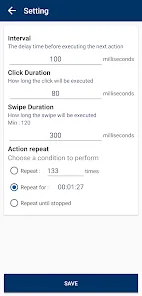
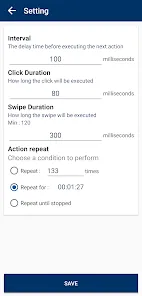
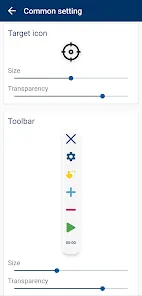
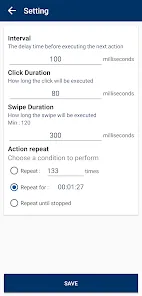
With GS Auto Clicker, you have the power to adjust the clicking speed to your liking. Whether you need rapid clicks for a game or slower intervals for a specific task, the app accommodates your preferences, ensuring optimal performance tailored to your requirements.

Multiple Click Modes

The app features various clicking modes, giving you the flexibility to choose how you want it to function. Whether you want continuous clicking or a specific number of clicks, GS Auto Clicker provides options that cater to different tasks, making it versatile for any scenario.

One-Click Setup

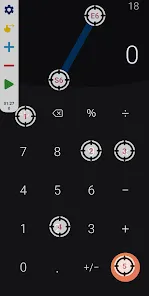
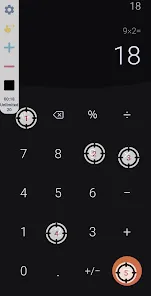
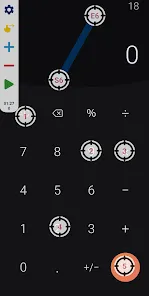
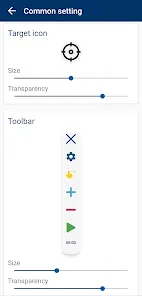
GS Auto Clicker - Auto Tap offers a user-friendly interface that allows you to set up your auto-clicking preferences in just a few taps. With straightforward options, you can easily customize your clicking speed and intervals to suit your needs, making the process quick and hassle-free.

User-Friendly Interface

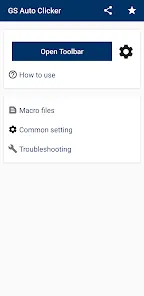
GS Auto Clicker boasts an intuitive interface that makes navigation seamless for users of all experience levels. Whether you're a tech novice or a seasoned user, you'll find it easy to access features and settings, allowing you to focus on your tasks without any distractions.

Pros & Cons

Pros
  • Automates repetitive clicking tasks effortlessly
  • Saves time and boosts productivity significantly
  • User-friendly interface for easy navigation
  • Customizable settings for personalized clicking patterns
  • Compatible with various applications and games
Cons
  • Lacks advanced customization options for click patterns
  • May lead to unintended clicks in sensitive applications
  • Potential for misuse in gaming and unfair advantages
  • Not always compatible with newer operating systems

Real Experience Using GS Auto Clicker - Auto Tap

Application Scenarios

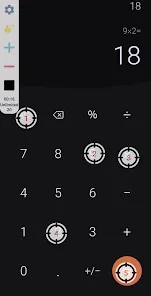
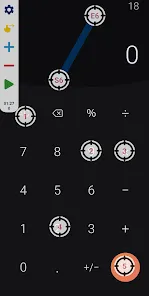
GS Auto Clicker - Auto Tap is designed to simplify repetitive tasks on Android devices, making it a valuable tool for various scenarios. Gamers often utilize this app to automate actions in mobile games, allowing them to farm resources or level up characters without constant manual input. Additionally, users engaged in data entry can streamline their workflow by automating clicks, saving time and reducing the risk of repetitive strain injuries. The app can also benefit those who need to perform repetitive tasks in other applications, such as scrolling through social media feeds or filling out forms. With its versatile functionality, GS Auto Clicker serves as a handy tool for anyone looking to optimize their device usage and increase efficiency.

User Experience

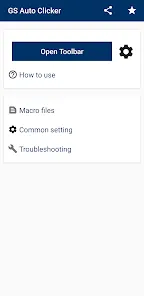
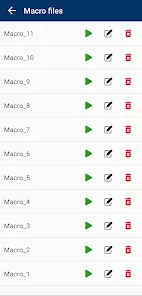
The user interface of GS Auto Clicker is straightforward and intuitive, which makes it accessible for both novice and experienced users. Upon launching the app, users are greeted with clear options for setting up their auto-clicking preferences. The ability to customize click intervals and duration offers a great deal of flexibility, allowing users to tailor the auto-clicking experience to their specific needs. In practice, the app runs smoothly without any noticeable lag, which is essential for gaming scenarios where timing is critical. Users have reported positive experiences with the reliability of the auto-clicking feature, noting that it works seamlessly across various apps. The app also includes a simple tutorial, which helps new users get started quickly. Overall, the user experience is enhanced by the app’s efficiency and ease of use.

Pricing

GS Auto Clicker is available for free, making it an attractive option for users looking to maximize their device capabilities without incurring any costs. While the free version offers a comprehensive set of features, there may be occasional ads that could disrupt the user experience. However, the presence of ads is minimal and does not significantly hinder the app's functionality. For those who desire an ad-free experience, users can explore premium options, which promise additional features and enhanced performance. The pricing structure is competitive, ensuring that users can choose a plan that best fits their needs without breaking the bank.

Updates & Support

The developers of GS Auto Clicker are committed to providing regular updates to enhance performance and add new features. Users can expect improvements based on feedback, ensuring that the app remains relevant and efficient. Support is readily available through the app’s help section, with comprehensive FAQs and troubleshooting guides to assist users in resolving any issues they may encounter. The active community surrounding GS Auto Clicker also contributes to a wealth of shared knowledge, allowing users to connect and share tips or tricks. Overall, the dedication to updates and customer support makes GS Auto Clicker a reliable choice for those seeking an auto-clicking solution.

verified Security & Privacy Review

When considering the security and privacy of GS Auto Clicker - Auto Tap, it is essential to examine its data handling practices and required permissions. The app is designed to automate tapping on screens, which inherently necessitates certain permissions to function effectively. Users must grant the app access to overlay on other apps, which can raise concerns about potential misuse if not managed properly. The developer has made efforts to ensure user data privacy by stating that the app does not collect personal information or store any user data. However, it is crucial for users to be aware of the permissions they grant, as these can affect their device's overall security. Regular updates and a clear privacy policy would further enhance user trust. Overall, while GS Auto Clicker - Auto Tap appears to prioritize user privacy, users should remain vigilant and review permissions carefully to safeguard their data.

Reviews

3.9

“Easy to use and incredibly helpful for gaming.”

“Saves so much time with repetitive tasks.”

“Highly customizable settings for precise clicking.”

“Occasionally lags but overall a great tool.”

“Reliable and straightforward, perfect for auto-tapping.”

Editor's Choice