This site uses cookies to enhance your user experience. By clicking any link on this site you are giving your consent to our cookie policy. Read more
Reject
Accept All
Google One

Google One

verified Verified App

Developer: Google LLC

  • category

    Category: Productivity

  • price

    Price: free

  • age rating

    Age Rating: Everyone

  • rating

    Rating: 4.1

  • download

    Downloads: 1,000,000,000+

  • version

    Version: 1.294.858740127

Screenshot 1
Screenshot 2
Screenshot 3
Screenshot 4
Screenshot 5
Screenshot 6

Features & Highlights

Exclusive Benefits

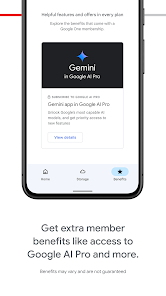
Google One members enjoy a variety of exclusive perks, including discounts on hotel bookings, early access to new features, and more. These added benefits enhance the overall experience and make being a member feel even more rewarding.

Expert Support

One of the standout features of Google One is the access to expert support for all your Google products. Whether you have questions about Google Photos, Drive, or any other service, you can reach out for help and get timely, personalized assistance.

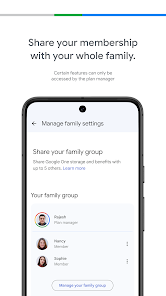
Family Sharing

Google One allows you to share your storage plan with family members, making it easy to manage and collaborate on shared files. Up to five family members can benefit from the extra space, ensuring everyone has access to what they need without extra cost.

Storage Expansion

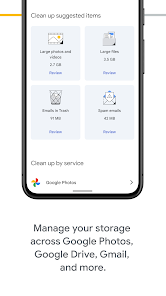
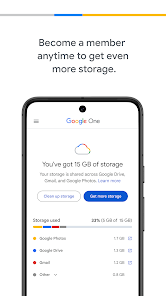
With Google One, you get the option to expand your Google Drive storage beyond the free limit. This means you can safely store your photos, videos, and documents without worrying about running out of space, making it a perfect solution for users with high storage needs.

Pros & Cons

Pros
  • Flexible storage plans for all your needs
  • Easy family sharing features for multiple users
  • Access to Google experts for personalized support
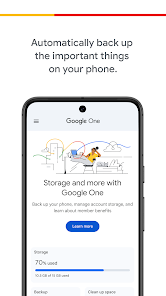
  • Automatic backups for photos and videos
  • Exclusive discounts on Google products and services
Cons
  • Limited free storage compared to competitors
  • Higher cost for additional space
  • Slow customer support response times
  • Complex family sharing setup

Real Experience Using Google One

Application Scenarios

Google One is designed to cater to a variety of scenarios that revolve around managing and optimizing your digital storage needs. Whether you are a casual user looking to back up your photos and files or a business professional needing ample storage for work-related documents, Google One offers a robust solution. It seamlessly integrates with other Google services, allowing users to store files from Google Drive, Gmail, and Google Photos in one centralized location. Families can benefit from shared plans, making it an ideal choice for those who want a single storage solution for multiple users. Additionally, the app provides options for secure file sharing and easy collaboration, making it suitable for both personal and professional use.

User Experience

The user experience of Google One is intuitive and user-friendly, with a clean interface that makes navigation a breeze. Upon entering the app, users are greeted with a dashboard that provides a clear overview of their storage usage and available options. The app offers features like automatic backups for Android devices, ensuring that critical data is saved without any manual effort. The customization options allow users to tailor their storage settings according to their preferences, and the performance is generally smooth, with quick access to files and backups. Furthermore, the ability to easily manage subscriptions and view billing details within the app adds to the overall convenience, making it a well-rounded tool for anyone looking to optimize their Google storage experience.

Pricing

Google One offers a variety of pricing tiers to accommodate different storage needs, ranging from 100 GB to several terabytes. The most basic plan starts at an affordable monthly rate, making it accessible for casual users. As users' storage requirements grow, they can easily upgrade to higher tiers. The family sharing feature allows up to five family members to share a single subscription, making it an economical choice for families. Additionally, Google One often provides promotional discounts for new users, further enhancing its appeal. Overall, the pricing is competitive and offers good value for the features and storage capacity provided.

Updates & Support

Google regularly updates the Google One app to improve functionality and address user feedback. Users can expect a consistent stream of new features, performance enhancements, and bug fixes, which contribute to a continuously improving experience. The support options are robust, offering a comprehensive help center with articles, FAQs, and troubleshooting guides. For more personalized assistance, users can access chat support or email options. This dedication to support and regular updates reinforces Google's commitment to providing a top-notch storage solution, ensuring that users have the tools and assistance they need for their digital storage needs.

verified Security & Privacy Review

Google One prioritizes user security and privacy, employing advanced encryption protocols to safeguard data both in transit and at rest. The app leverages Google’s robust security infrastructure, ensuring that user information is protected against unauthorized access. In terms of privacy practices, Google One provides transparent data usage policies. Users are informed about the types of data collected, including storage usage statistics and backup information. The app offers granular control over permissions, allowing users to manage what data is shared and with whom. Moreover, Google One includes features such as two-factor authentication, which adds an additional layer of security to user accounts. The app regularly updates its privacy settings and encourages users to review their security configurations, fostering a proactive approach to data protection. Overall, Google One demonstrates a strong commitment to user data handling by adhering to industry standards and best practices, making it a trustworthy choice for those seeking secure cloud storage solutions.

Reviews

4.1

“Great for backing up photos and files seamlessly.”

“User-friendly interface makes storage management easy.”

“Affordable pricing for the extra storage provided.”

“Reliable service with fast customer support.”

“Syncing across devices is flawless and convenient.”

Editor's Choice