This site uses cookies to enhance your user experience. By clicking any link on this site you are giving your consent to our cookie policy. Read more
Reject
Accept All

Advertiser and Editorial Disclosures

Google Gemini Enterprise

Google Gemini Enterprise

verified Verified App

Developer: Google LLC

  • category

    Category: Productivity

  • price

    Price: free

  • age rating

    Age Rating: Everyone

  • rating

    Rating: 4.1

  • download

    Downloads: 1,000,000+

  • version

    Version: 26.04.2408.905111433

Screenshot 1
Screenshot 2
Screenshot 3
Screenshot 4
Screenshot 5
Screenshot 6

Features & Highlights

Advanced AI Capabilities

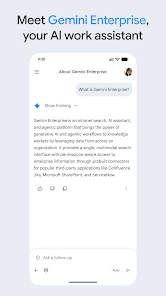
Google Gemini Enterprise harnesses cutting-edge AI technology to offer unparalleled insights and automation for businesses. With its powerful machine learning algorithms, users can streamline operations, enhance decision-making, and uncover valuable trends that drive growth and efficiency.

Customizable Dashboards

Users can create and personalize dashboards in Google Gemini Enterprise, tailoring the interface to meet specific business needs. This flexibility allows teams to monitor key metrics at a glance, providing quick access to essential information that supports informed decision-making.

Robust Security Features

Security is a top priority for Google Gemini Enterprise, which includes comprehensive data protection measures and compliance with industry standards. Organizations can confidently manage sensitive information, knowing that their data is safeguarded against unauthorized access and potential threats.

Seamless Integration

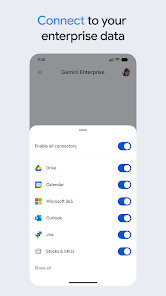
Designed for versatility, Google Gemini Enterprise easily integrates with existing tools and platforms, ensuring a smooth transition for organizations. This compatibility helps teams to maintain productivity while leveraging advanced features without the hassle of overhauling their current systems.

Pros & Cons

Pros
  • Boosts productivity with AI-driven insights tailored for your business needs.
  • Enhances collaboration through seamless integration with existing tools and platforms.
  • Offers robust security features to protect sensitive enterprise data.
  • Provides scalable solutions that grow with your organization's demands.
  • Delivers customizable options to suit diverse industry requirements.
Cons
  • Limited customization options may hinder specific business needs.
  • High costs could deter smaller enterprises from adoption.
  • Integration challenges with existing systems can disrupt workflows.
  • Potential data privacy concerns may worry organizations.

Real Experience Using Google Gemini Enterprise

Application Scenarios

Google Gemini Enterprise is designed for businesses seeking to enhance productivity and streamline operations through advanced AI capabilities. One of the primary application scenarios includes data analysis, where organizations can leverage the app's robust algorithms to process vast amounts of data quickly and efficiently. For example, companies in finance can utilize Gemini Enterprise to forecast market trends, while those in retail can analyze customer behavior to optimize inventory management. Additionally, the app excels in project management, allowing teams to collaborate seamlessly by integrating with existing tools like Google Workspace, thereby improving communication and task tracking.

User Experience

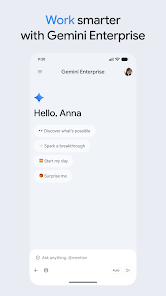
The user experience of Google Gemini Enterprise is intuitive and user-friendly, catering to both tech-savvy individuals and those less familiar with advanced technology. The interface is sleek and modern, with well-organized dashboards that provide easy access to essential features. Users appreciate the customizable settings, allowing them to tailor the app to fit their specific needs and workflows. The AI-driven recommendations are often spot-on, offering insights that can significantly enhance decision-making processes. Moreover, the integration with other Google services ensures a cohesive experience, reducing friction when switching between applications. Users have reported a noticeable improvement in efficiency and a reduction in time spent on repetitive tasks, thanks to the automation features embedded within the app.

Pricing

Google Gemini Enterprise follows a subscription-based pricing model, which is competitive within the industry. The pricing tiers are designed to accommodate different business sizes, from startups to large enterprises. Users can choose between monthly and annual billing options, with the latter offering a discount for long-term commitment. While some may find the initial investment considerable, the return on investment becomes evident through the time and resources saved by utilizing the app's capabilities. Additionally, Google provides a free trial period, allowing potential users to explore the app's features before committing to a subscription.

Updates & Support

Google Gemini Enterprise is regularly updated to enhance functionality and security, reflecting the company’s commitment to providing a cutting-edge tool for businesses. Users can expect frequent enhancements, including new features based on user feedback and emerging industry trends. The support system is robust, featuring a dedicated help center, comprehensive documentation, and a community forum where users can share experiences and solutions. For those requiring immediate assistance, Google offers real-time chat support, ensuring that any issues can be resolved swiftly. This proactive approach to updates and support instills confidence in users, knowing that they are backed by a reliable service.

verified Security & Privacy Review

Security & Privacy Review Google Gemini Enterprise prioritizes user data security and privacy with robust measures in place. The app employs end-to-end encryption for data transmission, ensuring that sensitive information remains protected from unauthorized access. Google’s reputation for security is reinforced by regular updates that address vulnerabilities and enhance user safety. In terms of permissions, Gemini Enterprise requires minimal access to device features, focusing primarily on functionalities essential for its operation. Users are informed about the permissions requested, allowing them to make informed decisions about their privacy. The app adheres to stringent data handling practices, with clear policies outlining how user data is collected, stored, and utilized. Data is anonymized where possible, reducing the risk of identification. Furthermore, Google provides users with control over their data, allowing them to manage privacy settings easily. Users can review and delete their data, ensuring a transparent approach to data management. Overall, Google Gemini Enterprise demonstrates a strong commitment to maintaining the security and privacy of its users.

Reviews

4.1

“Powerful AI tool that streamlines business tasks effectively.”

“User-friendly interface makes onboarding a breeze.”

“Occasional bugs disrupt workflow, needs improvement.”

“Impressive customization options for specific industry needs.”

“Great value for the price, highly recommend!”

FAQ

1

Does Google Gemini Enterprise collect my personal data?

Google Gemini Enterprise adheres to strict privacy policies and may collect certain data to enhance user experience and functionality; however, it does not sell personal data to third parties.

2

Does Google Gemini Enterprise offer a free trial or free version?

Yes, Google Gemini Enterprise offers a free trial period for new users, allowing them to explore its features before committing to a subscription. However, there is no permanent free version available.

3

Does Google Gemini Enterprise require an internet connection?

Yes, Google Gemini Enterprise requires an internet connection to access its features, utilize cloud-based services, and ensure real-time collaboration among users.

4

How can I contact support or send feedback for Google Gemini Enterprise?

Users can contact support for Google Gemini Enterprise through the dedicated support portal on the website, where they can submit tickets or access resources, and feedback can be sent via the feedback feature within the app.

5

How do I manage or cancel my Google Gemini Enterprise subscription?

Users can manage or cancel their Google Gemini Enterprise subscription through their account settings on the official website or app, where they can easily find the subscription management options.

How to use Google Gemini Enterprise

1

How can I contact customer service for the Google Gemini Enterprise app?

You can reach customer service by visiting the support page on the Google Gemini website or calling the dedicated support number provided in your account settings.

2

How do I log in to the Google Gemini Enterprise app?

To log in, open the app, enter your registered email and password, then click 'Sign In.'

3

Is there a way to activate the Google Gemini Enterprise app?

Yes, you can activate the app by entering the activation code sent to your registered email during the setup process.

4

What is the customer number for Google Gemini Enterprise app support?

The customer number is typically found in your account settings or on the official Google Gemini support page.

Editor's Choice