This site uses cookies to enhance your user experience. By clicking any link on this site you are giving your consent to our cookie policy. Read more
Reject
Accept All
GFiber: The Google Fiber App

GFiber: The Google Fiber App

verified Verified App

Developer: Google Fiber Inc.

  • category

    Category: Tools

  • price

    Price: free

  • age rating

    Age Rating: Everyone

  • rating

    Rating: 4.3

  • download

    Downloads: 100,000+

  • version

    Version: 4.7.1.260126

Screenshot 1
Screenshot 2
Screenshot 3
Screenshot 4
Screenshot 5
Screenshot 6
Screenshot 7
Screenshot 8
Screenshot 9
Screenshot 10
Screenshot 11
Screenshot 12
Screenshot 13
Screenshot 14
Screenshot 15
Screenshot 16
Screenshot 17
Screenshot 18

Features & Highlights

Easy Network Management

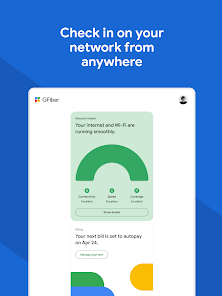
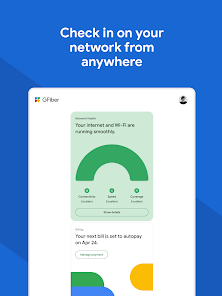
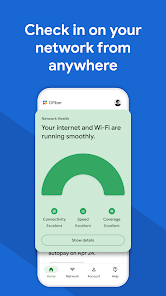
With GFiber, managing your home network is a breeze. The app allows you to monitor connected devices, prioritize bandwidth for specific activities, and even pause internet access for certain devices, ensuring you have control over your network at all times.

Speed Test Feature

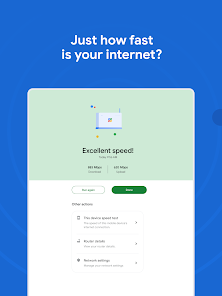
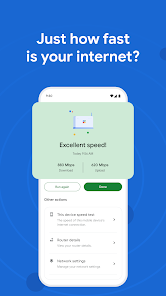
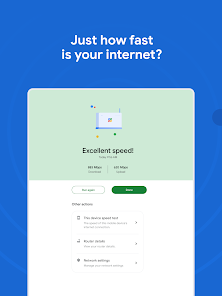
Quickly check your internet speed with the built-in speed test feature. This tool provides real-time insights into your connection quality, helping you troubleshoot any issues and ensuring you're getting the performance you pay for, anytime you need it.

Support and Troubleshooting

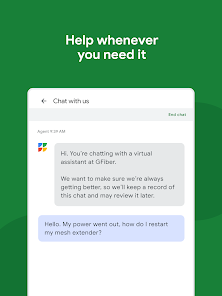
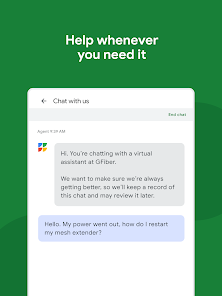
Access 24/7 support directly through the app, allowing you to resolve issues quickly and efficiently. The troubleshooting feature guides you through common problems, helping you get back online with minimal hassle and ensuring a smooth internet experience.

User-Friendly Interface

The app boasts a clean and intuitive design, making it easy for users of all tech levels to navigate. Whether you're adjusting settings, checking usage stats, or accessing support, the seamless layout enhances your overall experience with Google Fiber.

Pros & Cons

Pros
  • Fast and reliable internet connection for seamless streaming
  • Easy network management directly from your smartphone
  • Real-time speed tests to monitor your connection
  • Simple troubleshooting guides for quick issue resolution
  • Access to exclusive features and updates for enhanced performance
Cons
  • Limited availability in select areas only
  • Occasional connectivity issues during peak usage
  • Complicated installation process for some users
  • Customer support can be slow to respond

Real Experience Using GFiber: The Google Fiber App

Application Scenarios

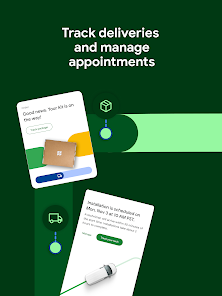
The GFiber app is designed for users of Google Fiber services, making it essential for managing their high-speed internet and television subscriptions. It is particularly useful for households that rely heavily on streaming services, online gaming, or remote work. Users can easily monitor their internet speeds, check data usage, and troubleshoot connectivity issues directly from the app. Additionally, the app offers seamless management of Google Fiber TV services, allowing users to browse channels, schedule recordings, and access on-demand content all in one convenient location. The GFiber app is also beneficial for tech-savvy users who want to optimize their home network settings, ensuring that every device connected receives the best possible performance.

User Experience

Overall, user experience with the GFiber app is highly positive. The interface is sleek, intuitive, and user-friendly, making it easy for even the least tech-savvy individuals to navigate. Upon launching the app, users are greeted with a dashboard that clearly displays their current internet speed, data usage, and network status. The setup process is streamlined, allowing users to get started quickly with minimal hassle. Features like live chat support and FAQs are easily accessible, providing users with immediate assistance when needed. However, some users have noted occasional glitches or slow loading times, particularly during peak hours. Despite these minor issues, the app remains a highly useful tool for managing Google Fiber services.

Pricing

The GFiber app itself is free to download and use, which is a significant advantage for Google Fiber subscribers. However, it is important to note that using the app requires an active Google Fiber subscription. Pricing for Google Fiber services varies based on the plan selected, with options for different internet speeds and TV bundles. Users can choose between basic internet plans and more comprehensive packages that include television services. While the app does not impose additional fees, the overall cost of Google Fiber can be higher compared to other internet service providers, especially for users seeking ultra-fast speeds or complete TV packages.

Updates & Support

The GFiber app is regularly updated to improve functionality and user experience. The development team actively seeks feedback from users to address bugs and introduce new features based on customer needs. The app’s support section is robust, offering troubleshooting guides, FAQs, and direct access to customer service representatives. Users can easily report issues or seek assistance through the app, ensuring that help is always just a tap away. Frequent updates enhance the overall reliability of the app, making it an essential tool for Google Fiber subscribers looking to maximize their internet and television experience.

verified Security & Privacy Review

The GFiber: The Google Fiber App prioritizes user data security and privacy, implementing robust measures to protect sensitive information. The app requires minimal permissions, primarily focusing on necessary functionalities, which reduces potential vulnerabilities. Users are informed about the data collected, which includes account information and usage statistics, and can review these practices in the app's privacy policy. Google Fiber utilizes encryption protocols for data transmission, ensuring that user information remains secure from unauthorized access. The app does not share personal data with third parties without user consent, adhering to strict privacy standards. Users can manage their privacy settings within the app, allowing them to control data sharing preferences effectively. Overall, GFiber demonstrates a commitment to maintaining user privacy and data integrity. Regular updates and transparency in data handling practices contribute to a trustworthy environment for users who prioritize security in their digital experiences.

Reviews

4.3

“Easy setup and great speed!”

“User-friendly interface, love the features.”

“Reliable connection with minimal interruptions.”

“App helps manage my network effortlessly.”

“Customer support is responsive and helpful.”

Editor's Choice