This site uses cookies to enhance your user experience. By clicking any link on this site you are giving your consent to our cookie policy. Read more
Reject
Accept All

Advertiser and Editorial Disclosures

Food Diary

Food Diary

verified Verified App

Developer: WeCode Team

  • category

    Category: Health & Fitness

  • price

    Price: free

  • age rating

    Age Rating: Everyone

  • rating

    Rating: 4.4

  • download

    Downloads: 100,000+

  • version

    Version: 5.0

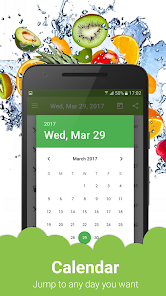
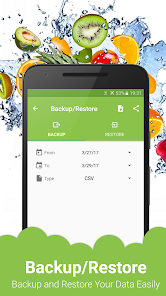
Screenshot 1
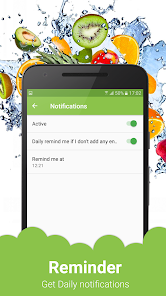
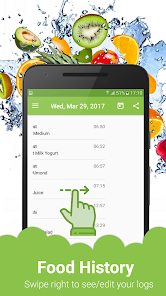
Screenshot 2
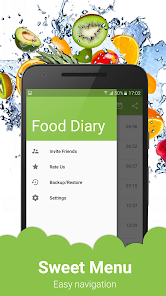
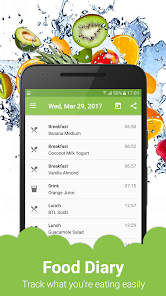
Screenshot 3
Screenshot 4
Screenshot 5
Screenshot 6
Screenshot 7
Screenshot 8
Screenshot 9
Screenshot 10
Screenshot 11
Screenshot 12
Screenshot 13
Screenshot 14
Screenshot 15

Features & Highlights

Customizable Food Database

Food Diary features a robust and customizable food database that allows users to add their favorite meals and recipes. This means you can tailor the app to your unique eating habits, ensuring that your entries are as accurate and personal as possible.

Meal Logging Made Easy

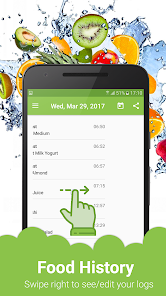
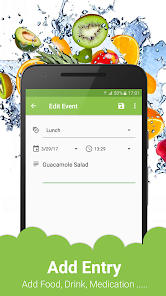
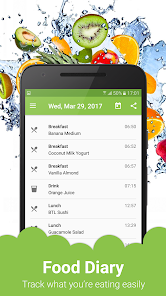
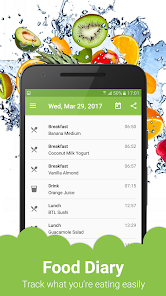
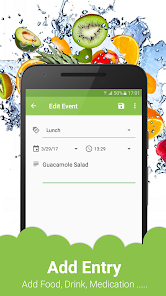
With Food Diary, tracking your meals becomes a breeze. Simply enter your meals and snacks for the day, and the app automatically calculates your nutritional intake, making it easier to stay on top of your dietary goals without the hassle of complicated entries.

Progress Tracking & Insights

Stay motivated with Food Diary's insightful progress tracking features. The app provides visual charts and statistics that highlight your eating habits over time, helping you identify patterns and areas for improvement as you work towards your health goals.

User-Friendly Interface

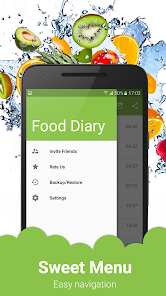
Designed with simplicity in mind, Food Diary offers a clean and intuitive interface that makes meal logging enjoyable. Navigating through the app is straightforward, ensuring that users of all tech-savviness can easily input their meals and access their dietary information.

Pros & Cons

Pros
  • Promotes mindful eating habits
  • Helps track nutritional intake accurately
  • Aids in identifying food sensitivities
  • Encourages accountability in dietary choices
  • Facilitates weight management and goal setting
Cons
  • Time-consuming to maintain daily records
  • May lead to obsessive behaviors around eating
  • Can cause anxiety about food choices
  • Often inaccurate due to estimation errors

Real Experience Using Food Diary

Application Scenarios

The Food Diary app is designed to cater to a variety of users, from fitness enthusiasts tracking their nutritional intake to individuals seeking to manage their dietary habits for health reasons. Whether you are aiming to lose weight, gain muscle, or simply maintain a balanced diet, this app provides an intuitive platform to log food consumption effortlessly. Users can input meals and snacks throughout the day, making it ideal for those with busy lifestyles who need a quick way to monitor their eating habits. Additionally, the app can be used for meal planning, allowing users to prepare their dietary schedules in advance. It also serves as a great tool for those with specific dietary restrictions or allergies, enabling them to keep a detailed record of what they consume and avoid potential triggers.

User Experience

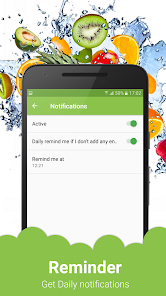
The user experience of the Food Diary app is commendable, featuring a clean and user-friendly interface that makes navigation a breeze. Upon opening the app, users are greeted with a dashboard that displays their daily calorie intake, nutritional breakdown, and progress towards their personal goals. The process of logging meals is straightforward, with an extensive database of foods that can be searched or scanned via barcode. Users can also customize entries for homemade dishes, ensuring accuracy in tracking. The app's reminders and motivational messages are thoughtful touches that encourage continued use and help users stay committed to their dietary objectives. Furthermore, the integration with fitness trackers allows for a holistic view of health, combining dietary habits with physical activity.

Pricing

The Food Diary app follows a freemium model, offering users basic functionalities at no cost while providing an option to upgrade to a premium version for a monthly or yearly fee. The free version is sufficient for casual users, but those seeking advanced features such as personalized meal plans, detailed nutrient analysis, and ad-free experience will find value in the premium subscription. The pricing is competitive compared to similar apps in the market, making it a worthwhile investment for individuals serious about their health and nutrition.

Updates & Support

The developers of the Food Diary app are committed to providing regular updates, ensuring that users benefit from the latest features and improvements based on user feedback. The app frequently introduces new food items to its database, as well as enhancements to the user interface for smoother navigation. Customer support is readily available through the app, offering assistance via email and an FAQ section that addresses common inquiries. Users have reported positive experiences with the support team, noting prompt responses and helpful guidance. Overall, the ongoing commitment to updates and user support enhances the overall experience, making the Food Diary app a reliable choice for anyone looking to track their food intake effectively.

verified Security & Privacy Review

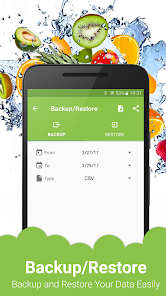
The Food Diary app places a strong emphasis on security and privacy, ensuring that user data is handled with care. All personal information, including dietary preferences and health-related data, is encrypted both in transit and at rest, providing a robust layer of protection against unauthorized access. The app requires minimal permissions, primarily limited to accessing the device’s storage for saving diary entries and photos. Users are informed about these permissions upfront and can choose to deny access without affecting core functionalities. This transparency fosters trust and empowers users to make informed decisions about their data. Food Diary adheres to strict privacy policies, and user data is not sold or shared with third parties for marketing purposes. Users have control over their data, with options to delete their accounts and all associated information at any time. Regular updates to the app include security patches and enhancements, ensuring that user privacy remains a priority. Overall, Food Diary demonstrates a commitment to maintaining a secure and private environment for users to track their food habits effectively.

Reviews

4.4

“Easy to track meals and calories daily”

“Great for meal planning and nutrition insights”

“User-friendly interface and helpful reminders”

“Excellent for maintaining healthy habits”

“Inspiring community support and recipes available”

FAQ

1

Does Food Diary collect my personal data?

Food Diary may collect personal data to enhance user experience, such as tracking food preferences and dietary habits, but it is essential to review the app's privacy policy for specific details on data collection and usage.

2

Does Food Diary offer a free trial or free version?

Yes, Food Diary often provides a free version with limited features or a free trial period for premium features, allowing users to explore the app before committing to a subscription.

3

Does Food Diary require an internet connection?

While some features of Food Diary may require an internet connection, such as syncing data and accessing online databases, the app generally allows users to log their meals offline as well.

4

How can I contact support or send feedback for Food Diary?

You can contact Food Diary support through the app's help section, via email, or by visiting their official website. Many apps also provide options for submitting feedback directly within the app.

5

How do I manage or cancel my Food Diary subscription?

You can manage or cancel your Food Diary subscription through the app settings or your app store account, depending on how you originally subscribed. Instructions are usually provided in the app or on the official website.

How to use Food Diary

1

Can I access the Food Diary app on multiple devices?

Yes, you can log in to your account on multiple devices using the same credentials.

2

Can I change my login credentials in the Food Diary app?

Yes, you can update your login credentials in the account settings under "Security."

3

How can I contact customer service for the Food Diary app?

You can reach customer service through the app's help section or email support at help

4

How do I activate my Food Diary app account?

To activate your account, click the link sent to your email after registration and follow the prompts.

5

How do I find my customer number for the Food Diary app?

Your customer number is located in your account settings under "Profile."

Editor's Choice