This site uses cookies to enhance your user experience. By clicking any link on this site you are giving your consent to our cookie policy. Read more
Reject
Accept All
Files by Google

Files by Google

verified Verified App

Developer: Google LLC

  • category

    Category: Tools

  • price

    Price: free

  • age rating

    Age Rating: Everyone

  • rating

    Rating: 4.5

  • download

    Downloads: 5,000,000,000+

  • version

    Version: 1.9938.854818729.0-release

Screenshot 1
Screenshot 2
Screenshot 3
Screenshot 4
Screenshot 5
Screenshot 6

Features & Highlights

File Sharing Made Easy

Sharing files is a breeze with Files by Google, as it allows you to send files to nearby devices without needing data or Wi-Fi. Simply use the built-in sharing feature to connect with friends and family quickly, making collaboration seamless and efficient.

Offline Access

Enjoy the convenience of accessing your important files even without an internet connection. Files by Google allows you to download and store files offline, ensuring you always have what you need at your fingertips, whether you’re on the go or in a remote area.

Smart File Management

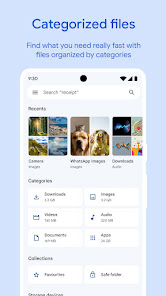
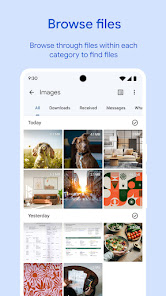
Files by Google organizes your files intuitively, making it easy to find what you need quickly. With categories like Images, Videos, and Documents, you can navigate through your storage effortlessly and keep your files in order without the hassle of manual sorting.

Storage Cleanup

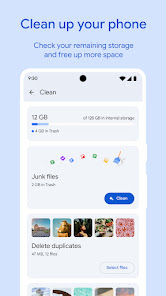
Free up valuable space with the built-in storage management features. Files by Google identifies large files, duplicates, and unused apps, providing you with helpful suggestions to declutter your device and optimize performance, all with just a few taps.

Pros & Cons

Pros
  • Efficiently manage storage space on your device
  • Quickly find and organize files seamlessly
  • Share files easily with others
  • Remove duplicate files to save space
  • Access files offline for convenience
Cons
  • Limited file format support for certain types
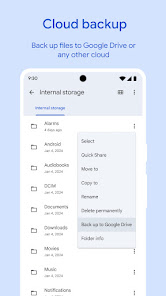
  • Occasional syncing issues with cloud storage
  • Interface may feel cluttered for some users
  • Lacks advanced features found in competitors

Real Experience Using Files by Google

Application Scenarios

Files by Google is a versatile application designed to streamline file management on Android devices. One of the most common scenarios for using this app is during a device cleanup. Many users find themselves struggling with storage issues, and Files by Google provides an intuitive interface that helps identify large files, duplicates, and unused applications that can be easily deleted. Additionally, the app excels in file sharing, allowing users to send files to nearby devices without the need for an internet connection. This feature is particularly useful for people who frequently share documents, photos, or videos with friends or colleagues. Whether you are a student looking to manage your study materials or a professional managing work documents, Files by Google can simplify the organization of your digital life.

User Experience

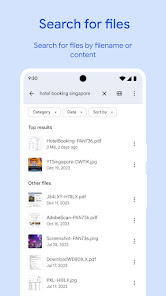
The user experience of Files by Google is seamless and user-friendly. Upon launching the app, users are greeted with a clean and organized interface that categorizes files into distinct sections, such as Images, Videos, and Documents. This categorization makes it easy to locate specific files without unnecessary scrolling. The app's smart suggestions feature recommends files for deletion, ensuring users can free up space swiftly. Furthermore, the built-in file search function is quick and efficient, allowing users to find what they need in seconds. Users have also praised the app's speed and reliability, noting that it performs well even on devices with limited resources. Overall, the intuitive design and thoughtful features contribute to a positive user experience that appeals to a wide range of users.

Pricing

Files by Google is completely free to download and use, which is one of its most appealing aspects. Unlike many other file management applications that may have hidden fees or premium subscriptions, Files by Google offers its full range of features at no cost. This makes it an attractive option for those who want a powerful file management tool without the burden of recurring charges. Users can enjoy unlimited access to its functionalities, including file sharing, storage management, and offline access without worrying about their budget.

Updates & Support

The development team behind Files by Google is committed to continuous improvement, regularly rolling out updates that enhance functionality and user experience. These updates often include new features, bug fixes, and performance improvements, ensuring that the app remains relevant and efficient. For support, users can access a comprehensive help center that provides troubleshooting tips and answers to frequently asked questions. Additionally, users can submit feedback directly through the app, allowing them to contribute to future updates and enhancements. This level of engagement from the developers fosters a community-oriented environment where users feel valued and heard.

verified Security & Privacy Review

The security and privacy of user data are paramount in the Files by Google app. It employs robust encryption protocols to ensure that files stored and shared via the app remain secure. Google’s reputation for data protection is bolstered by its compliance with various international standards and regulations, ensuring that user information is handled with the utmost care. Files by Google operates with minimal permissions, requiring only what is necessary for its functionality. Users are informed about the permissions requested during installation, which typically include access to storage and media files. This transparency helps users make informed decisions about their data. Additionally, the app features a built-in privacy dashboard that allows users to manage their data handling preferences easily. Files by Google does not sell user data to third parties, reinforcing its commitment to user privacy. Regular updates and security patches further enhance the app’s resilience against potential vulnerabilities, making it a reliable choice for users concerned about security and privacy in file management.

Reviews

4.5

“User-friendly interface makes file management easy and efficient.”

“Quickly frees up storage space on my device.”

“Great for organizing files and finding duplicates.”

“Excellent sharing features with friends and family.”

“Reliable and fast performance, highly recommend it!”

Editor's Choice