This site uses cookies to enhance your user experience. By clicking any link on this site you are giving your consent to our cookie policy. Read more
Reject
Accept All

Advertiser and Editorial Disclosures

Fake GPS location

Fake GPS location

verified

Lexa

4.7
Rating
50,000,000+ Downloads
/ Version
  • category

    Category: Tools

  • price

    Price: free

  • age rating

    Age Rating: Everyone

  • rating

    Rating: 4.7

  • available on

    Available on: /

  • updated on

    Updated on: Aug 16, 2022

Screenshot 1
Screenshot 2
Screenshot 3
Screenshot 4
Screenshot 5
Screenshot 6

Features & Highlights

Custom Path Creation

Create and simulate custom routes by setting multiple waypoints, allowing you to move along a predefined path. This feature is great for developers testing location services or for users who want to explore how navigation apps function without moving physically.

Location Spoofing

Easily change your device's GPS location to anywhere in the world with just a few taps. This feature is perfect for testing location-based apps or simply having a little fun by making it seem like you're in a different city or country.

Speed Control Settings

Adjust your movement speed to simulate walking, driving, or running, which adds a layer of realism to your location changes. This flexibility helps in testing apps more effectively or enjoying augmented reality games without leaving your location.

User-Friendly Interface

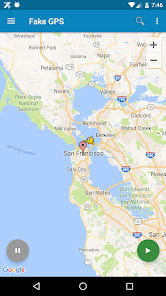
The app boasts a simple and intuitive interface that makes it easy for anyone to navigate and use. Whether you're a tech novice or a seasoned user, you'll find it straightforward to set your desired location and start enjoying the benefits right away.

Pros & Cons

Pros
  • Easily access location-restricted content online
  • Protect your privacy from tracking apps
  • Avoid location-based price discrimination
  • Enhance gaming experiences with location spoofing
  • Test apps in various geographical settings
Cons
  • Can lead to inaccurate app functionality and services.
  • May violate terms of service for various apps.
  • Risk of exposing personal information to malicious users.
  • Can result in penalties or account bans from platforms.

Real Experience Using Fake GPS location

Application Scenarios

The Fake GPS Location app is a versatile tool designed for users who need to spoof their geographical location on their mobile devices. This can be particularly useful in various scenarios such as testing location-based applications, accessing region-restricted content, or simply having some fun with friends by sharing a fictitious location. For instance, a developer can simulate different geographical settings while testing their app to ensure that it responds correctly to various GPS inputs. Gamers can also benefit from this feature by accessing location-specific game content without physically being in those areas. Additionally, social media enthusiasts often use the app to check-in at trendy locations virtually, enriching their profiles with unique experiences. Overall, the app caters to a wide range of users looking for flexibility in their digital presence.

User Experience

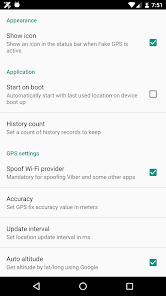
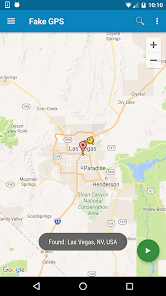
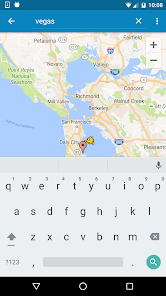
The user experience of the Fake GPS Location app is generally intuitive and straightforward. Upon launching the app, users are greeted with a clean interface that allows for easy navigation. Setting a fake location is as simple as searching for a desired place or dropping a pin on the map. The app offers real-time location updates, ensuring that users can switch their locations seamlessly. However, some users might encounter issues with accuracy, especially if their device’s settings are not properly configured. It's essential to enable developer options and mock location settings for the app to function correctly. The app's performance largely depends on the device, and users have reported varied results. Overall, the experience is satisfactory for most users, though some may require additional guidance to optimize settings.

Pricing

The Fake GPS Location app is available for free, making it accessible to a wide audience. However, the free version may come with certain limitations, such as ads or restricted features. For those looking for an enhanced experience, a premium subscription is available, which removes ads and unlocks additional functionalities. The pricing for the premium version is competitive compared to similar apps in the market, providing good value for users who require advanced features. This tiered pricing model allows users to try the app without financial commitment, making it an attractive option for casual users who might later decide to upgrade for a better experience.

Updates & Support

The developers of Fake GPS Location are committed to providing regular updates to ensure the app runs smoothly and remains compatible with the latest mobile operating system versions. Users can expect enhancements in functionality, bug fixes, and improved user interface elements with each update. Support is readily available through the app’s help section, which includes FAQs and troubleshooting tips. For more personalized assistance, users can reach out to the support team via email. Overall, the commitment to updates and customer support reflects the developers’ dedication to maintaining a reliable and user-friendly experience.

verified Security & Privacy Review

The Fake GPS Location app raises several concerns regarding security and privacy practices. First and foremost, it requires extensive permissions, including access to location services, which can potentially expose users to risks if not managed properly. Users should be cautious about granting these permissions, as misuse could lead to unauthorized tracking or data breaches. Additionally, the app's data handling practices are not thoroughly transparent. There is limited information available about how user data is collected, stored, or shared. Users must be aware that while the app may provide functionality to spoof location, it could also inadvertently expose personal information if not configured carefully. Furthermore, users should consider the potential implications of using such an app, especially in terms of compliance with legal regulations. Engaging in location spoofing can violate terms of service for various platforms and lead to account suspensions. Overall, while the app offers unique features, users must prioritize their security and privacy by understanding the risks associated with its use.

User Reviews

  • Rachel Aubuchon
    2026/07/02

    This app works great for what I need! one thing I'd change is to be able to search a specific address, city or location.. Instead, it takes me to a zoomed in map elsewhere in the state where I then have to zoom out a bunch, find where I need to go, and zoom into it. luckily I'm familiar with the areas I need but if I wasn't, it'd be less convenient to use. I thought I used to be able to search locations when I first was using it a couple years ago, not sure if it changed or I remember wrong.

  • Henri Daumas
    2024/09/26

    Works perfectly. You have to turn on Developer Mode first, and how to do that batteries by Android device. Then you need to set this app as the GPS test app. Once you've done that, move around the app's map to a location of choice and press the play button. This will spoof the phone into thinking that is it's current location. You can save locations as favorites and retrieve them from the menu. Very useful app.

  • L. Raye
    2021/06/18

    Works. ¯\_(ツ)_/¯ I mostly use it because I'm disabled and mostly housebound, and some food places require your phone to "be there" when they start the order you put in through the app (like McDonald's once did, though more recently they've made it easier to just say you're there). This way, I can just tell it when someone is there to get my order.

  • Ryan Pollom
    2025/03/28

    The app works but it's not user friendly. To go to a specific location you can only search via latitude and longitude. The search function needs to allow you to input a street address to find a specific location. The maps are lacking in substance. When search the maps there are a lot of missing street names. There are definitely better apps out there that accomplish the same thing.

  • A Google user
    2019/06/28

    use this app to place an order at McDonald's so my hubby can pick it up. McDonald's app won't place the order unless you're actually at the location. not very convenient when you're staying at work and need lunch delivered. took away one-star because I had to actually find the location myself every time I entered the address of where I waanted to spoof i got a server error. however if you know the map of the area where you're trying to be it works like a charm.

Review Source: Google Play store public user reviews.

FAQ

1

Does Fake GPS location collect my personal data?

Fake GPS location typically does not collect personal data, but users should review the app's privacy policy to understand its data handling practices and ensure their privacy is protected.

2

Does Fake GPS location offer a free trial or free version?

Some versions of Fake GPS location may offer a free trial or a free version with limited features, while others may require a purchase for full functionality.

3

Does Fake GPS location require an internet connection?

No, Fake GPS location does not require an internet connection to function, as it manipulates the device's GPS signals directly; however, an internet connection may be necessary for certain location-based services to work effectively.

4

How can I contact support or send feedback for Fake GPS location?

Users can contact support or send feedback for Fake GPS location through the app's help section, official website, or by reaching out via email to the support team.

5

How do I manage or cancel my Fake GPS location subscription?

Users can manage or cancel their Fake GPS location subscription through the app store where they purchased it, typically by going to the subscription settings in their account.

How to use Fake GPS location

1

Can I use the Fake GPS location app without creating an account?

Yes, the app can be used without an account, but some features may be limited.

2

How can I contact customer service for the Fake GPS location app?

You can reach customer service through the app's support section or email support

3

How can I report a bug or issue with the Fake GPS location app?

Use the feedback option in the app or send an email to support

4

How do I change my location settings in the Fake GPS location app?

Access the app's settings and adjust the location preferences to set your desired fake GPS location.

5

How do I log in to the Fake GPS location app?

Simply open the app and enter your registered email and password to log in.

What's New

Fix OpenStreetMap, address some crashes

Editor's Choice