This site uses cookies to enhance your user experience. By clicking any link on this site you are giving your consent to our cookie policy. Read more
Reject
Accept All
Epson Smart Panel

Epson Smart Panel

verified Verified App

Developer: Seiko Epson Corporation

  • category

    Category: Tools

  • price

    Price: free

  • age rating

    Age Rating: Everyone

  • rating

    Rating: 4.6

  • download

    Downloads: 10,000,000+

  • version

    Version: 5.2.0

Screenshot 1
Screenshot 2
Screenshot 3
Screenshot 4
Screenshot 5
Screenshot 6

Features & Highlights

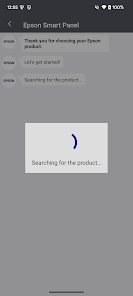
Easy Device Setup

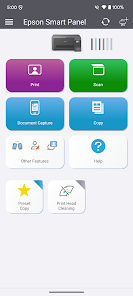
Epson Smart Panel simplifies the process of connecting your mobile device to Epson printers and scanners. With user-friendly prompts and intuitive navigation, you can start printing, scanning, or copying in just a few taps, making it perfect for both tech-savvy users and beginners alike.

Real-Time Status Updates

Stay informed with real-time notifications on your printer's status, including ink levels and error alerts. Epson Smart Panel keeps you in the loop, so you can tackle any issues before they become a headache, ensuring smooth and uninterrupted printing.

Remote Printing

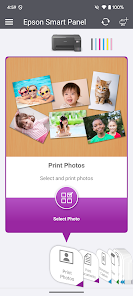
With Epson Smart Panel, you can print documents and photos from anywhere within your Wi-Fi range. This feature allows you to send print jobs directly from your smartphone or tablet, ensuring convenience and flexibility, especially when you're on the go or away from your desk.

Scan and Share

The app enables you to scan documents directly to your mobile device for easy sharing via email or social media. With just a few taps, you can digitize important paperwork and share it instantly, making it a great tool for both personal and professional use.

Pros & Cons

Pros
  • Easy remote control of your Epson devices
  • User-friendly interface for simple navigation
  • Access to advanced features and settings
  • Real-time status updates for efficient monitoring
  • Seamless connectivity with multiple devices
Cons
  • Limited compatibility with older Epson devices
  • User interface can be confusing
  • Frequent updates may disrupt functionality
  • Connectivity issues with certain networks

Real Experience Using Epson Smart Panel

Application Scenarios

The Epson Smart Panel app is designed to be a versatile companion for users of Epson printers and projectors. It shines in various scenarios, whether at home, in the office, or during presentations. For home users, the app simplifies the process of printing photos or documents directly from smartphones and tablets, making it ideal for quick printing tasks. In an office environment, the app facilitates seamless printing of important documents, enabling users to manage multiple printers with ease. For educators and professionals who rely on projectors, the app allows for easy control and setup, making it a valuable tool for enhancing presentations. Users can connect their devices to projectors wirelessly, manage display settings, and even mirror content from their devices, making the app essential for both casual and formal settings.

User Experience

User experience with the Epson Smart Panel app is generally positive. The interface is intuitive and user-friendly, allowing users to navigate through its features without confusion. Setting up the app is straightforward; users can easily connect their devices to printers or projectors with minimal hassle. The print quality is commendable, and users appreciate the ability to customize settings like paper size and print quality directly from their devices. Moreover, the app supports various file formats, ensuring compatibility with diverse document types. However, some users have reported occasional connectivity issues, particularly when switching between different networks. Despite this, the overall experience remains robust, as the app also provides helpful tutorials and guides to assist users in troubleshooting common problems.

Pricing

The Epson Smart Panel app is available for free, which is a significant advantage for users who might be hesitant to invest in printing or presentation solutions. While there are no direct costs associated with the app itself, users should be aware that additional expenses may arise from purchasing ink, paper, or compatible Epson devices. This pricing model makes the app accessible to a wide audience, from casual users to professionals, allowing them to leverage its features without any upfront financial commitment.

Updates & Support

Epson provides regular updates to the Smart Panel app, enhancing its functionality and addressing user feedback. These updates often include new features, improved connectivity options, and bug fixes, which contribute to an overall better user experience. The support options available through the app are also commendable; users can access a comprehensive help section, FAQs, and customer support through various channels. Additionally, Epson maintains an active online community where users can share experiences and solutions, fostering a sense of support among users. Overall, Epson's commitment to updates and support ensures that users can rely on the Smart Panel app for their printing and presentation needs.

verified Security & Privacy Review

The Epson Smart Panel app takes user security and privacy seriously, implementing several measures to protect sensitive information. The app requires standard permissions such as access to the device's camera and location, which are necessary for specific functionalities like scanning documents and finding printers. Users are advised to review these permissions carefully during installation. Data transmitted between the app and Epson printers is encrypted, ensuring that sensitive documents and information remain secure during processing. Additionally, the app does not store personal data on its servers, minimizing the risk of unauthorized access. Epson has a clear privacy policy that outlines how user data is collected, used, and shared, providing transparency to users. Furthermore, users can manage their data preferences within the app, allowing them to opt-out of certain data collection practices if desired. Overall, Epson Smart Panel demonstrates a commitment to maintaining user privacy while delivering a functional and efficient printing experience.

Reviews

4.6

“User-friendly interface, easy to navigate and use.”

“Great for managing multiple Epson devices seamlessly.”

“Occasional connectivity issues can be frustrating.”

“Printing setup is quick and straightforward.”

“Helpful features enhance overall printing experience.”

Editor's Choice