This site uses cookies to enhance your user experience. By clicking any link on this site you are giving your consent to our cookie policy. Read more
Reject
Accept All
Epson DocumentScan

Epson DocumentScan

verified Verified App

Developer: Seiko Epson Corporation

  • category

    Category: Productivity

  • price

    Price: free

  • age rating

    Age Rating: Everyone

  • rating

    Rating: 3.0

  • download

    Downloads: 1,000,000+

  • version

    Version: 1.9.0

Screenshot 1
Screenshot 2
Screenshot 3
Screenshot 4
Screenshot 5
Screenshot 6

Features & Highlights

Advanced Image Processing

Thanks to advanced image processing technology, Epson DocumentScan enhances the clarity and quality of scanned documents. It automatically adjusts brightness and contrast, ensuring that every detail is preserved, making your documents look professional and sharp.

Multiple File Formats

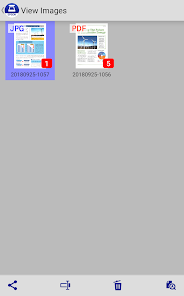
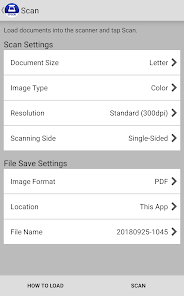
Epson DocumentScan supports a variety of file formats, including PDF, JPEG, and TIFF, giving you the flexibility to choose the best format for your needs. Whether you're sharing documents or archiving them, you can easily select the format that works best for you.

Seamless Cloud Integration

Epson DocumentScan allows users to easily upload scanned documents directly to popular cloud services like Google Drive and Dropbox. This feature streamlines your workflow, ensuring that your files are accessible from anywhere and reducing the hassle of manual uploads.

User-Friendly Interface

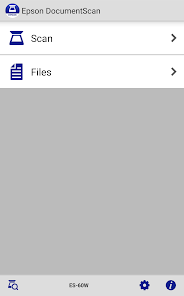
With its intuitive design, Epson DocumentScan makes scanning documents a breeze for users of all skill levels. The straightforward navigation and clear instructions help you get started quickly, so you can focus on what matters most—your documents.

Pros & Cons

Pros
  • High-speed scanning for increased productivity.
  • User-friendly interface for effortless operation.
  • Versatile file formats for easy sharing.
  • Compact design saves office space.
  • Reliable security features protect sensitive documents.
Cons
  • Limited compatibility with non-Epson devices
  • Slow processing speed for large documents
  • Occasional software glitches during scanning
  • Lacks advanced editing features post-scan

Real Experience Using Epson DocumentScan

Application Scenarios

Epson DocumentScan is designed for a variety of real-world scenarios that cater to both personal and professional needs. Whether you are a student looking to digitize lecture notes or a small business owner managing invoices and contracts, this app provides the flexibility to handle diverse document types. Users can easily scan receipts, business cards, and multi-page documents, making it an ideal choice for those who need to keep their paperwork organized. Additionally, the app's integration with cloud storage services allows for seamless access and sharing of scanned documents, which is particularly beneficial for remote teams and collaborative projects. Overall, Epson DocumentScan is well-suited for anyone who seeks to simplify their document management process.

User Experience

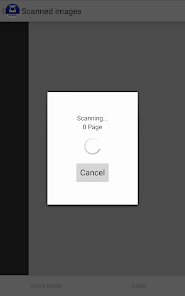
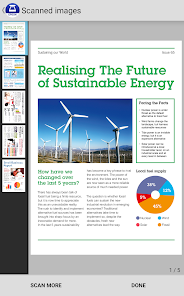
The user experience of Epson DocumentScan is generally positive, with a clean and intuitive interface that facilitates ease of use. Upon launching the app, users are greeted with straightforward navigation options, making it easy to start scanning with just a few taps. The scanning process is efficient, with the app quickly capturing high-quality images of documents. Users have reported that the OCR (Optical Character Recognition) feature works effectively, allowing for easy text extraction from scanned documents. However, some users have encountered occasional hiccups with the auto-crop feature, which may require manual adjustments for optimal results. Overall, the app is responsive and user-friendly, allowing both novice and experienced users to take full advantage of its capabilities.

Pricing

Epson DocumentScan is available for free, which makes it an attractive option for users who are budget-conscious. However, while the free version offers a solid range of features, users may find that certain advanced functionalities require in-app purchases or subscriptions. This tiered pricing model allows users to choose the features that best meet their needs without feeling overwhelmed by unnecessary costs. Overall, the pricing structure is competitive, especially considering the app's robust capabilities and the convenience it provides for document management.

Updates & Support

The developers of Epson DocumentScan are committed to providing regular updates to enhance user experience and address any technical issues. Users appreciate the prompt release of updates that often include new features and bug fixes, ensuring the app remains functional and up to date with evolving technology. Additionally, customer support is readily available through various channels, including email and online forums. The support team is generally responsive and helpful, assisting users with troubleshooting and inquiries. This commitment to ongoing support and improvement contributes positively to user satisfaction and confidence in the app.

verified Security & Privacy Review

The Epson DocumentScan app prioritizes user data security and privacy through a range of robust practices. One of its core features is the implementation of encryption protocols for data transmission, ensuring that scanned documents are protected from unauthorized access during transfer. The app requires minimal permissions, primarily focusing on camera and storage access, which are essential for its functionality. This limited access helps mitigate risks associated with excessive data collection. User data handling is transparent, with clear policies outlining how information is collected, stored, and utilized. Epson does not share personal data with third parties without explicit consent, reinforcing its commitment to user privacy. Additionally, the app allows users to delete their data, providing greater control over personal information. Regular updates ensure that security vulnerabilities are addressed swiftly, further enhancing user confidence. Overall, the Epson DocumentScan app demonstrates a strong dedication to maintaining the security and privacy of its users, making it a reliable choice for document scanning needs.

Reviews

3.0

“User-friendly interface for quick scanning tasks”

“Excellent image quality and fast processing speed”

“Syncs easily with cloud storage options”

“Occasional crashes during heavy use”

“Great for digitizing documents on the go”

Editor's Choice