This site uses cookies to enhance your user experience. By clicking any link on this site you are giving your consent to our cookie policy. Read more
Reject
Accept All

Advertiser and Editorial Disclosures

EE: Mobile, broadband & tech

EE: Mobile, broadband & tech

verified Verified App

Developer: EE

  • category

    Category: Tools

  • price

    Price: free

  • age rating

    Age Rating: Everyone

  • rating

    Rating: 2.2

  • download

    Downloads: 10,000,000+

  • version

    Version: 5.77.0

Screenshot 1
Screenshot 2
Screenshot 3
Screenshot 4
Screenshot 5
Screenshot 6
Screenshot 7
Screenshot 8

Features & Highlights

Broadband Flexibility

EE offers a range of broadband packages, including superfast fiber options designed to meet the needs of households and businesses alike. With no upfront costs and various contract lengths available, customers can easily find a solution that fits their connectivity requirements without breaking the bank.

Flexible Mobile Plans

With a variety of mobile plans tailored to meet different needs, EE allows users to choose from pay monthly or pay-as-you-go options. This flexibility ensures that you can find a plan that suits your lifestyle, whether you need a lot of data or prefer a more budget-friendly choice.

Smart Tech Integration

EE’s commitment to technology extends beyond connectivity, as they offer smart home solutions and devices that integrate seamlessly with their network. This means you can easily control your home devices, from security cameras to smart speakers, all while enjoying a reliable connection.

Superfast 5G Network

EE boasts one of the UK's most advanced 5G networks, delivering lightning-fast download speeds and reduced latency for an exceptional online experience. Whether streaming, gaming, or browsing, users can expect seamless connectivity even in crowded areas, making it perfect for those on the go.

Pros & Cons

Pros
  • EE offers extensive 5G coverage for faster mobile data speeds.
  • Enjoy reliable broadband connections for seamless streaming and gaming.
  • Access to innovative tech solutions that enhance everyday life.
  • Excellent customer service ensures quick resolutions to any issues.
  • Flexible plans cater to various needs and budgets effortlessly.
Cons
  • Limited coverage in rural areas can hinder connectivity.
  • High prices compared to competitors may deter customers.
  • Customer service may experience long wait times, frustrating users.

Real Experience Using EE: Mobile, broadband & tech

Application Scenarios

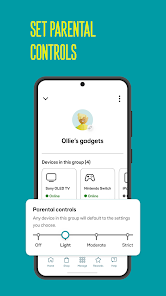
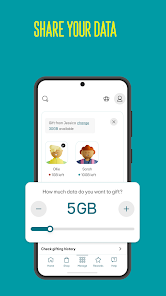
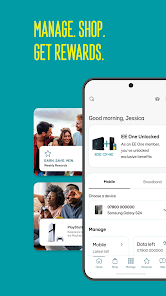
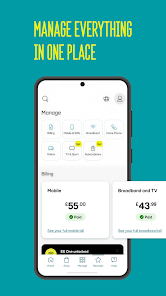
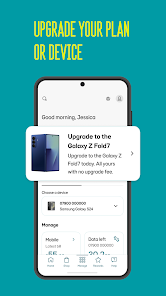
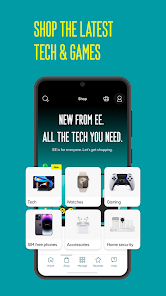
The EE app serves as a comprehensive platform for managing mobile and broadband services. It is particularly useful for customers who need to keep track of their mobile data usage in real-time, ensuring they never exceed their limits. Users can easily view their plan details, check remaining data, and add extra data if necessary. For those with broadband services, the app provides insights into internet usage and helps troubleshoot connectivity issues. The app is also an excellent tool for managing multiple accounts, making it ideal for families or businesses that require oversight of several lines and services. Additionally, the app allows users to purchase new devices or upgrade existing ones, streamlining the shopping experience directly from their smartphones.

User Experience

The user experience of the EE app is designed to be intuitive and user-friendly. Upon opening the app, users are greeted with a clean interface that displays relevant information at a glance. The navigation is straightforward, with clearly labeled sections allowing users to quickly find what they need. Most users appreciate the app's ability to provide real-time notifications about data usage, payments, and promotional offers, which keeps them informed about their services. Additionally, the app supports biometric login options, such as fingerprint or facial recognition, enhancing security while simplifying access. However, some users have reported occasional bugs or slow loading times, which can detract from an otherwise smooth experience.

Pricing

The EE app is free to download and use for existing EE customers. However, users should note that the app primarily serves as a management tool for their existing services rather than a standalone product with separate pricing. All features within the app, such as checking data usage, viewing bills, and purchasing additional services, are included in the customer's current plan. For those looking to upgrade or add new services, pricing will vary depending on the specific plans and devices selected. Overall, the app adds value to the existing service without additional costs.

Updates & Support

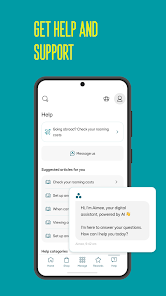
EE frequently updates the app to enhance performance and address user feedback. These updates often focus on improving functionality, fixing bugs, and introducing new features that align with customer needs. The app also includes a support section where users can find FAQs, troubleshooting guides, and contact options for direct assistance. Customers have remarked on the promptness of EE’s customer support, whether through the app or other channels. Overall, the commitment to regular updates and customer support ensures that users feel supported and satisfied with their experience.

verified Security & Privacy Review

The EE: Mobile, broadband & tech app prioritizes user security and privacy, implementing robust measures to protect personal information. The app utilizes encryption protocols to safeguard data transmitted between the device and its servers, ensuring that sensitive information remains confidential. In terms of permissions, the app requests access to specific features such as location services and contacts, which are essential for optimizing user experience and providing personalized services. Users are informed of these permissions during the installation process, allowing them to make informed decisions about data sharing. EE adheres to stringent privacy practices in compliance with relevant regulations, including GDPR. The app clearly outlines its data handling policies, making it transparent how user data is collected, stored, and utilized. Users can manage their privacy settings within the app, including options to opt-out of certain data collection practices. Overall, EE demonstrates a commitment to maintaining user trust through responsible data management and comprehensive security features.

Reviews

2.2

“Great coverage and fast internet speeds!”

“Customer service is always helpful and friendly.”

“Affordable plans with no hidden fees.”

“Reliable network, rarely drops calls.”

“User-friendly app for managing my account.”

FAQ

1

Can I submit suggestions or feedback to EE: Mobile, broadband & tech?

Yes, users can submit feedback and suggestions through the app's feedback section or by contacting customer support directly.

2

Does EE: Mobile, broadband & tech collect my personal data?

Yes, the app collects personal data to provide tailored services and improve user experience, but it adheres to privacy regulations and policies.

3

Does EE: Mobile, broadband & tech support offline use?

Some features may require an internet connection, but certain aspects of the app can be accessed offline, such as viewing previously loaded information.

4

How do I cancel my EE: Mobile, broadband & tech subscription?

Users can cancel their subscription by navigating to the account settings within the app or contacting customer support for assistance.

5

How much does a subscription to EE: Mobile, broadband & tech cost?

Subscription costs vary based on the selected plan and services; users can view specific pricing details within the app or on the EE website.

How to use EE: Mobile, broadband & tech

1

Can I activate my EE account online?

Yes, you can activate your account online by visiting the EE activation page and entering your details as prompted.

2

How can I contact Customer Service for EE?

You can reach Customer Service by calling 150 from your EE phone or 0800 956 6000 from any other phone.

3

How do I log in to my EE account?

Visit the EE website and click on 'Log in'. Enter your mobile number and password to access your account.

4

How do I log in to the EE app?

Open the EE app and enter your mobile number and password. If you haven't registered yet, you can do so through the app.

5

How do I reach Customer Service if I'm overseas?

You can contact Customer Service while abroad by calling +44 7953 966 250. Make sure to check any roaming charges.

Editor's Choice