This site uses cookies to enhance your user experience. By clicking any link on this site you are giving your consent to our cookie policy. Read more
Reject
Accept All
DYMO Connect

DYMO Connect

verified Verified App

Developer: DYMO

  • category

    Category: Productivity

  • price

    Price: free

  • age rating

    Age Rating: Everyone

  • rating

    Rating: 1.6

  • download

    Downloads: 100,000+

  • version

    Version: 2.2.9

Screenshot 1
Screenshot 2
Screenshot 3
Screenshot 4
Screenshot 5
Screenshot 6

Features & Highlights

Bluetooth Connectivity

With seamless Bluetooth connectivity, DYMO Connect lets you print labels directly from your smartphone or tablet. This feature ensures that you can create and print labels on-the-go, making it perfect for busy professionals who need quick and efficient solutions.

Customizable Templates

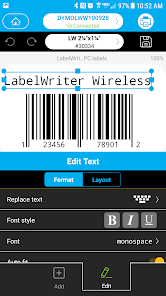
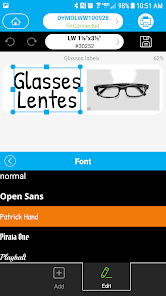
The app offers a vast library of customizable templates, allowing users to tailor their labels to specific requirements. You can easily adjust fonts, colors, and sizes, ensuring that your labels not only serve their purpose but also look great.

Smart Label Creation

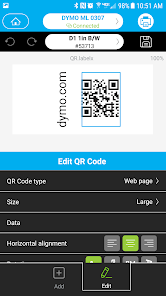
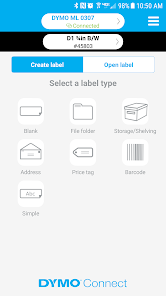
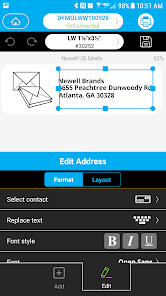
DYMO Connect simplifies the label-making process with its intuitive interface, allowing users to create custom labels effortlessly. Whether you need address labels, barcodes, or organizational tags, the app provides a wide range of templates and design options to suit your needs.

User-Friendly Interface

DYMO Connect boasts a user-friendly interface that makes navigating the app a breeze. Even those who are not tech-savvy can quickly learn to create and manage labels, making it accessible for everyone from home users to small business owners.

Pros & Cons

Pros
  • Easy label creation with user-friendly interface
  • Customizable templates for various labeling needs
  • Wireless printing from mobile devices and tablets
  • Compatibility with multiple DYMO label printers
  • Quick access to saved designs for efficiency
Cons
  • Limited compatibility with older devices
  • Frequent connectivity issues reported
  • Lacks advanced label design features
  • User interface can be confusing for beginners

Real Experience Using DYMO Connect

Application Scenarios

DYMO Connect is designed to simplify the process of creating and managing labels for various applications. Whether you are a small business owner needing to organize inventory, a teacher labeling classroom supplies, or a home user looking to manage your personal belongings, DYMO Connect has you covered. The app seamlessly integrates with DYMO label printers, allowing you to create custom labels directly from your smartphone or tablet. Users can take advantage of a variety of templates for shipping labels, address labels, and even personalized labels for gifts and events. The versatility of the app makes it suitable for both professional and personal use, enhancing productivity and organization in any setting.

User Experience

The user experience with DYMO Connect is generally smooth and intuitive. The app features a clean interface that makes navigation straightforward. Users can easily choose from a wide range of fonts, colors, and graphics to create labels that suit their needs. The ability to use images and barcodes adds another layer of customization, making it easy to produce professional-quality labels. Additionally, the app supports Bluetooth connectivity, which allows for quick pairing with DYMO printers. The printing process is fast and efficient, which is crucial for users who work in fast-paced environments. However, some users have reported minor connectivity issues, which can occasionally disrupt the labeling process. Overall, the ease of use and rich features contribute to a positive user experience.

Pricing

DYMO Connect itself is free to download, making it accessible for all users. However, users need to own a compatible DYMO label printer to take full advantage of the app's features. The cost of DYMO printers varies depending on the model and capabilities, but there are options available for different budgets. Additionally, users should consider the cost of label rolls, which can add up over time, especially for those who print labels frequently. Despite these costs, many users find that the investment in a DYMO printer and supplies is worthwhile due to the time-saving benefits and organizational advantages the app provides.

Updates & Support

DYMO Connect is regularly updated to enhance functionality and improve user experience. The developers actively implement user feedback to fix bugs and introduce new features, ensuring the app stays relevant and efficient. For support, users can access a comprehensive help center on the DYMO website, which offers FAQs, troubleshooting guides, and instructional videos. Additionally, customer service is available for users who encounter specific issues. While some users have expressed a desire for more responsive customer support, the resources provided are generally sufficient to assist with most inquiries. Overall, the commitment to updates and support contributes to the app’s reliability and user satisfaction.

verified Security & Privacy Review

The DYMO Connect app prioritizes user security and privacy through a range of robust practices. It employs encryption protocols to safeguard data transmission between the app and connected devices, ensuring that sensitive information remains secure. The app requests permissions that are directly relevant to its functionality, such as access to Bluetooth for device pairing, which minimizes unnecessary exposure of personal data. Users are informed about the types of data collected, which typically includes information related to label designs and printer settings. The app does not share personal information with third parties without user consent, aligning with best practices for data handling. Furthermore, DYMO Connect provides options for users to manage their data, allowing them to delete stored information when no longer needed. Overall, DYMO Connect demonstrates a commitment to maintaining user privacy while offering a seamless experience. Regular updates and monitoring of security practices contribute to a trustworthy environment for users who rely on this app for their labeling needs.

Reviews

1.6

“User-friendly interface makes label creation easy and quick.”

“Great app for organizing and printing labels effectively.”

“Syncs seamlessly with my DYMO printer, highly recommend.”

“Occasional bugs but overall a solid labeling tool.”

“Customization options are impressive and very useful.”

Editor's Choice