This site uses cookies to enhance your user experience. By clicking any link on this site you are giving your consent to our cookie policy. Read more
Reject
Accept All
DWG FastView-CAD Viewer&Editor

DWG FastView-CAD Viewer&Editor

verified Verified App

Developer: Gstarsoft Co., Ltd.

  • category

    Category: Productivity

  • price

    Price: free

  • age rating

    Age Rating: Everyone

  • rating

    Rating: 3.7

  • download

    Downloads: 10,000,000+

  • version

    Version: 5.16.11

Screenshot 1
Screenshot 2
Screenshot 3
Screenshot 4
Screenshot 5
Screenshot 6
Screenshot 7
Screenshot 8

Features & Highlights

Annotation Tools

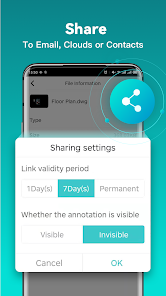
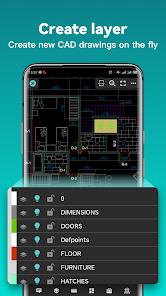
With a robust set of annotation tools, DWG FastView allows users to add comments, markups, and notes directly onto their CAD files. This makes it easy to share insights and suggestions with colleagues, improving overall project clarity and efficiency.

Multi-Format Support

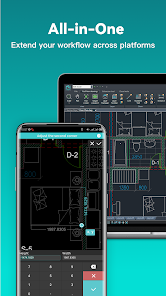
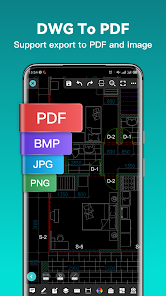
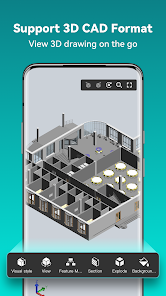
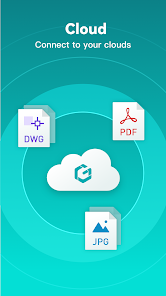
DWG FastView supports a wide range of file formats, enabling users to easily open, view, and edit CAD files without compatibility issues. This flexibility ensures that you can work with various projects and collaborate seamlessly with team members who use different software solutions.

Real-Time Collaboration

The app facilitates real-time collaboration, allowing multiple users to view and edit projects simultaneously. This feature enhances teamwork and communication, ensuring that feedback is instant and that everyone is on the same page, regardless of their location.

User-Friendly Interface

Designed with usability in mind, DWG FastView features a clean and intuitive interface that makes navigating through complex designs a breeze. Even if you're new to CAD software, you'll find it easy to access tools and features, streamlining your workflow.

Pros & Cons

Pros
  • Supports multiple CAD file formats for versatility
  • User-friendly interface for easy navigation and editing
  • Fast performance ensures quick file loading and viewing
  • Annotation tools enhance collaboration and communication
  • Mobile access allows viewing on-the-go for convenience
Cons
  • Limited support for complex file formats
  • Lacks advanced editing features
  • User interface can be unintuitive
  • Performance issues with large files

Real Experience Using DWG FastView-CAD Viewer&Editor

Application Scenarios

DWG FastView-CAD Viewer&Editor is an indispensable tool for professionals in the architecture, engineering, and construction industries. Its primary application lies in the ability to view and edit CAD drawings on the go, making it an ideal choice for site visits and client meetings. Users can effortlessly open and annotate DWG files directly from their mobile devices, eliminating the need for a desktop setup. This feature is particularly beneficial for architects and engineers who require immediate access to project revisions and updates. Additionally, the app supports various file formats, including DXF and DWT, allowing for versatile compatibility across different design software, which enhances collaborative efforts among teams. Whether you're a project manager reviewing blueprints or a contractor accessing technical drawings on-site, DWG FastView ensures that you remain connected to your work, no matter where you are.

User Experience

The user interface of DWG FastView is designed with simplicity and efficiency in mind. Users often commend the app for its intuitive navigation and quick loading times, which streamline the process of accessing files. The ability to zoom in and out, pan, and rotate drawings provides a seamless experience, making it easy to examine intricate details. Moreover, the annotation tools allow for straightforward markup, enabling users to highlight crucial information directly on the drawings. Feedback from users indicates that the editing features, while robust, maintain a user-friendly approach, making it accessible even for those who may not be as tech-savvy. Overall, the combination of functionality and ease of use has led to high satisfaction rates among users, who appreciate the app's efficiency in handling CAD files.

Pricing

DWG FastView offers a flexible pricing structure that caters to various user needs. The basic features of the app are available for free, allowing users to view and annotate CAD files without any cost. For those seeking advanced functionalities such as cloud storage and enhanced editing capabilities, the premium subscription is available at a reasonable monthly or yearly rate. This tier not only unlocks additional features but also provides users with access to regular updates and improvements. Many users find the pricing to be competitive, especially when compared to other CAD software solutions, making it a cost-effective option for both individuals and businesses.

Updates & Support

The development team behind DWG FastView is proactive in delivering updates that enhance app performance and introduce new features based on user feedback. Regular updates ensure that the app remains compatible with the latest file formats and operating systems. Furthermore, customer support is readily available, with a dedicated team to assist users with any inquiries or technical difficulties. Many users appreciate the responsive nature of the support team, which helps to resolve issues quickly and efficiently. This commitment to continuous improvement and user satisfaction contributes significantly to the overall experience of using DWG FastView.

verified Security & Privacy Review

The security and privacy practices of DWG FastView-CAD Viewer&Editor are commendable, prioritizing user data protection. The app employs robust encryption protocols to safeguard files during transfers and storage, ensuring that sensitive design data remains confidential. Regarding permissions, DWG FastView requires access to files and storage, which is standard for CAD applications that need to open and save drawings. Users should be aware that the app does not request unnecessary permissions, minimizing potential vulnerabilities. The app's privacy policy is transparent, outlining how user data is collected and utilized. It emphasizes that personal information is not shared with third parties without explicit consent, reinforcing user trust. Additionally, the app allows users to manage their data preferences easily, providing options to opt-out of data collection practices. Overall, DWG FastView demonstrates a strong commitment to security and privacy, making it a reliable choice for users who prioritize the integrity of their CAD files and personal information.

Reviews

3.7

“User-friendly interface for quick CAD viewing.”

“Great editing features for on-the-go work.”

“Reliable performance with large files.”

“Excellent compatibility with various CAD formats.”

“Regular updates improve functionality and user experience.”

Editor's Choice