This site uses cookies to enhance your user experience. By clicking any link on this site you are giving your consent to our cookie policy. Read more
Reject
Accept All
DroidCam Webcam (Classic)

DroidCam Webcam (Classic)

verified Verified App

Developer: Dev47Apps

  • category

    Category: Tools

  • price

    Price: free

  • age rating

    Age Rating: Everyone

  • rating

    Rating: 4.1

  • download

    Downloads: 10,000,000+

  • version

    Version: /

Screenshot 1
Screenshot 2
Screenshot 3
Screenshot 4
Screenshot 5
Screenshot 6
Screenshot 7

Features & Highlights

Audio Support

With integrated audio support, DroidCam Webcam (Classic) enables seamless communication during video calls. You can easily transmit audio from your device, ensuring that your voice is heard loud and clear, enhancing the overall experience for both you and your audience.

Easy Setup Process

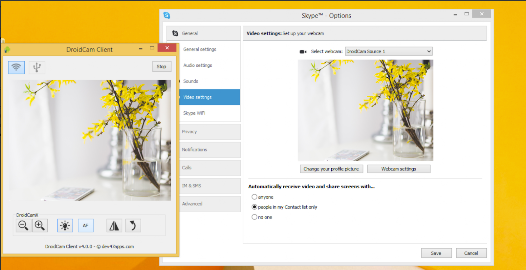
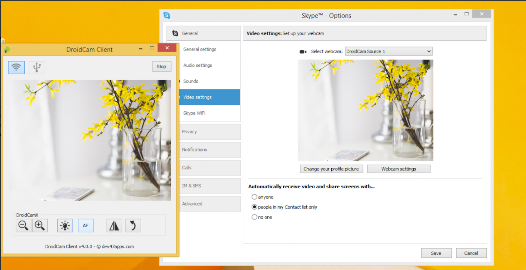
Getting started with DroidCam Webcam (Classic) is a breeze thanks to its user-friendly setup process. Simply download the app on your phone and connect it to your PC via Wi-Fi or USB, making it accessible for users of all tech levels without any hassle.

High-Quality Video

DroidCam Webcam (Classic) delivers impressive video quality, allowing users to stream in high definition. Whether you're on a video call or recording content, the app ensures your image is clear and crisp, making it an excellent choice for professionals and casual users alike.

Multiple Connection Options

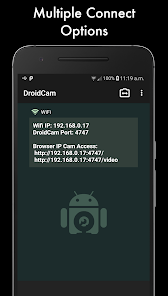
DroidCam Webcam (Classic) offers various connection methods, including Wi-Fi and USB, providing flexibility to suit your needs. This versatility ensures you can use your phone as a webcam wherever you are, whether at home or on the go, without being tied down by cables.

Pros & Cons

Pros
  • High-quality video streaming capabilities for clear visuals
  • Easy setup with user-friendly mobile app integration
  • Wireless connection for convenient, clutter-free use
  • Compatible with various video conferencing platforms
  • Affordable alternative to traditional webcams and devices
Cons
  • Limited resolution compared to dedicated webcams
  • Requires stable Wi-Fi for optimal performance
  • Dependent on smartphone battery life
  • Potential latency issues during video streaming

Real Experience Using DroidCam Webcam (Classic)

Application Scenarios

DroidCam Webcam (Classic) is an innovative solution that transforms your Android device into a high-quality webcam for your computer. This app is particularly useful in various scenarios, especially for users who rely on video conferencing platforms such as Zoom, Skype, or Microsoft Teams. With the increasing demand for remote communication, DroidCam provides a practical alternative to traditional webcams, which may be hard to find or inconvenient to set up. Additionally, it serves well for live streaming, online teaching, and even gaming, where a high-definition camera can significantly enhance the visual experience. The ability to use your smartphone camera allows for greater flexibility and mobility, making it a favorite among content creators and professionals who require a reliable video source on the go.

User Experience

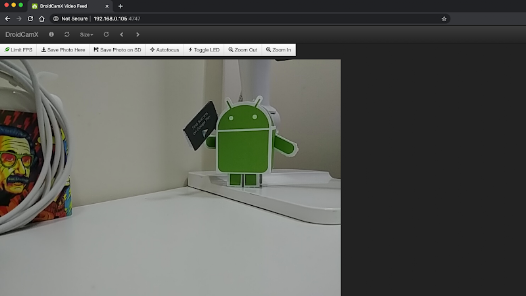
The user experience of DroidCam Webcam (Classic) is generally positive, with a straightforward interface that allows users to connect their devices quickly. Installation is simple; users just need to download the app on their Android device and the corresponding client on their computer. The connection can be established via Wi-Fi or USB, providing options for different user preferences. Once set up, the app delivers impressive video quality, with options to adjust the resolution and frame rates. However, some users have reported occasional connectivity issues, especially when using Wi-Fi, but these are often resolved with a stable network. Overall, the app’s performance is commendable, and it effectively meets the needs of users looking for an alternative webcam solution.

Pricing

DroidCam Webcam (Classic) is available for free, which makes it an attractive option for those looking to enhance their video conferencing experience without incurring additional costs. The free version offers a solid range of features, but for users seeking enhanced functionality, there is a pro version available for a nominal fee. The pro version removes watermarks, unlocks higher resolutions, and provides additional features, making it worth considering for frequent users who desire a more polished experience. Overall, the pricing structure is competitive, especially given the quality of service provided by the app.

Updates & Support

The developers of DroidCam are committed to maintaining and updating the app regularly, which is essential in keeping pace with changes in technology and user expectations. Users can expect periodic updates that enhance the app's performance, fix bugs, and introduce new features. In terms of support, the app offers a user-friendly FAQ section on their website, along with forums where users can share their experiences and troubleshoot issues. While direct customer support may not be as extensive as some premium products, the community support is robust, and many users find answers to their questions through shared knowledge and experience. Overall, the app is well-supported, making it a reliable choice for those in need of a webcam solution.

verified Security & Privacy Review

The DroidCam Webcam (Classic) app offers users a convenient way to transform their mobile devices into webcams. However, when it comes to security and privacy, several factors should be considered. The app requires access to your camera and microphone, which raises concerns about unauthorized use. Users must ensure they are aware of these permissions and the potential risks associated with them. In terms of data handling, DroidCam operates primarily over local network connections, reducing exposure to external threats. However, the app does not utilize encryption for video streams, potentially allowing for eavesdropping on sensitive communications if the network is compromised. Additionally, users should be cautious about sharing their IP address, as it can be exploited by malicious actors. The app's privacy policy should be reviewed to understand how user data is collected, stored, and used. Overall, while DroidCam Webcam (Classic) can serve its purpose effectively, users must remain vigilant about the permissions granted and the potential implications for their privacy and security.

Reviews

4.1

“Easy setup and great video quality!”

“Perfect for remote meetings.”

“Reliable connection with minimal lag.”

“User-friendly interface, highly recommend!”

“Transforms phone into a useful webcam.”

Editor's Choice