This site uses cookies to enhance your user experience. By clicking any link on this site you are giving your consent to our cookie policy. Read more
Reject
Accept All
Dr.Fone: Photo & Data Recovery

Dr.Fone: Photo & Data Recovery

verified Verified App

Developer: Shenzhen Wondershare Software Co., Ltd.

  • category

    Category: Tools

  • price

    Price: free

  • age rating

    Age Rating: Everyone

  • rating

    Rating: 3.8

  • download

    Downloads: 10,000,000+

  • version

    Version: 5.2.20.987

Screenshot 1
Screenshot 2
Screenshot 3
Screenshot 4
Screenshot 5
Screenshot 6
Screenshot 7
Screenshot 8

Features & Highlights

Data Recovery from Various Devices

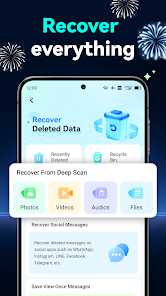
This powerful tool supports data recovery across multiple platforms, including iOS and Android devices. Whether you’ve lost contacts, messages, or important files, Dr.Fone makes it simple to retrieve your data, ensuring you never have to worry about accidental loss again.

Preview Before Recovery

One of the standout features of Dr.Fone is the ability to preview recoverable files before initiating the recovery process. This lets you select only the items you need, saving you time and ensuring you restore exactly what’s important to you.

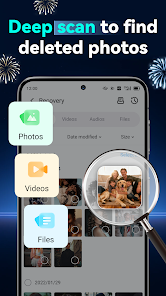
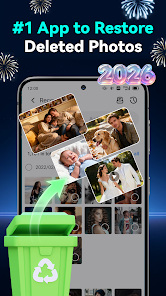
Recover Deleted Photos

Dr.Fone excels at recovering deleted photos from both your device and external storage. With its advanced scanning algorithms, it can locate lost images that may seem irretrievable, giving you a chance to restore those cherished memories with ease and confidence.

User-Friendly Interface

Dr.Fone is designed with a user-friendly interface that makes data recovery accessible to everyone, regardless of technical skill. Its intuitive navigation guides you through the recovery process step-by-step, so you can recover your important files without any hassle or confusion.

Pros & Cons

Pros
  • Recovers lost photos and files effortlessly
  • Supports various file types and formats
  • User-friendly interface for easy navigation
  • Safe and secure data recovery process
  • Compatible with multiple devices and platforms
Cons
  • Limited recovery options for certain file types
  • High cost compared to alternatives
  • Slow scanning process can be frustrating
  • Success rates vary significantly by device

Real Experience Using Dr.Fone: Photo & Data Recovery

Application Scenarios

Dr.Fone: Photo & Data Recovery is a versatile application designed to assist users in recovering lost or deleted data across various scenarios. Whether you've accidentally erased precious photos from your smartphone, lost important files due to a system crash, or faced data loss after a software update, Dr.Fone has you covered. The app excels in situations where users need to recover data from both iOS and Android devices, making it a go-to solution for a diverse range of users. Additionally, it can be particularly useful for those who may have experienced device theft or damage, providing a chance to restore data from backups or cloud services. Furthermore, the app's ability to scan for deleted files from social media apps adds an extra layer of convenience for users who frequently share images and videos on platforms like WhatsApp and Facebook.

User Experience

The user experience of Dr.Fone is generally positive, as it is designed with an intuitive interface that caters to both tech-savvy individuals and those less familiar with technology. Upon launching the app, users are greeted with clear instructions and a well-structured layout that guides them through the recovery process. The app’s scanning feature is efficient, often returning results quickly, which is crucial when time is of the essence. Users have reported high success rates in recovering lost data, particularly photos and videos. However, some may find the need for a computer connection to unlock certain features a bit cumbersome. Overall, the seamless experience, combined with a straightforward design, makes Dr.Fone accessible for users of all skill levels.

Pricing

Dr.Fone offers a flexible pricing model that includes both free and premium options. The free version allows users to scan for lost data and preview recoverable files, which is helpful for assessing whether the full version is worth the investment. For those who require complete recovery capabilities, the premium version is available through a subscription or one-time purchase. The pricing is competitive compared to similar applications in the market, making it an appealing choice for users who prioritize data recovery. While some may wish for a more robust free version, the trial experience does provide enough insight into the app’s capabilities, encouraging users to opt for the premium features when necessary.

Updates & Support

Dr.Fone regularly releases updates to enhance functionality, improve user experience, and address any potential bugs. These updates reflect the developers' commitment to keeping the app current with the latest technology and user needs. Additionally, the customer support for Dr.Fone is commendable, with a dedicated help center and responsive customer service team available to assist users with any inquiries or technical difficulties. The availability of tutorials and FAQs on their website further empowers users to troubleshoot minor issues independently, promoting a sense of confidence when using the app. Overall, the combination of frequent updates and reliable support makes Dr.Fone a trustworthy option for data recovery needs.

verified Security & Privacy Review

Dr.Fone: Photo & Data Recovery prioritizes user security and privacy through various measures. The app requires essential permissions to access files and data on the device, ensuring that it can effectively recover lost photos and data. However, it is crucial for users to be aware of the permissions they grant, as the app needs access to sensitive information. The app operates under a strict privacy policy that outlines how user data is handled. Dr.Fone does not store recovered files on its servers, which minimizes the risk of unauthorized access. Furthermore, it employs encryption methods to protect data during the recovery process, ensuring that sensitive information remains secure. Users are encouraged to read the privacy policy thoroughly to understand how their data will be utilized. Overall, Dr.Fone demonstrates a commitment to safeguarding user privacy, but users should remain vigilant about the permissions they accept and the data they wish to recover.

Reviews

3.8

“Effective recovery tool, saved my precious photos!”

“User-friendly interface, easy to navigate and use.”

“Restored lost data quickly, highly recommend!”

“A lifesaver for deleted files, very reliable.”

“Customer support was responsive and helpful.”

Editor's Choice