This site uses cookies to enhance your user experience. By clicking any link on this site you are giving your consent to our cookie policy. Read more
Reject
Accept All
DingTalk

DingTalk

verified Verified App

Developer: DingTalk (Singapore) Private Limited.

  • category

    Category: Productivity

  • price

    Price: free

  • age rating

    Age Rating: Everyone

  • rating

    Rating: 2.2

  • download

    Downloads: 5,000,000+

  • version

    Version: 8.2.3

Screenshot 1
Screenshot 2
Screenshot 3
Screenshot 4
Screenshot 5
Screenshot 6
Screenshot 7
Screenshot 8

Features & Highlights

Integrated Calendar

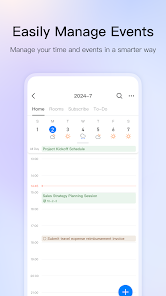
The integrated calendar feature in DingTalk helps users manage their schedules by allowing them to set appointments and reminders directly within the app. This functionality ensures that team members stay organized and on top of their commitments, enhancing overall efficiency.

Smart Collaboration

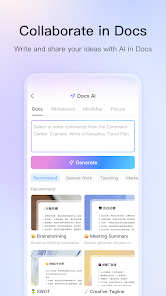
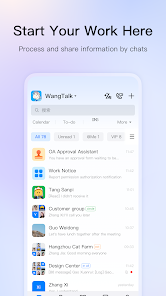
DingTalk enhances team collaboration through its intuitive interface that allows users to share files, messages, and updates seamlessly. The platform supports real-time communication, ensuring that team members stay connected regardless of their location, fostering a more cohesive work environment.

Task Management

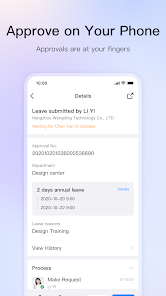
With DingTalk's task management tools, users can easily assign, track, and prioritize tasks within their teams. This feature helps streamline workflows and boosts productivity by providing clear visibility on project progress and individual responsibilities, making it easier to meet deadlines.

Video Conferencing

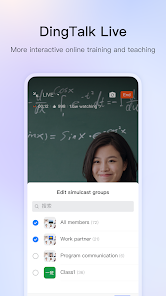
DingTalk offers high-quality video conferencing capabilities that enable teams to hold virtual meetings effortlessly. With features like screen sharing and recording, users can ensure effective communication and collaboration, even when working remotely.

Pros & Cons

Pros
  • Enhanced team collaboration and communication tools are available
  • Seamless integration with various business applications is offered
  • User-friendly interface simplifies task management and scheduling
  • Robust security features protect sensitive company data
  • Customizable workflows increase efficiency and productivity
Cons
  • Limited integration with non-Chinese apps
  • Complex interface can confuse new users
  • Notifications may overwhelm users with constant alerts
  • Lack of robust offline functionality

Real Experience Using DingTalk

Application Scenarios

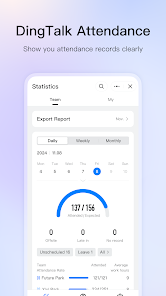
DingTalk is a versatile communication and collaboration platform that caters to a wide range of application scenarios. Businesses of all sizes utilize DingTalk for internal communication, project management, and team collaboration. For remote teams, the app serves as a virtual office where members can hold video conferences, share documents, and manage tasks seamlessly. Educational institutions also leverage DingTalk to facilitate online learning, allowing teachers and students to interact in real-time. Furthermore, its integration capabilities with various third-party applications make it an ideal choice for organizations looking to streamline their workflows. From scheduling meetings to tracking attendance, DingTalk covers it all, making it suitable for enterprises, small businesses, and educational settings alike.

User Experience

The user experience on DingTalk is generally positive, marked by a clean interface that is easy to navigate. Users appreciate the intuitive design that allows them to quickly access features like messaging, video calls, and file sharing. The app’s notification system is well-implemented, ensuring that users stay updated without feeling overwhelmed. Users also benefit from features like customizable workflows and task assignments, which enhance productivity. However, some users have reported occasional lag during video calls, especially in regions with slower internet connections. Overall, the app effectively combines functionality with a user-friendly design, making it accessible for both tech-savvy individuals and those less familiar with digital communication tools.

Pricing

DingTalk offers a flexible pricing model that caters to different business needs. The app is free for basic use, allowing small teams to access core features without any financial commitment. For larger organizations, DingTalk provides premium plans that unlock advanced functionalities such as increased storage, enhanced security features, and priority support. Pricing tiers vary based on the number of users and feature sets, allowing businesses to choose a plan that aligns with their budget and requirements. This tiered approach ensures that companies can scale their use of DingTalk as they grow, making it a cost-effective solution for long-term collaboration.

Updates & Support

DingTalk is committed to continuous improvement, frequently rolling out updates that enhance functionality and user experience. These updates often include new features, performance enhancements, and security patches. The app also provides users with a comprehensive help center, including FAQs, troubleshooting guides, and tutorial videos to assist with common issues. Additionally, DingTalk offers customer support through various channels, including email and live chat, ensuring that users can find assistance when needed. The platform’s commitment to regular updates and robust support contributes to a reliable user experience, making it a trusted choice for communication and collaboration.

verified Security & Privacy Review

DingTalk takes user security and privacy seriously, implementing various measures to protect sensitive information. The app employs end-to-end encryption for messages, ensuring that communications remain confidential between users. Additionally, it requires users to verify their identities, which adds an extra layer of security against unauthorized access. In terms of permissions, DingTalk requests access to essential features such as contacts, camera, and microphone to enhance user experience. However, users can manage these permissions through their device settings, allowing for greater control over what data is shared. DingTalk's privacy policy outlines how user data is collected, used, and stored. The app commits to not selling personal information to third parties and provides transparency regarding data handling practices. Users are encouraged to regularly review their privacy settings and be mindful of the information they share within the app. Overall, DingTalk demonstrates a strong commitment to securing user data and maintaining privacy, making it a reliable choice for those concerned about digital security.

Reviews

2.2

“User-friendly interface with great collaboration features”

“Reliable for team communication and task management”

“Frequent updates improve functionality and user experience”

“Seamless integration with other work tools”

“Occasional bugs, but overall a solid app”

Editor's Choice