This site uses cookies to enhance your user experience. By clicking any link on this site you are giving your consent to our cookie policy. Read more
Reject
Accept All
Digital Wellbeing

Digital Wellbeing

verified Verified App

Developer: Google LLC

  • category

    Category: Tools

  • price

    Price: free

  • age rating

    Age Rating: Everyone

  • rating

    Rating: 3.6

  • download

    Downloads: 5,000,000,000+

  • version

    Version: 1.36.834316632 (787857)

Screenshot 1
Screenshot 2
Screenshot 3
Screenshot 4
Screenshot 5
Screenshot 6

Features & Highlights

App Timers

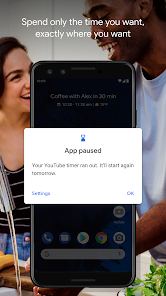
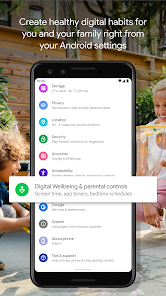
App Timers empower users to set daily limits on app usage, helping to cultivate a balanced approach to screen time. When the limit is reached, users receive a reminder, encouraging them to take breaks, engage in other activities, and ultimately foster a more mindful interaction with their devices.

Focus Mode

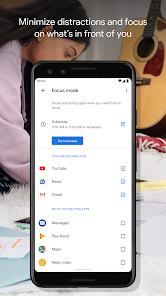
Focus Mode allows users to minimize distractions by blocking certain apps and notifications during designated times. This feature helps create a more productive environment, enabling users to concentrate on tasks without constant interruptions, leading to better focus and efficiency in daily activities.

Screen Time Tracking

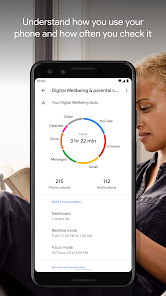
Screen Time Tracking provides insights into how much time you spend on different apps and activities throughout the day. This awareness helps you identify patterns in your usage, allowing for better management of your digital habits and fostering a healthier relationship with your devices.

Wind Down Feature

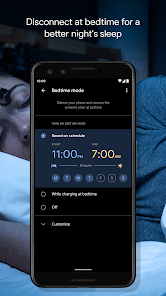
The Wind Down feature helps users prepare for sleep by gradually reducing screen brightness and limiting notifications as bedtime approaches. By creating a calming environment, it encourages healthier nighttime routines and promotes better sleep quality, making it easier to disconnect from technology before sleep.

Pros & Cons

Pros
  • Promotes healthier screen time habits for users
  • Enhances focus by reducing distractions and notifications
  • Encourages mindful technology usage for better balance
  • Supports mental health through awareness of usage patterns
  • Facilitates improved sleep quality by managing device access
Cons
  • May lead to increased screen time awareness
  • Can create anxiety about usage limits
  • Might overlook underlying mental health issues
  • Risks promoting digital detox extremes

Real Experience Using Digital Wellbeing

Application Scenarios

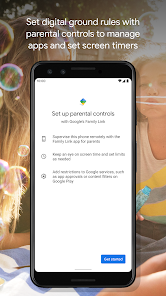
Digital Wellbeing is designed to enhance users' awareness of their digital habits and promote healthier usage of technology. It is particularly beneficial for individuals who find themselves constantly distracted by their devices or those who wish to establish a healthier relationship with technology. The app is ideal for parents looking to monitor their children's screen time and encourage balanced digital usage. Additionally, professionals can utilize it to track their productivity levels, ensuring that they stay focused on work without being sidetracked by social media or other engaging applications. Overall, Digital Wellbeing fits well into various scenarios, whether for personal use, family management, or workplace productivity enhancement.

User Experience

The user experience with Digital Wellbeing is largely positive, as it features a clean and intuitive interface that is easy to navigate. Upon first launching the app, users are greeted with a concise overview of their daily screen time and app usage statistics, which are visually represented through graphs and charts. This data visualization empowers users to understand their habits at a glance. The app also offers personalized recommendations based on individual usage patterns, which can motivate users to make necessary adjustments. Furthermore, the focus mode feature allows users to temporarily silence notifications and limit app access, effectively reducing distractions. Despite its strengths, some users may find the tracking features slightly overwhelming initially, but with regular use, they adapt and appreciate the insights provided.

Pricing

Digital Wellbeing is available as a free app, making it accessible to a wide range of users. This pricing model is particularly advantageous for those who may be hesitant to invest in paid applications before fully understanding their benefits. The app does not include in-app purchases, ensuring that users can access all features without any financial commitment. This transparency in pricing fosters trust and encourages more individuals to try the app for themselves, ultimately leading to a healthier digital lifestyle.

Updates & Support

The developers of Digital Wellbeing are committed to continuous improvement, frequently releasing updates that enhance functionality and user experience. With each update, users can expect new features and optimizations based on user feedback and technological advancements. Support is readily available through the app's help section, which provides comprehensive FAQs and troubleshooting guides. For more personalized assistance, users can reach out to customer support via email or through social media channels. This level of support ensures that users feel valued and are able to maximize their experience with the app, reinforcing its role as an essential tool for managing digital wellbeing.

verified Security & Privacy Review

The Digital Wellbeing app prioritizes user security and privacy, implementing robust measures to safeguard personal information. The app collects minimal data necessary for functionality, primarily focusing on usage statistics to help users manage their screen time and digital habits effectively. All data transmitted between the app and its servers is encrypted, ensuring that sensitive information remains protected from unauthorized access. Additionally, Digital Wellbeing adheres to strict privacy policies, transparently outlining data collection practices and user rights. Users have control over their data, with options to delete their usage history and opt out of data collection features. In terms of permissions, the app requires access to device usage statistics and app activity, which are essential for providing insights into digital habits. However, it does not request unnecessary permissions, maintaining a balance between functionality and user privacy. Overall, Digital Wellbeing demonstrates a commitment to protecting user data, making it a reliable choice for those seeking to enhance their digital well-being without compromising their privacy.

Reviews

3.6

“Helps me stay focused on important tasks”

“Great insights into my screen time habits”

“User-friendly interface with helpful features”

“Promotes healthier device usage habits”

“Effective tool for managing digital distractions”

Editor's Choice