This site uses cookies to enhance your user experience. By clicking any link on this site you are giving your consent to our cookie policy. Read more
Reject
Accept All

Advertiser and Editorial Disclosures

Dexcom Clarity

Dexcom Clarity

verified Verified App

Developer: Dexcom

  • category

    Category: Health & Fitness

  • price

    Price: free

  • age rating

    Age Rating: Everyone

  • rating

    Rating: 3.9

  • download

    Downloads: 1,000,000+

  • version

    Version: 2.27.0.524

Screenshot 1
Screenshot 2
Screenshot 3
Screenshot 4
Screenshot 5
Screenshot 6

Features & Highlights

Data Visualization

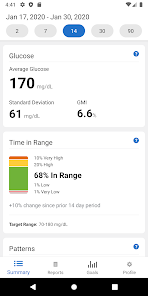
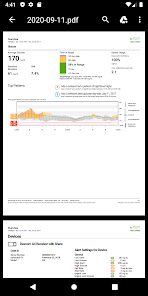
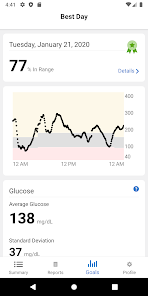
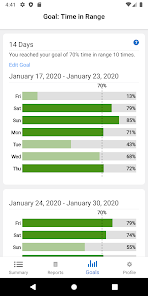
Dexcom Clarity offers intuitive data visualization tools that allow users to easily interpret their glucose trends and patterns. With colorful graphs and charts, it simplifies complex data, helping users make informed decisions about their diabetes management with confidence and clarity.

Integration with Devices

Dexcom Clarity seamlessly integrates with various diabetes management devices, allowing for a cohesive experience. This connectivity ensures that all data is centralized, making it easier to track and analyze glucose levels alongside other health metrics.

Personalized Insights

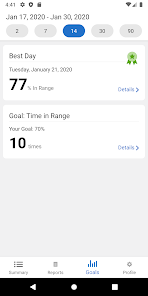
The app provides personalized insights based on your glucose data, helping you understand your diabetes management better. By identifying patterns and trends, Dexcom Clarity empowers users to make adjustments to their routines, ultimately improving their overall health and well-being.

Reports and Summaries

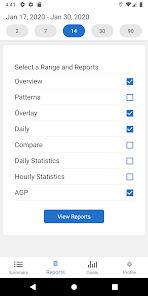
Users can generate comprehensive reports that summarize glucose data over specific time frames. These reports are invaluable for discussions with healthcare providers, ensuring that both parties have a clear understanding of diabetes management progress and necessary adjustments.

Pros & Cons

Pros
  • Improves diabetes management through data insights
  • Offers customizable reports for personalized care
  • Tracks trends for better decision-making
  • Enhances communication with healthcare providers
  • Simplifies data sharing with family and friends
Cons
  • Limited integration with third-party apps
  • Data may be overwhelming for users
  • Requires regular internet access for updates
  • Interpretation can be complex for some patients

Real Experience Using Dexcom Clarity

Application Scenarios

Dexcom Clarity serves as an essential tool for individuals managing diabetes, particularly those using continuous glucose monitoring (CGM) systems. Users can leverage this app in various scenarios, such as tracking daily glucose levels, assessing trends over time, and sharing data with healthcare providers. The app is particularly useful for those who need to monitor their glucose levels closely, enabling them to make informed decisions about their diet, exercise, and medication. Furthermore, caregivers can utilize the app to keep an eye on loved ones' glucose levels, ensuring timely interventions when necessary. Whether at home, at work, or on the go, Dexcom Clarity provides a seamless experience to manage diabetes effectively.

User Experience

The user experience of Dexcom Clarity is designed to be intuitive and straightforward, making it accessible for users of all ages. The interface is clean and organized, allowing users to easily navigate through their glucose data, view trends, and generate reports. Many users appreciate the visual representations of their glucose levels, which help in quickly identifying patterns and anomalies. The app’s integration with Dexcom’s CGM devices enhances its functionality, providing real-time data that is crucial for effective diabetes management. Additionally, users have reported that the app is responsive and rarely experiences bugs or crashes, contributing to its reliability. The ability to customize alerts and notifications also enhances the user experience, ensuring that users stay informed without being overwhelmed.

Pricing

Dexcom Clarity is free to download and use, making it an attractive option for individuals managing diabetes who may already be investing in CGM systems. Users should note, however, that while the app itself is free, it is designed to work in conjunction with Dexcom's CGM devices, which do come with associated costs. The pricing for these devices may vary based on insurance coverage and regional pricing, so users should explore their options thoroughly. Overall, the app provides significant value without additional costs, especially for those already utilizing Dexcom's products.

Updates & Support

Dexcom regularly updates the Clarity app to improve functionality and introduce new features based on user feedback. These updates often include enhancements to data visualization, better integration capabilities, and general performance improvements. Users can easily access support through the app, including FAQs, troubleshooting tips, and direct customer service options. The commitment to user satisfaction is evident in the responsive nature of the support team, which assists users in resolving any issues promptly. Overall, Dexcom Clarity maintains an active development roadmap, ensuring that the app evolves to meet the changing needs of its users.

verified Security & Privacy Review

The Dexcom Clarity app prioritizes user security and privacy, ensuring that sensitive health data is protected throughout its usage. The app employs robust encryption protocols to safeguard data both in transit and at rest, helping to prevent unauthorized access. Users are required to create an account, which provides an additional layer of security through authentication measures. In terms of privacy practices, Dexcom Clarity adheres to strict guidelines, including compliance with HIPAA regulations, ensuring that personal health information is handled with care and confidentiality. Users are informed about data collection practices and have control over what information is shared, particularly regarding access to third-party applications. The app requests permissions that are pertinent to its functionality, such as access to device storage for data storage and sharing capabilities. Users are encouraged to review these permissions and make informed decisions regarding their privacy settings. Overall, Dexcom Clarity demonstrates a commitment to maintaining the security and privacy of its users' health information, fostering trust and confidence in its services.

Reviews

3.9

“User-friendly interface for tracking glucose levels easily”

“Great insights for better diabetes management”

“Helps me understand my trends and patterns”

“Data sharing feature is extremely helpful for my doctor”

“Love the customizable reports for personal goals”

Compare APP

FAQ

1

Does Dexcom Clarity collect my personal data?

Yes, Dexcom Clarity collects certain personal data to provide insights and improve user experience, but it adheres to strict privacy policies to protect user information.

2

Does Dexcom Clarity offer a free trial or free version?

Dexcom Clarity does not offer a free trial; however, it is available for free as part of the Dexcom CGM system, with no additional subscription fees required for basic features.

3

Does Dexcom Clarity require an internet connection?

Yes, Dexcom Clarity requires an internet connection to sync data, access reports, and utilize its full range of features.

4

How can I contact support or send feedback for Dexcom Clarity?

Users can contact Dexcom support through the app or the Dexcom website, where they can find resources for assistance or submit feedback directly.

5

How do I manage or cancel my Dexcom Clarity subscription?

Since Dexcom Clarity is provided at no additional cost with the Dexcom CGM system, there is no subscription to manage or cancel. Users can simply stop using the app if they choose.

How to use Dexcom Clarity

1

Can I access my Dexcom Clarity data online?

Yes, you can access your Dexcom Clarity data through the Dexcom Clarity web portal by logging in with your credentials.

2

Do I need to activate the Dexcom Clarity app?

Yes, you need to activate your account by creating a username and password after downloading the app. Follow the prompts for successful activation.

3

How can I reset my password for the Dexcom Clarity app?

To reset your password, go to the login page and select “Forgot Password.” Follow the instructions sent to your email to reset it.

4

How do I contact customer service for the Dexcom Clarity app?

You can contact Dexcom customer service by calling their support number at 1-844-607-8398. They are available to assist you with any inquiries.

5

How do I create an account for the Dexcom Clarity app?

Download the app, open it, and select “Create Account.” Follow the prompts to enter your information and set up your account.

Editor's Choice