This site uses cookies to enhance your user experience. By clicking any link on this site you are giving your consent to our cookie policy. Read more
Reject
Accept All

Advertiser and Editorial Disclosures

Device Care

Device Care

verified Verified App

Developer: Samsung Electronics Co., Ltd.

  • category

    Category: Tools

  • price

    Price: free

  • age rating

    Age Rating: Everyone

  • rating

    Rating: 3.9

  • download

    Downloads: 1,000,000,000+

  • version

    Version: 13.8.71.1

Screenshot 1
Screenshot 2
Screenshot 3
Screenshot 4
Screenshot 5
Screenshot 6

Features & Highlights

Battery Optimization

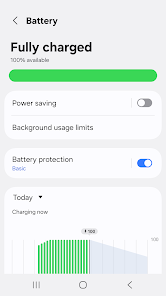
Device Care helps you extend your battery life by intelligently managing power consumption. It analyzes your usage patterns and suggests optimal settings to ensure you get the most out of every charge, keeping your device running longer throughout the day.

Performance Enhancements

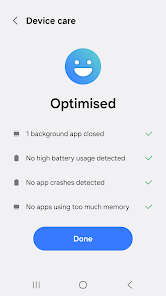
Device Care actively monitors system performance and identifies areas for improvement. By optimizing memory usage and closing background apps, it ensures your device runs smoothly and efficiently, enhancing your overall user experience with minimal effort on your part.

Security Checks

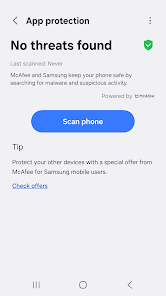
Keeping your device secure is a breeze with Device Care's built-in security checks. It scans for potential vulnerabilities, recommends updates, and provides tips on safe browsing, giving you peace of mind that your personal data is protected while you enjoy your device.

Storage Management

With its smart storage management feature, Device Care identifies large files and unused apps, providing personalized recommendations for cleanup. It makes it easy to free up space, allowing you to store more of what matters without the hassle of manual searching.

Pros & Cons

Pros
  • Enhances device performance and speed
  • Extends battery life and efficiency
  • Streamlines storage management effortlessly
  • Provides regular system updates and security
  • Simplifies troubleshooting and maintenance tasks
Cons
  • Limited customization options for advanced users
  • Can consume significant battery life
  • May not detect all performance issues
  • Interface can be confusing for some users

Real Experience Using Device Care

Application Scenarios

Device Care is designed to enhance the performance and longevity of your mobile device, making it an essential tool for anyone who relies heavily on their smartphone or tablet. Whether you’re a student juggling multiple apps for studying, a professional handling work-related tasks on-the-go, or a casual user who simply wants a smooth experience, Device Care caters to all. It can be particularly useful in scenarios where your device begins to lag or drain battery quickly, helping you identify and rectify issues before they become major problems. Additionally, for those who often download new applications or store media, the app offers storage management solutions, ensuring that your device runs efficiently. In short, Device Care is beneficial for anyone looking to maintain their device's health and optimize its performance.

User Experience

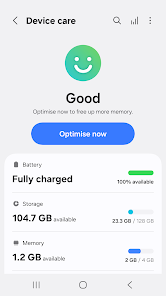
The user experience with Device Care is largely positive, thanks to its intuitive design and user-friendly interface. Upon opening the app, users are greeted with a clean dashboard that provides an overview of their device's status, including battery life, storage usage, and memory management. This simplicity makes it accessible for all age groups, even those who may not be tech-savvy. The app features one-tap optimization, allowing users to boost performance with minimal effort. Furthermore, the detailed analytics sections provide insights into what apps are consuming the most resources, enabling informed decisions about which applications to keep or remove. Overall, the app delivers a seamless experience that is both efficient and informative, helping users maintain their devices with ease.

Pricing

Device Care operates on a freemium model, meaning that the app is free to download and use, but it also offers premium features for a fee. The free version provides essential tools for basic maintenance, such as battery optimization and storage management. However, users looking for advanced features, such as ad-free experience and enhanced analytics, may opt for the premium subscription. The pricing is competitive, offering monthly and yearly plans, which allows users to choose an option that best fits their needs. This flexibility ensures that Device Care remains accessible while providing value to those who require more robust functionality.

Updates & Support

Device Care is frequently updated to ensure compatibility with the latest operating system releases and to introduce new features that enhance user experience. The developers actively listen to user feedback, making improvements based on common requests and issues. This commitment to continuous improvement is evident in the regular updates that address bugs and optimize performance. Furthermore, the support team is responsive and available through various channels, including email and social media, providing users with assistance whenever needed. The combination of regular updates and strong customer support significantly enhances the overall experience, making Device Care a reliable choice for device maintenance.

verified Security & Privacy Review

Device Care prioritizes user security and privacy with robust measures designed to protect personal information. The app employs encryption protocols to safeguard data during both storage and transmission, ensuring that sensitive information remains confidential. When it comes to permissions, Device Care requests only those necessary for its core functionalities. Users can conveniently monitor and manage these permissions within their device settings, promoting transparency and control over personal data access. The app’s privacy practices are in line with industry standards, providing clear disclosures about data collection and usage. Users are informed about what information is gathered, such as device performance metrics and diagnostic data, which are utilized to enhance the app’s functionality. Importantly, Device Care does not sell user data to third parties, reinforcing its commitment to user privacy. Overall, Device Care demonstrates a strong focus on security and privacy, making it a trustworthy choice for users looking to optimize their device performance while keeping their data safe.

Reviews

3.9

“Intuitive interface makes optimization easy and quick.”

“Battery management has noticeably improved my usage.”

“Great tool for keeping my device running smoothly.”

“Notifications help me stay on top of performance.”

“Cleans up storage effectively, highly recommend!”

FAQ

1

Does Device Care collect my personal data?

Device Care may collect certain usage data to improve its functionality and user experience, but it typically does not collect personally identifiable information unless explicitly stated in the privacy policy.

2

Does Device Care offer a free trial or free version?

Device Care is generally available as a free app with basic features, allowing users to access its functionalities without a subscription or trial period.

3

Does Device Care require an internet connection?

Device Care does not require a constant internet connection to function, but some features may benefit from internet access, such as downloading updates or accessing online help resources.

4

How can I contact support or send feedback for Device Care?

You can contact support or send feedback for Device Care through the app itself, usually found in the settings menu, or by visiting the official website or support page for further assistance.

5

How do I manage or cancel my Device Care subscription?

To manage or cancel your Device Care subscription, you can go to the app settings or your device's subscription management settings, where you can view and adjust your subscription preferences.

How to use Device Care

1

How can I contact customer service for the Device Care app?

You can reach customer service through the app's settings or by visiting the official website for support options.

2

How do I activate the Device Care app?

The Device Care app is typically pre-installed on Samsung devices. You may need to open it and follow the on-screen instructions to activate features.

3

How do I find the customer number for my Device Care app?

The customer number can usually be found in the app’s settings under the 'About' section.

4

How do I log in to the Device Care app?

Open the app and enter your Samsung account credentials to log in. If you don’t have an account, you can create one directly in the app.

Editor's Choice