This site uses cookies to enhance your user experience. By clicking any link on this site you are giving your consent to our cookie policy. Read more
Reject
Accept All
Cricut Heat: DIY Heat Transfer

Cricut Heat: DIY Heat Transfer

verified Verified App

Developer: Cricut

  • category

    Category: Lifestyle

  • price

    Price: free

  • age rating

    Age Rating: Everyone

  • rating

    Rating: 3.1

  • download

    Downloads: 100,000+

  • version

    Version: 1.1.4

Screenshot 1
Screenshot 2
Screenshot 3
Screenshot 4
Screenshot 5
Screenshot 6
Screenshot 7
Screenshot 8

Features & Highlights

Customizable Heat Settings

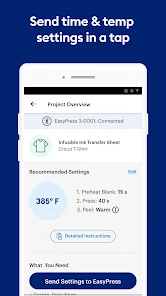
With Cricut Heat, you have full control over heat settings for various materials, ensuring perfect results every time. Adjust temperature and time according to your fabric type, making it suitable for everything from cotton to polyester, so your projects look professional and last longer.

Easy Design Integration

Cricut Heat seamlessly integrates with your existing design files, allowing you to create unique heat transfer projects effortlessly. Whether you're using simple graphics or intricate designs, the app takes the guesswork out of positioning and scaling, enabling you to focus on your creativity.

Step-By-Step Guidance

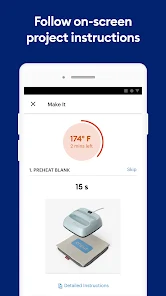
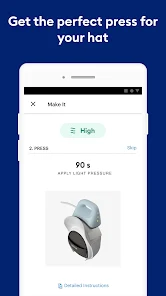
The app offers intuitive step-by-step instructions tailored to each project, making it ideal for beginners and seasoned crafters alike. You'll feel confident as you follow along, ensuring you achieve the best results with every transfer, even if it's your first time using heat transfer materials.

Versatile Project Ideas

Cricut Heat inspires creativity with a wide range of project ideas, from custom apparel to home decor. The app showcases trendy designs and practical applications, encouraging users to explore various heat transfer techniques and express their personal style in new and exciting ways.

Pros & Cons

Pros
  • Easy to use for all skill levels
  • Quickly personalize fabrics and materials
  • Wide variety of heat transfer options available
  • Durable designs withstand multiple washes
  • Compact size for convenient storage and portability
Cons
  • Limited compatibility with various materials
  • High initial investment cost
  • Requires precise temperature control
  • Not suitable for large projects

Real Experience Using Cricut Heat: DIY Heat Transfer

Application Scenarios

Cricut Heat: DIY Heat Transfer is an invaluable tool for crafters and DIY enthusiasts looking to elevate their projects with heat transfer techniques. This app is perfect for a variety of scenarios, including personalizing apparel, creating custom home decor, and designing unique gifts for special occasions. Users can easily select from a wide range of materials, such as iron-on vinyl and infusible ink, to achieve professional-quality results. Whether you are preparing for a birthday party, looking to craft seasonal decorations, or simply want to express your creativity through custom designs, Cricut Heat empowers users to bring their ideas to life. The app seamlessly integrates with Cricut machines, allowing for a smooth workflow from design to execution, making it ideal for both beginners and seasoned crafters alike.

User Experience

The user experience with Cricut Heat is largely positive, as the app provides an intuitive interface that is easy to navigate. Users appreciate the step-by-step guidance offered throughout the heat transfer process, ensuring that even those unfamiliar with the technology can achieve great results. The app features a vast library of pre-designed templates and projects, which users can customize to suit their individual tastes. Additionally, the ability to upload personal designs adds a layer of creativity that many users find appealing. The app also includes helpful tips and tutorials, making it a valuable resource for learning new techniques and troubleshooting common issues. Overall, the user experience is enhanced by the app's responsive design and its compatibility with various Cricut devices, fostering a sense of confidence in executing even complex projects.

Pricing

Cricut Heat: DIY Heat Transfer offers a freemium model, allowing users to download the app at no cost. However, while basic features are accessible for free, users may encounter a selection of premium templates and advanced functionalities that require in-app purchases or a subscription plan. The pricing structure is designed to be flexible, catering to casual users who may only need occasional access to premium features, as well as dedicated crafters who benefit from a subscription for unlimited access. This tiered pricing approach ensures that everyone from hobbyists to serious DIY enthusiasts can find value in the app without feeling overwhelmed by costs.

Updates & Support

Cricut Heat is frequently updated to enhance functionality and improve user experience. The developers actively listen to user feedback, implementing new features and fixing bugs promptly. Regular updates often introduce new templates, materials, and enhanced tools, keeping the app fresh and relevant to current crafting trends. Support for users is readily available through multiple channels, including a comprehensive FAQ section, user forums, and direct customer service assistance. This commitment to ongoing improvement and user support ensures that Cricut Heat remains a reliable tool for DIY heat transfer projects, fostering a loyal community of crafters who rely on the app for their creative endeavors.

verified Security & Privacy Review

The Cricut Heat: DIY Heat Transfer app prioritizes user security and privacy by implementing standard data protection measures. The app requires users to grant certain permissions, including access to device storage, which is necessary for saving and managing projects. However, it does not request access to sensitive information such as contacts or location, minimizing potential privacy risks. The app's privacy policy outlines its commitment to safeguarding user data. It specifies that personal information collected is used solely for enhancing user experience and is not shared with third parties without consent. Users can manage their data preferences through the app settings, allowing them to control what information is collected and how it is used. Additionally, the app employs encryption to protect user data during transmission, ensuring that sensitive information remains secure. Regular updates are provided to address any potential vulnerabilities, reflecting the developers' commitment to maintaining a secure environment. Overall, Cricut Heat demonstrates a responsible approach to data handling, making it a trustworthy choice for users interested in DIY heat transfer projects.

Reviews

3.1

“Easy to use and intuitive interface!”

“Great for creative DIY projects.”

“Perfect for customizing apparel and gifts.”

“High-quality heat transfer results every time.”

“Incredible support and helpful tutorials available.”

Editor's Choice