This site uses cookies to enhance your user experience. By clicking any link on this site you are giving your consent to our cookie policy. Read more
Reject
Accept All
CPU Monitor - temperature

CPU Monitor - temperature

verified Verified App

Developer: System monitor tools lab - Cpu Ram Battery

  • category

    Category: Tools

  • price

    Price: free

  • age rating

    Age Rating: Everyone

  • rating

    Rating: 4.1

  • download

    Downloads: 1,000,000+

  • version

    Version: 11.10.2

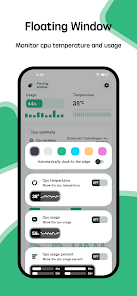
Screenshot 1
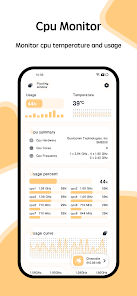
Screenshot 2
Screenshot 3
Screenshot 4
Screenshot 5
Screenshot 6

Features & Highlights

Customizable Alerts

Receive personalized notifications when your CPU temperature exceeds predefined limits. This proactive alert system allows you to take action before potential damage occurs, giving you peace of mind while using your device for demanding applications or multitasking.

Historical Data Tracking

Access comprehensive historical data to analyze your CPU's temperature trends over time. This feature not only aids in identifying patterns that may indicate hardware issues but also assists in optimizing performance for future computing tasks.

Real-Time Temperature Monitoring

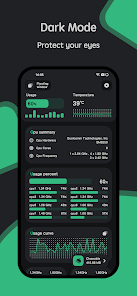
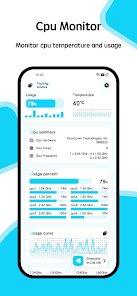
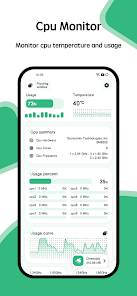
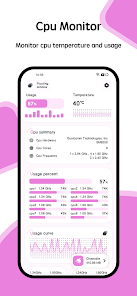
Stay informed about your CPU's temperature with real-time monitoring that updates every second. This feature helps you keep track of your device's performance and prevents overheating, ensuring your system runs smoothly during intensive tasks or gaming sessions.

User-Friendly Interface

Navigating the app is a breeze with its intuitive design, making it accessible for both tech enthusiasts and casual users. The clean layout presents essential information clearly, allowing you to monitor your CPU's health without feeling overwhelmed by technical jargon.

Pros & Cons

Pros
  • Real-time temperature tracking prevents overheating issues.
  • Enhances system performance by optimizing CPU usage.
  • Extends hardware lifespan through effective thermal management.
  • User-friendly interface for easy monitoring and adjustments.
  • Alerts for high temperatures ensure timely interventions.
Cons
  • Limited accuracy in measurement readings can mislead users
  • Constant monitoring can increase system resource usage
  • May not account for ambient temperature variations
  • User interface can be complex for beginners

Real Experience Using CPU Monitor - temperature

Application Scenarios

CPU Monitor - temperature is an essential tool for anyone looking to keep tabs on their device's performance and health. Whether you are a casual user or a tech enthusiast, this app shines in various scenarios. For gamers who need to ensure their device remains cool during intense sessions, CPU Monitor provides real-time temperature readings to avoid overheating. Professionals using demanding applications like video editing or 3D rendering can also benefit from monitoring their CPU temperature, allowing them to manage performance effectively. Additionally, developers and system administrators can leverage the app to diagnose issues and optimize their systems for better performance. Overall, the app caters to a diverse range of users and scenarios where CPU temperature monitoring is crucial.

User Experience

The user experience of CPU Monitor - temperature is designed with simplicity and efficiency in mind. Upon opening the app, users are greeted with a clean and intuitive interface that displays real-time CPU temperatures and usage statistics. The layout is user-friendly, making it easy for both novice and seasoned users to navigate. The app provides customizable alerts that notify users when their CPU temperature exceeds a predefined threshold, adding a layer of safety for device protection. Additionally, the app offers a history log feature that allows users to track temperature changes over time, aiding in identifying patterns or issues. Overall, the user experience is smooth, informative, and tailored to meet the needs of its audience.

Pricing

CPU Monitor - temperature adopts a freemium pricing model, which allows users to access basic features without any cost. The free version includes essential temperature monitoring and usage statistics, making it suitable for casual users. However, for those looking for advanced features such as detailed analytics, customizable themes, and ad-free navigation, there is a premium subscription available. The pricing is competitive compared to similar apps in the market, providing good value for users who require more in-depth insights into their device's performance. The option to try the basic features before committing to a subscription is an appealing aspect for potential users.

Updates & Support

The developers of CPU Monitor - temperature are committed to continuous improvement, frequently releasing updates that enhance functionality and address user feedback. These updates often introduce new features, improve performance, and fix bugs, ensuring that users have access to the best version of the app. Support is readily available through various channels, including an in-app help section, email support, and active community forums. Users can easily find answers to common questions or report issues to the development team. This robust support system enhances the overall experience, allowing users to maximize the app's capabilities without frustration.

verified Security & Privacy Review

When it comes to security and privacy, the CPU Monitor - temperature app demonstrates a commitment to safeguarding user information. The app requests minimal permissions, primarily focusing on accessing system data necessary for monitoring CPU temperatures. This limited access helps reduce the risk of potential data leaks or misuse. Users are not required to provide personal information, such as email addresses or phone numbers, which enhances privacy protection. Additionally, the app does not collect sensitive data, ensuring that your usage patterns and personal details remain confidential. Regular updates are crucial for security, and CPU Monitor - temperature appears to prioritize this by addressing vulnerabilities promptly. The app is designed to operate offline, further limiting exposure to data breaches that can occur through internet connectivity. Overall, CPU Monitor - temperature adheres to best practices in data security and privacy, making it a reliable choice for users concerned about protecting their information while monitoring system performance.

Reviews

4.1

“Accurate temperature readings, very helpful for monitoring.”

“User-friendly interface and easy to navigate.”

“Great app for keeping track of CPU performance.”

“Lifesaver for preventing overheating issues.”

“Notifications keep me informed on temperatures.”

Editor's Choice