
 Home
Home  Apps
Apps  Games
Games  Windows
  Topics
  Terms of Service
  Cookies & Privacy Policy
  About us
 Easy Setup Process
Setting up Cox Panoramic Wifi is a breeze, making it accessible for everyone. The intuitive app guides you through the installation process in just a few minutes, allowing you to get connected quickly without any technical hassle.


Cox Communications, Inc.
 3.9
3.9 
Category: Productivity

Price: free

Age Rating: Everyone

Rating: 3.9

Available on: /

Updated on: Jun 11, 2026
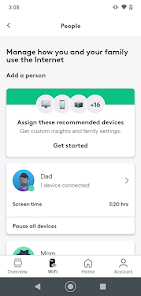
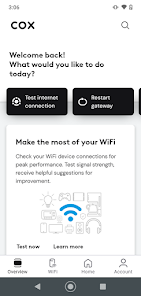
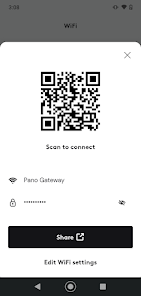
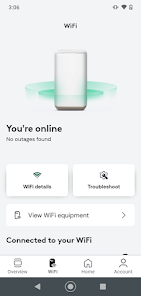
Setting up Cox Panoramic Wifi is a breeze, making it accessible for everyone. The intuitive app guides you through the installation process in just a few minutes, allowing you to get connected quickly without any technical hassle.
Cox Panoramic Wifi is designed to eliminate dead spots and provide seamless connectivity throughout your home. With advanced technology, it ensures that every corner of your space is covered, allowing you to enjoy uninterrupted streaming and browsing no matter where you are.
Cox Panoramic Wifi comes with robust parental controls that help you manage your children's online activities. You can set time limits, filter content, and monitor usage, ensuring a safe and balanced internet experience for the whole family.
Stay informed about your network with real-time insights provided by the Cox app. You can monitor device usage, troubleshoot issues, and even pause internet access for specific devices, giving you control over your home network like never before.

 Reliable coverage throughout your home Easy setup with user-friendly app Advanced security features protect your devices Parental controls for safe browsing Seamless connectivity for multiple devices
 Limited coverage in larger homes Higher monthly fees than competitors Occasional connectivity issues reported by users Customer support can be slow to respond
 The Cox Panoramic Wifi app is designed to enhance the experience of managing your home internet network. It is particularly beneficial for users with multiple devices connected to their wifi, such as smart TVs, gaming consoles, and IoT devices. The app is ideal for families who want to monitor and control their children’s internet usage, with features that allow parents to pause internet access on specific devices during study time or bedtime. Additionally, for those who frequently host guests, the app provides a convenient way to create a guest network, ensuring that visitors can connect without compromising your primary network's security. Overall, the app seamlessly integrates into daily life, making it easier to manage connectivity at home.
User experience with the Cox Panoramic Wifi app is generally positive, characterized by an intuitive interface that simplifies network management. The app’s dashboard offers a clear overview of all connected devices, making it easy to identify and manage them. Users appreciate the ability to troubleshoot connectivity issues on the go, as the app provides helpful tips and diagnostics. The speed test feature is another highlight, allowing users to check their internet speed directly from the app. However, some users have reported occasional lag when loading the device list or navigating between features, which can be frustrating. Overall, the app’s user-friendly design and useful functionalities make it a valuable tool for anyone looking to optimize their home internet experience.
The Cox Panoramic Wifi app is available for free to Cox internet subscribers, making it an attractive addition for those already utilizing Cox services. The app does not carry any additional costs beyond the standard internet subscription. For users who are considering upgrading their internet plans, the app also provides insights into available options, helping them make informed decisions based on their usage and needs. This accessibility ensures that even those on a budget can benefit from enhanced internet management features without incurring extra expenses.
Cox regularly updates the Panoramic Wifi app to enhance its functionality and address any user-reported issues. These updates often include performance improvements, new features, and security enhancements, demonstrating Cox's commitment to providing a reliable service. The app also includes a support section where users can find FAQs, troubleshooting guides, and contact information for customer service. Users have noted that the Cox support team is generally responsive and helpful, making it easy to resolve any issues that may arise. Overall, the combination of regular updates and effective customer support contributes to a reliable and user-friendly experience with the app.
Security & Privacy Review


Trying to get on the app to unpause my laptop but its says to restart with my cell data but that don't work. Then it says to to try with wifi turned on. wth...Cox needs to get their stuff together and come down on the wifi price with all the complications that come with them. It's no wonder why so many people are switching to AT&T and Verizon.
It doesn't work, at least for me, after you upgrade to a new router. The router and home network are fine. I can see the network through the COX general app and on the COX website. But, the COX panoramic wifi app just gives an error message that the "gateway needs to be reactivated." I've restarted everything, uninstalled/reinstalled the app, worked with tech support - nothing. It's been over a week, so it's not a timing issue for the network to catch up. Bottom line - app is unusable.
Cox REQUIRES this app if you want to change the name or password of the WiFi router they supply. It claims to identify all connected devices, but that "feature" needs work. "Generic IoT device" is not very informative. It does alert you when a new device connects, but doesn't (can't?) tell you much about it. It needs a switch to PREVENT (or allow) new devices to connect. My recent list of connected devices included six cell phones that were not mine. I wouldn't use it at all if I didn't have to.
Very limited in what you can control. There after many things you can't control through the app. I guess that's ok for some. But what if i want to use quad9 for malware blocking, or any other dns service? Too bad! Setting a printer with a dhcp reservation? I was just told that's a business class feature. (But that used to be available for residential customers) The built in speed test doesn't work. I wouldn't use this app if i didn't have to. If there were alternative ISPs I'd try them too
This app is awful. We have been with cox for three years. The application loading correctly is a hit or miss. The internet is awful as well. We went from paying 70 a month for charter (which allowed us to have our own router and had consistent speeds) to paying 150+ for internet that constantly drops, you have to use their modem/router combo and you have to pay extra for these stupid pods to extend the wifi. The pods also crash all the time and customer service says "we don't see any issues".
Review Source: Google Play store public user reviews.
Cox Panoramic Wifi may collect certain data to enhance user experience and improve services, but it adheres to privacy policies that outline how your information is used and protected.
Cox Panoramic Wifi typically does not offer a free trial or free version, as it is part of the Cox internet service subscription.
Yes, Cox Panoramic Wifi requires an internet connection to function properly as it manages the network settings and connected devices through the app.
You can contact support for Cox Panoramic Wifi through the app, by visiting the Cox website, or by calling their customer service hotline, where you can also provide feedback about your experience.
You can manage or cancel your Cox Panoramic Wifi subscription by logging into your Cox account online or through the app, where you will find options for subscription management.
Yes, you can pause internet access for specific devices through the "Devices" section of the app.
Yes, you may need to activate the app by connecting it to your Cox account using your user ID and password.
You can reach Cox customer service at 1-800-234-3993 for assistance with the Panoramic Wifi app.
Log in to the app, navigate to the "Wifi" section, and adjust your settings as needed.
Use the "Forgot Password" link on the login page to receive a password reset email.
Included in this update: Bug fixes and other improvements.
 Google Play
  App Store






























