This site uses cookies to enhance your user experience. By clicking any link on this site you are giving your consent to our cookie policy. Read more
Reject
Accept All
Color Picker

Color Picker

verified Verified App

Developer: Mikhail Gribanov

  • category

    Category: Tools

  • price

    Price: free

  • age rating

    Age Rating: Everyone

  • rating

    Rating: 4.3

  • download

    Downloads: 1,000,000+

  • version

    Version: 7.9.0

Screenshot 1
Screenshot 2
Screenshot 3
Screenshot 4
Screenshot 5
Screenshot 6
Screenshot 7
Screenshot 8

Features & Highlights

Color Harmony Suggestions

Not sure which colors work well together? Color Picker offers smart suggestions for complementary and analogous colors, helping you make informed decisions in your design projects. This feature is especially useful for those who want to enhance their color theory knowledge.

Instant Color Identification

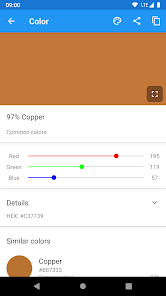
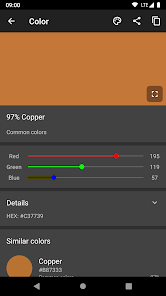
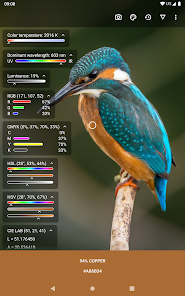
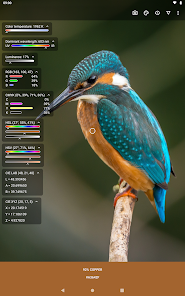
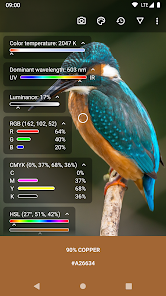
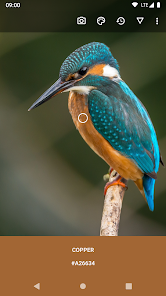
With Color Picker, you can effortlessly identify any color in your environment using your device's camera. Just point and click, and the app provides you with the exact color code, making it perfect for designers and artists looking to capture inspiration on the go.

Palette Creation

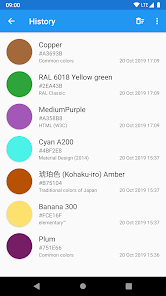
Create stunning color palettes with ease using Color Picker's intuitive interface. You can mix and match colors, save your favorite combinations, and even share them with friends or collaborators, ensuring you have the perfect palette for every project.

User-Friendly Interface

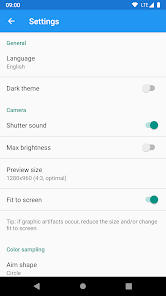
Color Picker boasts a clean and simple interface that makes it accessible for users of all skill levels. Whether you’re a professional designer or just starting, navigating through the app is a breeze, allowing you to focus on your creativity without any distractions.

Pros & Cons

Pros
  • Easily select precise colors for design projects
  • Streamline your workflow with instant color matching
  • Enhance creativity with diverse color palettes available
  • Improve accessibility by ensuring color contrast compliance
  • Simplify collaboration by sharing color codes effortlessly
Cons
  • Limited color accuracy in certain lighting conditions
  • Difficult to match colors across different devices
  • May require manual input for precise shades
  • Can be overwhelming with too many options

Real Experience Using Color Picker

Application Scenarios

The Color Picker app is a versatile tool ideal for a variety of users, from graphic designers and web developers to DIY enthusiasts and artists. It is particularly useful in scenarios where precise color selection is essential. For instance, a graphic designer may use it to identify and match colors in a digital image, ensuring consistency across various media. Similarly, web developers can utilize the app to grab hex codes directly from websites, facilitating seamless integration of color schemes into their projects. DIY enthusiasts can benefit from the app while planning home decor or paint projects, allowing them to visualize color combinations before making a purchase. Artists can also leverage the Color Picker to create palettes that inspire their next masterpiece. The app's flexibility makes it suitable for both professional and casual users, adapting to a wide range of creative workflows.

User Experience

User experience is a cornerstone of the Color Picker app, and it excels in this area. The interface is intuitive and user-friendly, designed to cater to both novices and seasoned professionals. Upon opening the app, users are greeted with a clean layout that offers easy navigation through its features. The color selection tool is responsive, allowing users to pick colors from images or the screen effortlessly. The app also provides a comprehensive color wheel and various formats for color codes, including RGB, HEX, and CMYK. Users can save their favorite colors and create custom palettes, streamlining their creative processes. The ability to export palettes and share them directly to social media or via email adds an extra layer of convenience. Overall, the Color Picker delivers a seamless and enjoyable experience, making color selection a breeze.

Pricing

Updates & Support Regular updates are a hallmark of the Color Picker app, ensuring that it remains relevant and functional in a fast-evolving digital landscape. The development team actively listens to user feedback, implementing requested features and fixing bugs promptly. Users can expect periodic enhancements that improve overall performance and introduce innovative capabilities. Support is readily available through various channels, including email and an online help center. The support team is responsive and knowledgeable, assisting users with any issues they may encounter. This commitment to continuous improvement and customer service fosters a loyal user base, making the Color Picker app a dependable choice for anyone needing a reliable color selection tool.

verified Security & Privacy Review

The Color Picker app prioritizes user security and privacy through stringent data protection measures. It does not collect personal information or usage data, ensuring that user preferences and activities remain confidential. The app operates with minimal permissions, requiring only access to the device's camera for color detection and the photo library for saving color palettes. This limited access reduces potential vulnerabilities associated with overreaching permissions. All data processed within the app is stored locally on the user's device, eliminating concerns about cloud storage breaches or unauthorized access. The app employs encryption protocols to safeguard any information temporarily held during active sessions. Furthermore, Color Picker maintains transparency regarding its privacy practices, providing users with clear guidelines on how their data is handled. Users are encouraged to review the privacy policy for detailed information on data handling practices. Overall, Color Picker demonstrates a strong commitment to user privacy and data security, making it a trustworthy choice for those concerned about their digital footprint.

Reviews

4.3

“Intuitive interface makes color selection easy and fun.”

“Great for designers and artists alike.”

“Accurate colors, perfect for digital projects.”

“Wish it had more advanced features.”

“User-friendly, but needs better color palette options.”

Editor's Choice