This site uses cookies to enhance your user experience. By clicking any link on this site you are giving your consent to our cookie policy. Read more
Reject
Accept All

Advertiser and Editorial Disclosures

CloudEdge

CloudEdge

verified Verified App

Developer: Hangzhou Meari Technology Co., Ltd.

  • category

    Category: Lifestyle

  • price

    Price: free

  • age rating

    Age Rating: Everyone

  • rating

    Rating: 4.4

  • download

    Downloads: 1,000,000+

  • version

    Version: 6.1.2

Screenshot 1
Screenshot 2
Screenshot 3
Screenshot 4
Screenshot 5
Screenshot 6

Features & Highlights

Cloud Storage Options

With CloudEdge, you can choose from various cloud storage plans to securely store your video footage. This ensures that your recordings are safe and easily retrievable, giving you flexibility and peace of mind knowing that you won't lose critical evidence.

Real-Time Monitoring

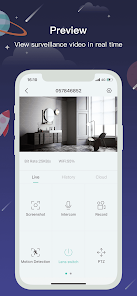
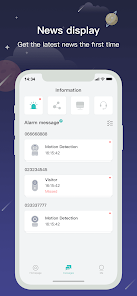
CloudEdge provides real-time monitoring of your security cameras, allowing you to keep an eye on your property at any time, from anywhere. With instant notifications, you can respond quickly to any unusual activity, ensuring peace of mind and enhanced security.

Two-Way Audio

The app features two-way audio, enabling you to communicate directly through your security cameras. This is perfect for interacting with visitors or pets at home, adding an extra layer of functionality and convenience to your security system.

User-Friendly Interface

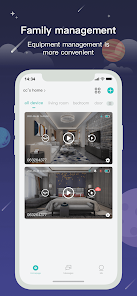
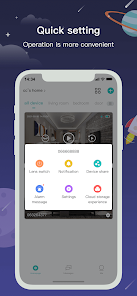
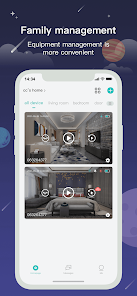
Navigating CloudEdge is a breeze, thanks to its intuitive user interface designed for all users, regardless of tech-savviness. The app allows for easy access to live feeds, recorded footage, and settings adjustments, making security management straightforward and efficient.

Pros & Cons

Pros
  • Scalable infrastructure for growing business needs
  • Enhanced security features protect sensitive data
  • User-friendly interface simplifies management tasks
  • Cost-effective solutions reduce operational expenses
  • Real-time analytics support informed decision-making
Cons
  • Limited customization options for advanced users
  • Occasional connectivity issues can disrupt services
  • Data privacy concerns with third-party storage
  • Dependence on internet access for functionality

verified Security & Privacy Review

The CloudEdge app prioritizes user security and privacy, implementing robust measures to protect sensitive information. The app employs end-to-end encryption for data transmission, ensuring that user data remains confidential during transit. Additionally, it utilizes secure cloud storage solutions that comply with industry standards, providing an extra layer of protection against unauthorized access. In terms of permissions, CloudEdge is transparent about the access it requires. Users are informed about the specific permissions needed for optimal functionality, such as camera and storage access, and can choose to grant or deny these permissions. The app also provides users with control over their data, allowing them to delete their accounts and associated data whenever desired. CloudEdge adheres to strict privacy practices, clearly outlining its data handling policies in its privacy policy. The app does not sell user data to third parties and limits data collection to what is necessary for app functionality. Overall, CloudEdge demonstrates a strong commitment to maintaining user privacy and securing personal information.

Reviews

4.4

“Easy setup and user-friendly interface!”

“Great video quality and real-time alerts.”

“Reliable app, but occasional connectivity issues.”

“Customer support is responsive and helpful.”

“Love the cloud storage feature for added security!”

FAQ

1

Does CloudEdge collect my personal data?

CloudEdge may collect personal data to enhance user experience and provide services, but it adheres to privacy policies to protect user information.

2

Does CloudEdge offer a free trial or free version?

Yes, CloudEdge offers a free version with basic features, as well as a free trial for premium features that allows users to explore additional functionalities.

3

Does CloudEdge require an internet connection?

Yes, CloudEdge requires an internet connection to function, as it relies on cloud services to manage and stream video feeds.

4

How can I contact support or send feedback for CloudEdge?

You can contact CloudEdge support via the in-app support feature, through the official website, or by sending feedback directly to their support email.

5

How do I manage or cancel my CloudEdge subscription?

You can manage or cancel your CloudEdge subscription through the app settings or by visiting the account management section on the CloudEdge website.

How to use CloudEdge

1

How do I activate my CloudEdge account?

After downloading the app, follow the on-screen prompts to create an account. You'll receive an activation email to confirm your registration.

2

How do I contact customer service for the CloudEdge app?

You can contact CloudEdge customer service through the app's support section or visit their official website for contact details.

3

How do I log in to the CloudEdge app?

To log in, open the app and enter your registered email and password. Tap 'Login' to access your account.

4

What is the customer service number for CloudEdge?

The customer service number for CloudEdge can be found in the app under 'Help' or on their official website.

Editor's Choice