This site uses cookies to enhance your user experience. By clicking any link on this site you are giving your consent to our cookie policy. Read more
Reject
Accept All
CellMapper

CellMapper

verified Verified App

Developer: CellMapper.net

  • category

    Category: Tools

  • price

    Price: free

  • age rating

    Age Rating: Everyone

  • rating

    Rating: 2.4

  • download

    Downloads: 1,000,000+

  • version

    Version: 5.6.5

Screenshot 1
Screenshot 2
Screenshot 3
Screenshot 4
Screenshot 5
Screenshot 6

Features & Highlights

Customizable Settings

CellMapper offers customizable settings that allow users to tailor their mapping experience according to their preferences. From adjusting data collection intervals to selecting specific network types, this flexibility ensures that users can focus on the aspects that matter most to them.

Network Coverage Mapping

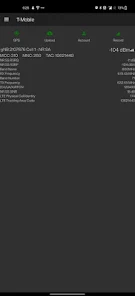
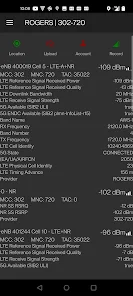
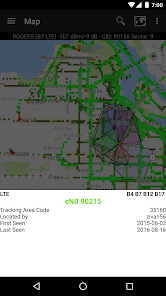
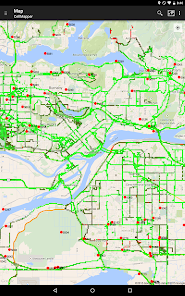
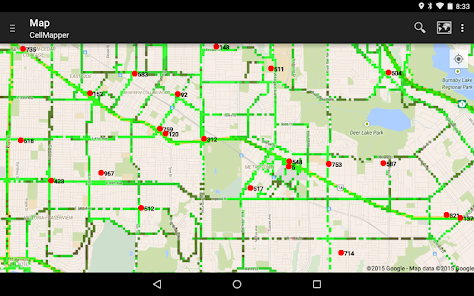
CellMapper provides comprehensive mapping of cellular network coverage, allowing users to visualize signal strength across different areas. This feature helps in identifying dead zones and optimizing network performance for better connectivity, making it invaluable for both casual users and professionals in the telecommunications field.

Real-Time Data Collection

With its real-time data collection capability, CellMapper allows users to contribute to the database while on the go. This ensures that the information remains current and accurate, fostering a community-driven approach to enhancing cellular network insights.

User-Friendly Interface

CellMapper boasts an intuitive user interface that simplifies navigation and data interpretation. Users can easily access detailed maps and network statistics, making it straightforward for anyone, regardless of technical expertise, to utilize the app effectively for their needs.

Pros & Cons

Pros
  • User-friendly interface for easy navigation and usage
  • Real-time data updates enhance network accuracy and reliability
  • Community-driven insights improve coverage understanding and mapping
  • Supports multiple networks for comprehensive connectivity analysis
  • Customizable filters help focus on specific data needs
Cons
  • Limited coverage in rural areas
  • Data accuracy can vary significantly
  • Dependent on user contributions for updates
  • Interface may be confusing for new users

Real Experience Using CellMapper

Application Scenarios

CellMapper is an essential tool for anyone interested in understanding and optimizing cellular network coverage. It is particularly beneficial for mobile network enthusiasts, engineers, and those who frequently travel or live in areas with spotty service. Users can leverage the app to map out cell tower locations, gather signal strength data, and analyze network performance in real-time. For instance, it can help a user identify dead zones while hiking or driving in rural areas, enabling them to plan their routes more effectively. Additionally, the app is invaluable for professionals in telecommunications, who can utilize it to troubleshoot network issues and improve services by visualizing coverage areas and identifying gaps in service. Whether you are a casual user or a network professional, CellMapper provides the insights necessary to enhance your mobile experience.

User Experience

The user experience of CellMapper is designed to be intuitive and user-friendly. Upon launching the app, users are greeted with a clean interface that allows easy access to essential features. The mapping function is straightforward, presenting users with a visually appealing layout of cell towers and signal strengths. The app also includes various filters and settings that enable users to customize their experience based on personal preferences or specific needs. Many users appreciate the community-driven aspect of the app, where contributions from other users help enrich the database of cell towers and signal quality. Furthermore, the app's real-time data collection feature enhances user engagement, as they can see the immediate impact of their movements on the network map. Overall, CellMapper delivers a satisfying and informative experience, making it a go-to application for users keen on cellular network insights.

Pricing

CellMapper adopts a free-to-use model, making it accessible to a broad audience. While the basic features provide ample functionality for most users, there are optional in-app purchases available for those who wish to enhance their experience. These purchases typically unlock advanced features or ad-free browsing, catering to the needs of power users or professionals who require more detailed insights. This pricing strategy ensures that users can enjoy the core benefits of the app without any financial commitment while still having the option to invest in additional features if they find value in them. This approach not only attracts a larger user base but also fosters a community of engaged individuals sharing their experiences and data.

Updates & Support

CellMapper prides itself on its commitment to regular updates and robust user support. The development team actively listens to user feedback, which informs continuous improvements and feature enhancements. Regular updates ensure that users benefit from the latest advancements in technology and app functionality, addressing any bugs or issues promptly. The support system is equally commendable, with a dedicated help section within the app and an active online community where users can seek assistance or share tips. Whether you encounter a technical issue or have a suggestion for improvement, the responsive support team is ready to assist, ensuring that the user experience remains seamless and enjoyable. Overall, CellMapper's emphasis on updates and support greatly enhances its reliability and user satisfaction.

verified Security & Privacy Review

The CellMapper app is designed with user security and privacy in mind, implementing various measures to protect sensitive information. It requires minimal permissions, primarily accessing location data to enhance its functionality in mapping cellular networks. Users should be aware that while location data is essential for the app’s core features, it is handled responsibly and is not shared with third parties without explicit consent. Furthermore, CellMapper employs encryption methods to safeguard user data both in transit and at rest, ensuring that personal information remains secure from potential breaches. The app is regularly updated to address any security vulnerabilities, reflecting the developers' commitment to maintaining a safe user experience. Users can also manage their privacy settings within the app, allowing for greater control over the information shared. Overall, CellMapper prioritizes data security and user privacy, making it a reliable choice for individuals concerned about their personal information while utilizing cellular mapping services.

Reviews

2.4

“Incredibly useful for network coverage mapping!”

“Easy to use and highly informative.”

“Great community support and data accuracy.”

“Helps me find the best signal locations.”

“Fantastic tool for tracking cell tower data!”

Editor's Choice