This site uses cookies to enhance your user experience. By clicking any link on this site you are giving your consent to our cookie policy. Read more
Reject
Accept All
Canon Camera Connect

Canon Camera Connect

verified Verified App

Developer: Canon Inc.

  • category

    Category: Photography

  • price

    Price: free

  • age rating

    Age Rating: Everyone

  • rating

    Rating: 4.4

  • download

    Downloads: 10,000,000+

  • version

    Version: /

Screenshot 1
Screenshot 2
Screenshot 3
Screenshot 4
Screenshot 5
Screenshot 6
Screenshot 7
Screenshot 8

Features & Highlights

Camera Settings Control

Canon Camera Connect lets you adjust various camera settings directly from your mobile device, including exposure, ISO, and white balance. This feature enhances your shooting experience, enabling you to make real-time adjustments without having to touch the camera, which is especially useful in dynamic shooting environments.

Image Transfer

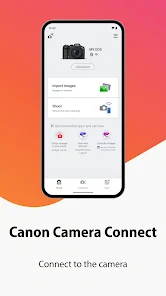
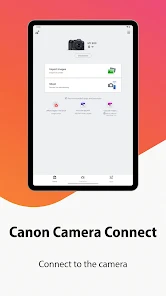
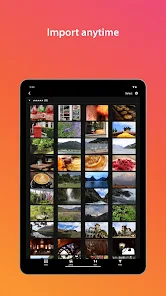
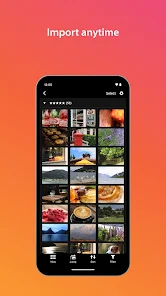
The app simplifies transferring images from your Canon camera to your smartphone or tablet, making it easy to share your favorite photos on social media. You can quickly access and download both JPEG and RAW files, ensuring you have the flexibility to edit or share as needed.

Location Data Tagging

This feature allows you to add GPS location data to your images directly from your smartphone. By using your phone's GPS, you can enrich your photos with location information, making it easier to remember where your best shots were taken and enhancing your storytelling.

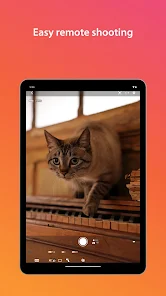
Remote Shooting

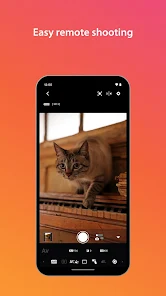
With Canon Camera Connect, you can take control of your camera remotely, allowing you to capture the perfect shot without being behind the lens. This feature is perfect for group photos or capturing wildlife, giving you the freedom to position your camera exactly where you want it.

Pros & Cons

Pros
  • Easily transfer photos to your smartphone
  • Control your camera remotely for perfect shots
  • Share images instantly on social media
  • Access camera settings for quick adjustments
  • View and organize photos seamlessly on devices
Cons
  • Limited compatibility with older camera models
  • Connection issues can occur frequently
  • User interface can be confusing for beginners
  • Slow image transfer speeds hinder workflow

Real Experience Using Canon Camera Connect

Application Scenarios

The Canon Camera Connect app is designed for photography enthusiasts and professionals who rely on Canon cameras to capture stunning images. One of the primary scenarios for using this app is during outdoor photography sessions. Users can effortlessly transfer high-resolution images directly from their camera to their mobile devices for instant sharing on social media or editing on the go. Additionally, the app is perfect for event photographers who need to quickly send images to clients or family members. Another practical application is for remote shooting; users can control their camera settings and capture images from a distance, making it ideal for wildlife photography or group shots where the photographer wants to be included. Furthermore, the app supports video transfer, allowing users to quickly share their footage without the need for cumbersome cables.

User Experience

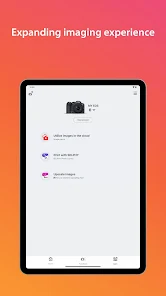
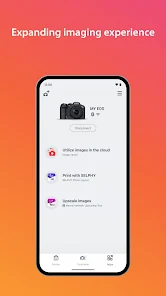
User experience with the Canon Camera Connect app is generally positive, thanks to its intuitive interface and user-friendly design. The app opens with a clean layout, presenting easy-to-navigate menus that guide users through the process of connecting their camera. Establishing a connection via Wi-Fi or Bluetooth is typically smooth, although some users report occasional connectivity issues, especially in crowded environments. Once connected, the image transfer speed is commendable, allowing users to quickly access their photos. The app also offers features like remote shutter release and live view shooting, which enhance the overall experience for photographers. However, some users have expressed a desire for additional editing features within the app itself, as they often find themselves switching between multiple apps to achieve their desired results.

Pricing

The Canon Camera Connect app is available for free on both iOS and Android platforms, making it accessible to a wide range of users. There are no hidden fees or subscription models, which is a significant advantage for photographers on a budget. However, it’s worth noting that while the app itself is free, users will need to invest in compatible Canon cameras to utilize its full potential. The app does not offer in-app purchases, which means users can enjoy all its features without worrying about unexpected costs. This pricing model aligns well with Canon's strategy of promoting its hardware while providing valuable software support to enhance user experience.

verified Security & Privacy Review

The Canon Camera Connect app emphasizes user security and privacy through various practices and features. It requires minimal permissions, primarily accessing the device's camera and storage to facilitate image transfers and remote shooting. This limited permission scope helps to mitigate potential vulnerabilities associated with excessive access. Users are informed about the data being collected, which primarily includes metadata related to images and user preferences. Canon ensures that personal information is handled in accordance with applicable privacy laws and regulations, maintaining transparency in its data processing activities. The app does not share user data with third parties without explicit consent, which adds an additional layer of trust. Furthermore, Canon implements encryption protocols during data transmission, safeguarding images and personal information from unauthorized access. Users are encouraged to utilize secure passwords and keep their app updated to benefit from the latest security enhancements. Overall, Canon Camera Connect demonstrates a commitment to privacy and data security, making it a reliable choice for users who prioritize these aspects in their mobile applications.

Reviews

4.4

“User-friendly interface for quick photo transfers”

“Reliable connection with my Canon camera”

“Great for remote shooting and sharing images”

“Occasional connectivity issues, needs improvement”

“Excellent app for managing my camera settings”

Editor's Choice