This site uses cookies to enhance your user experience. By clicking any link on this site you are giving your consent to our cookie policy. Read more
Reject
Accept All

Advertiser and Editorial Disclosures

Blood Pressure App Pro

Blood Pressure App Pro

verified Verified App

Developer: Hitchhike Tech

  • category

    Category: Health & Fitness

  • price

    Price: free

  • age rating

    Age Rating: Everyone

  • rating

    Rating: 3.9

  • download

    Downloads: 10,000,000+

  • version

    Version: 1.2.9

Screenshot 1
Screenshot 2
Screenshot 3
Screenshot 4
Screenshot 5
Screenshot 6
Screenshot 7

Features & Highlights

Comprehensive Tracking

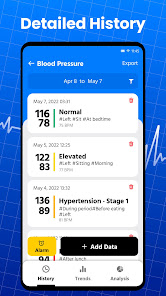
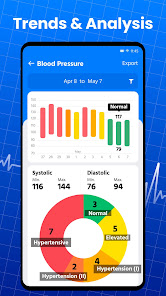
The app provides detailed graphs and charts that visualize your blood pressure trends over time. This feature helps you understand patterns and make informed decisions about your health, empowering you to share this information with your healthcare provider for better management.

Easy Data Entry

With Blood Pressure App Pro, logging your blood pressure readings is a breeze. The intuitive interface allows you to enter your data quickly, ensuring you can keep track of your health without any hassle, making it perfect for users of all ages.

Health Insights

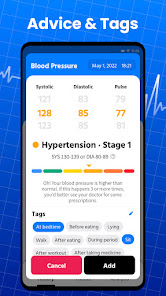
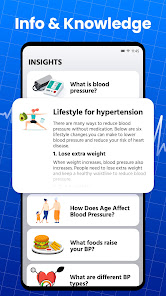
Receive personalized health insights based on your recorded data. The app analyzes your readings and offers actionable tips to improve your lifestyle, helping you make healthier choices and ultimately leading to better blood pressure management.

Medication Reminders

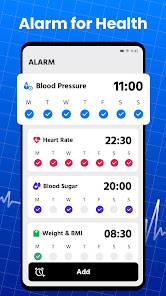
Never forget to take your medication again! Blood Pressure App Pro includes customizable reminders that alert you when it's time to take your meds, ensuring you stay on track with your treatment plan and maintain optimal blood pressure levels.

Pros & Cons

Pros
  • Track your blood pressure effortlessly and accurately
  • Receive personalized health insights and recommendations
  • Set reminders for regular monitoring and medication
  • Easily share data with healthcare professionals
  • Enjoy a user-friendly interface for seamless navigation
Cons
  • Limited customization options for tracking preferences
  • Data may not sync with all devices
  • Requires frequent manual input for accuracy
  • May lack comprehensive health insights or analysis

Real Experience Using Blood Pressure App Pro

Application Scenarios

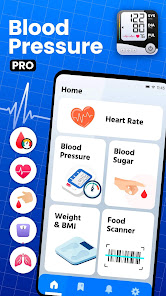
The Blood Pressure App Pro is designed to cater to a wide range of users, from those managing chronic hypertension to individuals simply interested in monitoring their cardiovascular health. It is particularly beneficial for patients with a history of heart disease, providing them with an easy way to keep track of their blood pressure readings over time. Whether at home, in a clinical setting, or on the go, users can log their blood pressure readings quickly and efficiently. The app is also useful for healthcare professionals who want to monitor their patients' readings remotely, facilitating proactive health management. Additionally, fitness enthusiasts can leverage the app to correlate their blood pressure data with workout routines, diet, and other lifestyle factors, promoting a holistic approach to health.

User Experience

User experience is one of the standout features of Blood Pressure App Pro. The interface is intuitive and user-friendly, making it accessible even for those who may not be tech-savvy. Users can effortlessly input their readings, and the app provides insightful visualizations of their data over time, making it easy to spot trends and anomalies. Notifications and reminders can be customized, ensuring users never miss a reading. The option to set goals adds a motivational layer, encouraging users to maintain healthy blood pressure levels. The app also allows users to export their data easily for sharing with healthcare providers, enhancing communication and care. Overall, the user experience is smooth and straightforward, making blood pressure management less daunting.

Pricing

Updates & Support The developers of Blood Pressure App Pro are committed to providing regular updates to enhance app functionality and user experience. New features, bug fixes, and performance improvements are rolled out consistently, ensuring that users have access to the latest advancements in health monitoring technology. Customer support is responsive and easily accessible through the app, offering assistance via email and in-app messaging. Users often report positive experiences with the support team, highlighting their prompt and knowledgeable responses. This ongoing commitment to customer satisfaction and product improvement solidifies Blood Pressure App Pro’s reputation as a reliable tool for managing blood pressure effectively.

verified Security & Privacy Review

The Blood Pressure App Pro prioritizes user security and privacy by implementing robust data protection measures. The app employs end-to-end encryption for all sensitive information, ensuring that user data remains confidential and secure during transmission. Furthermore, the app adheres to strict data privacy regulations, providing users with clear information on data collection and usage practices. Upon installation, users are informed about the permissions required by the app, including access to health-related data and device storage. Users have the option to customize these permissions, allowing them to maintain control over their personal information. The app does not share user data with third parties without explicit consent, thereby safeguarding users' privacy. Additionally, Blood Pressure App Pro includes features for data export and import, enabling users to manage their health records conveniently. Regular updates ensure that the app remains compliant with the latest security standards, providing peace of mind for users concerned about their data privacy. Overall, Blood Pressure App Pro demonstrates a commitment to protecting user information while offering essential health-tracking features.

Reviews

3.9

“Easy to use and very helpful for tracking.”

“Accurate readings, great for daily monitoring.”

“User-friendly interface, love the reminders feature!”

“Excellent app, has improved my health management.”

“Reliable data, highly recommend for hypertension management.”

FAQ

1

Does Blood Pressure App Pro collect my personal data?

Blood Pressure App Pro respects user privacy and collects minimal personal data necessary for the app's functionality. Users can review the app's privacy policy to understand what data is collected and how it is used.

2

Does Blood Pressure App Pro offer a free trial or free version?

Blood Pressure App Pro offers a free trial period for new users to explore the app's features. After the trial, users may need to subscribe to access all functionalities, as there may not be a fully free version available.

3

Does Blood Pressure App Pro require an internet connection?

Blood Pressure App Pro can function offline, allowing users to log their blood pressure readings without an internet connection. However, an internet connection is required for features like syncing data across devices or accessing online resources.

4

How can I contact support or send feedback for Blood Pressure App Pro?

To contact support or send feedback for Blood Pressure App Pro, users can access the help section within the app, where they can find options to reach out via email or submit a support request. Additionally, contact information may be available on the app's official website.

5

How do I manage or cancel my Blood Pressure App Pro subscription?

Users can manage or cancel their Blood Pressure App Pro subscription through their account settings within the app or through the app store where the app was downloaded. Detailed instructions are usually provided in the app's help section.

How to use Blood Pressure App Pro

1

Can I change my account settings in the app?

Yes, you can change your account settings by going to 'Settings' within the app and selecting 'Account'.

2

How can I contact customer service for the Blood Pressure App Pro?

You can reach customer service via the app's support section or by emailing support

3

How can I reset my login credentials?

To reset your login credentials, tap 'Forgot Password' on the login screen and follow the prompts to receive a reset link.

4

How do I log in to the Blood Pressure App Pro?

Open the app, tap on 'Log In', enter your credentials, and press 'Submit' to access your account.

5

How do I update the app for the latest features?

To update the app, visit the App Store or Google Play Store, search for Blood Pressure App Pro, and select 'Update'.

Editor's Choice