This site uses cookies to enhance your user experience. By clicking any link on this site you are giving your consent to our cookie policy. Read more
Reject
Accept All
Big Font (change font size)

Big Font (change font size)

verified Verified App

Developer: AZSoft Technology Inc.

  • category

    Category: Tools

  • price

    Price: free

  • age rating

    Age Rating: Everyone

  • rating

    Rating: 4.2

  • download

    Downloads: 5,000,000+

  • version

    Version: 4.00

Screenshot 1
Screenshot 2
Screenshot 3
Screenshot 4
Screenshot 5
Screenshot 6
Screenshot 7
Screenshot 8

Features & Highlights

Customizable Font Settings

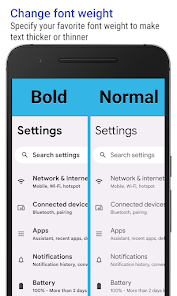
Big Font offers a range of customizable settings to ensure that your text looks just the way you want it. From bold options to different font styles, you can personalize your reading experience to match your unique taste and enhance visibility while maintaining aesthetic appeal.

Easy Font Size Adjustment

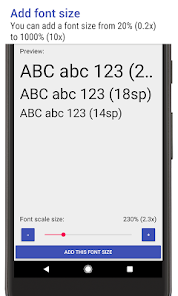
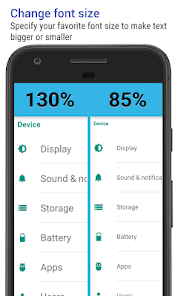
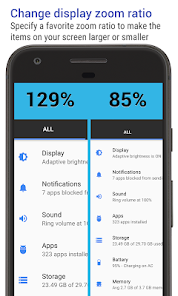
With Big Font, changing the font size on your device is a breeze. Simply slide the adjustable bar to find the perfect size that suits your reading preferences, making it easier to view text in apps, messages, and web pages without straining your eyes.

Universal Compatibility

This app is designed to work seamlessly across various platforms and applications. Whether you're browsing the web, reading emails, or using social media, Big Font ensures that your font size preferences are applied universally, so you can enjoy consistent readability wherever you go.

User-Friendly Interface

Navigating Big Font is simple and intuitive, making it accessible for users of all ages. The clean layout and straightforward controls allow you to adjust settings quickly, ensuring that you can focus on what really matters—enjoying your content without the hassle of tiny text.

Pros & Cons

Pros
  • Enhances readability for those with vision challenges
  • Reduces eye strain during prolonged reading sessions
  • Improves accessibility for all age groups
  • Facilitates quick scanning of important information
  • Boosts focus by minimizing distractions in text
Cons
  • Limited text visibility on smaller screens
  • Reduces overall information density
  • Can disrupt design aesthetics and layout
  • May hinder text flow and readability

Real Experience Using Big Font (change font size)

Application Scenarios

Big Font is designed to cater to a wide range of users who require larger text for enhanced readability. Whether you are an older adult struggling with small print or someone who simply prefers a more accessible interface, this app proves to be invaluable. Users can apply larger font sizes across various applications, including messaging platforms, web browsers, and even settings menus. This versatility allows individuals with visual impairments or those who need larger text for comfort to enjoy their devices without compromising on usability. Additionally, it is an excellent tool for anyone who spends a significant amount of time reading on their mobile devices, making it easier to engage with content without straining the eyes.

User Experience

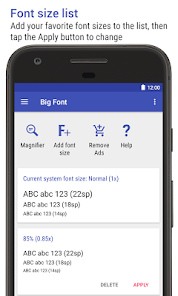
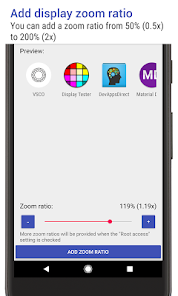
The user experience of Big Font is commendable, with a straightforward interface that even the least tech-savvy individuals can navigate easily. Upon launching the app, users are greeted with a clean layout where they can quickly select their desired font size. The real-time preview feature is particularly helpful, allowing users to see how the changes will affect their device’s appearance before applying them. The app runs smoothly without any noticeable lag, ensuring that changes take effect promptly. Users have reported that the font adjustments positively impact their overall interaction with their devices, enhancing readability in various contexts, from social media to reading articles. The ability to customize font sizes to personal preferences adds a layer of personalization that users appreciate.

Pricing

Big Font operates on a freemium model, allowing users to access basic features at no cost. For those who desire additional functionalities, there are premium options available at a reasonable price. This flexible pricing structure ensures that users can experiment with the app without any financial commitment, making it accessible to a broader audience. The premium version unlocks enhanced features, such as even larger font sizes and additional customization options, providing users with a more tailored experience. Considering the significance of accessibility, the pricing is justified, especially for those who rely on larger fonts for daily use.

Updates & Support

Big Font is regularly updated to improve its features and fix any bugs, demonstrating the developers’ commitment to enhancing user satisfaction. Users can expect to see new updates that may introduce additional font styles and further customization options. Support is also readily available, with a dedicated help section within the app that provides answers to frequently asked questions and troubleshooting tips. For more complex issues, users can directly contact customer support, which is responsive and helpful. This level of support ensures that users can make the most of the app without facing prolonged issues, contributing to an overall positive experience.

verified Security & Privacy Review

Security & Privacy Review The Big Font app prioritizes user privacy and data security by implementing robust measures to protect sensitive information. The app does not require extensive personal data to function, minimizing the risk of data exposure. Users can adjust font sizes and styles without the need to create an account, which further enhances privacy. In terms of permissions, Big Font requests access to system settings necessary for adjusting font size, but it does not demand access to personal data such as contacts or location. This limited permission scope reduces potential vulnerabilities while using the app. Additionally, Big Font adheres to best practices in data handling by not collecting or storing user data on external servers. This means that any changes made within the app remain local to the device, ensuring that users retain complete control over their information. Overall, Big Font demonstrates a commitment to user security and privacy, making it a trustworthy option for those looking to customize their device’s typography without compromising personal data.

Reviews

4.2

“Great for improving readability on my phone!”

“User-friendly interface, easy to adjust font size.”

“Perfect for those with visual impairments.”

“Life-changing app for older users!”

“Simple yet effective solution for big font needs.”

Editor's Choice