This site uses cookies to enhance your user experience. By clicking any link on this site you are giving your consent to our cookie policy. Read more
Reject
Accept All
Basecamp - Project Management

Basecamp - Project Management

verified Verified App

Developer: 37signals

  • category

    Category: Productivity

  • price

    Price: free

  • age rating

    Age Rating: Everyone

  • rating

    Rating: 4.8

  • download

    Downloads: 1,000,000+

  • version

    Version: 4.21.6

Screenshot 1
Screenshot 2
Screenshot 3
Screenshot 4
Screenshot 5
Screenshot 6

Features & Highlights

Campfire Chats

Campfire Chats provide a casual space for team members to communicate in real-time. This feature encourages spontaneous conversations and quick problem-solving, helping to strengthen team dynamics while keeping everyone connected, regardless of their physical location.

File Storage

Basecamp's File Storage feature centralizes all project-related documents, making it easy to upload, share, and access files in one place. This eliminates confusion over version control and ensures that everyone has the latest information at their fingertips.

Message Boards

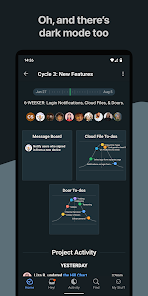
Basecamp's Message Boards allow team members to share updates, ideas, and feedback in a structured way. This feature keeps discussions organized and accessible, making it easy for everyone to stay in the loop and reference past conversations without the clutter of endless email threads.

To-Do Lists

With To-Do Lists, project tasks can be broken down into manageable pieces, ensuring nothing falls through the cracks. Team members can assign tasks, set deadlines, and track progress, fostering accountability and clarity throughout the project lifecycle.

Pros & Cons

Pros
  • Simplifies team collaboration and communication effectively
  • Centralizes project tasks and deadlines in one place
  • User-friendly interface enhances productivity for all users
  • Integrates with various tools to streamline workflows
  • Encourages transparency and accountability among team members
Cons
  • Limited customization options hinder unique workflows
  • Lacks advanced reporting features for data analysis
  • No built-in time tracking for task management
  • Mobile app experience is less intuitive than desktop

Real Experience Using Basecamp - Project Management

Application Scenarios

Basecamp is designed to cater to a variety of project management needs, making it an ideal choice for teams of all sizes, from freelancers to large corporations. It serves well in diverse scenarios such as managing remote teams, organizing client projects, and facilitating collaboration among departments within an organization. Users can create dedicated project spaces where files, tasks, and discussions are centralized. This is particularly beneficial for creative agencies handling multiple client accounts, as it allows for streamlined communication and efficient project tracking. Additionally, Basecamp's to-do lists and scheduling features can enhance productivity, making it suitable for personal projects and academic group work as well.

User Experience

The user experience in Basecamp is often praised for its clean interface and intuitive design. Upon logging in, users are greeted with a dashboard that provides an overview of ongoing projects, upcoming deadlines, and recent activity. The platform promotes collaboration through features like message boards, group chats, and automatic check-ins, allowing team members to stay updated and engaged. Users appreciate the simplicity of task assignments and the ability to prioritize work without unnecessary complexity. Basecamp also emphasizes transparency, as all members can see project progress, which fosters accountability. However, some users have noted that the learning curve can be steep for those new to project management tools, particularly if they are transitioning from more traditional methods.

Pricing

Basecamp offers a straightforward pricing structure that appeals to budget-conscious teams. The application provides a free tier with limited features suitable for individuals or very small teams, which allows users to test the waters before committing. For those seeking more extensive functionality, Basecamp's flat-rate pricing model is advantageous, charging a single monthly fee that covers unlimited users and projects. This pricing strategy eliminates concerns about escalating costs as teams grow, making it an attractive option for organizations planning to expand.

Updates & Support

Basecamp is committed to continuous improvement, regularly releasing updates that introduce new features and enhance existing ones based on user feedback. The development team actively engages with the community, ensuring that the platform evolves to meet changing project management needs. Support resources are readily available, including a comprehensive help center, tutorials, and community forums. Users can also access customer support through email, which is generally responsive and helpful. Overall, Basecamp's dedication to updates and support plays a significant role in its sustained popularity among project management tools.

verified Security & Privacy Review

Basecamp prioritizes user security and privacy with robust measures designed to protect sensitive information. The app employs encryption protocols both in transit and at rest, ensuring that data is safeguarded from unauthorized access. Additionally, Basecamp adheres to industry-standard security practices, including regular audits and vulnerability assessments. Regarding privacy practices, Basecamp is transparent about its data handling policies. Users' personal information is collected only as necessary for account management and service improvement, and the company does not sell user data to third parties. Basecamp also allows users to manage their privacy settings, providing options to control visibility and sharing of project data. In terms of permissions, Basecamp requires minimal access to device features, focusing primarily on essential functionalities. Users are informed about the permissions requested, allowing for informed consent. Overall, Basecamp demonstrates a commitment to maintaining user trust through its comprehensive security measures and responsible data privacy practices.

Reviews

4.8

“Great for team collaboration and communication.”

“User-friendly interface, easy to navigate.”

“Customizable features enhance project management.”

“Effective tool for remote team organization.”

“Reliable and consistent performance across devices.”

Editor's Choice